檔案上傳可說是最普遍的需求之一,無論小型網站還是高併發的商務系統都躲不掉。WebWork 提供了友善的攔截器機制,讓開發者得以專注在業務邏輯上。本文從三個層面切入:Request 的包裝、上傳解析類別的取得,以及專案中的實際設定與使用。
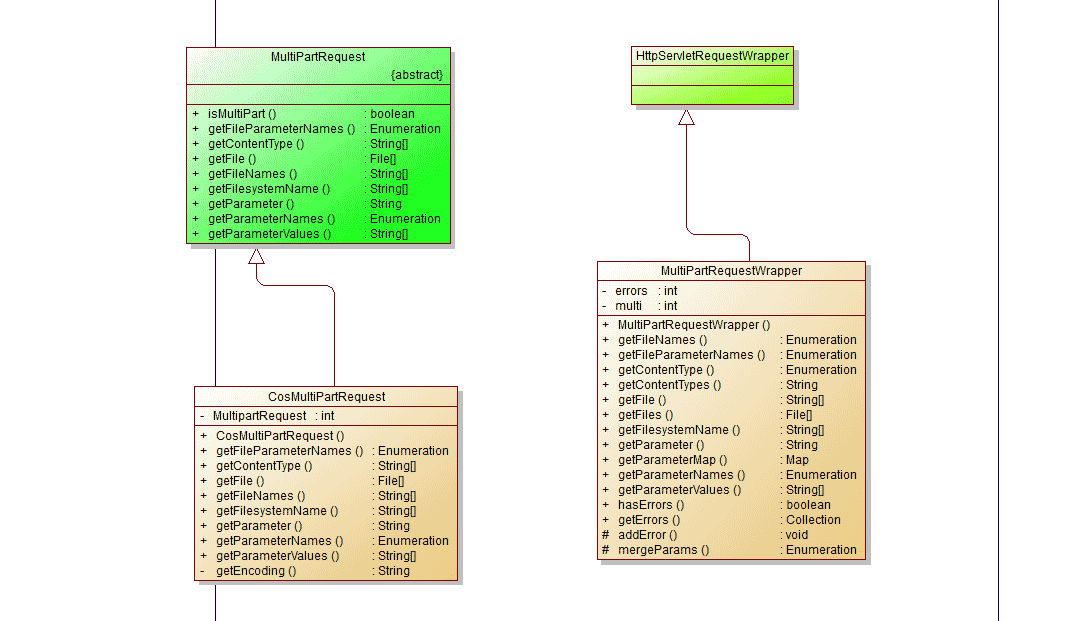
一、包裝 Request 請求
每次客戶端請求 Action,都會進入 ServletDispatcher.service()(流程細節可參考 Action 呼叫的相關解析):
public void service(HttpServletRequest request, HttpServletResponse response) throws ServletException {
    try {
        if (encoding != null) {
            try { request.setCharacterEncoding(encoding); } catch (Exception localException) { }
        }
        if (locale != null) { response.setLocale(locale); }
        if (this.paramsWorkaroundEnabled) { request.getParameter("foo"); }

        request = wrapRequest(request);   // 包裝 request

        serviceAction(request, response,
            getNameSpace(request), getActionName(request),
            getRequestMap(request), getParameterMap(request),
            getSessionMap(request), getApplicationMap());
    } catch (IOException e) {
        String message = "Could not wrap servlet request with MultipartRequestWrapper!";
        log.error(message, e);
        sendError(request, response, 500, new ServletException(message, e));
    }
}
wrapRequest 做的事:
protected HttpServletRequest wrapRequest(HttpServletRequest request) throws IOException {
    if ((request instanceof MultiPartRequestWrapper)) {
        return request;                       // 已包裝過,直接回傳
    }
    if (MultiPartRequest.isMultiPart(request)) {
        request = new MultiPartRequestWrapper(request, getSaveDir(), getMaxSize());
    }
    return request;
}
先確認傳進來的 request 是否已是 MultiPartRequestWrapper(避免重複包裝);若不是,再檢查 Content-Type 是否為 multipart/form-data,若是就包裝成 WebWork 自己的 MultiPartRequestWrapper,該類別繼承自 HttpServletRequestWrapper。
public static boolean isMultiPart(HttpServletRequest request) {
    String content_type = request.getHeader("Content-Type");
    return content_type != null && content_type.startsWith("multipart/form-data");
}
臨時目錄與大小上限在 webwork.properties 中設定,正是於建立 wrapper 時生效。參數由 getSaveDir() 與 getMaxSize() 取得:
protected String getSaveDir() {
    String saveDir = Configuration.getString("webwork.multipart.saveDir").trim();
    if (saveDir.equals("")) {
        // 找不到設定時退回 Servlet 容器的臨時目錄
        File tempdir = (File) getServletConfig().getServletContext()
                        .getAttribute("javax.servlet.context.tempdir");
        log.info("Unable to find 'webwork.multipart.saveDir' property setting. "
               + "Defaulting to javax.servlet.context.tempdir");
        if (tempdir != null) { saveDir = tempdir.toString(); }
    } else {
        File multipartSaveDir = new File(saveDir);
        if (!multipartSaveDir.exists()) { multipartSaveDir.mkdir(); }
    }
    if (log.isDebugEnabled()) { log.debug("saveDir=" + saveDir); }
    return saveDir;
}
二、取得上傳的解析類別
MultiPartRequestWrapper 的建構子決定要委派給哪個實作:
public MultiPartRequestWrapper(HttpServletRequest request, String saveDir, int maxSize) throws IOException {
    super(request);
    if ((request instanceof MultiPartRequest)) {
        this.multi = ((MultiPartRequest) request);
    } else {
        String parser = Configuration.getString("webwork.multipart.parser");
        if (parser.equals("")) {
            log.warn("Property webwork.multipart.parser not set. "
                   + "Using com.opensymphony.webwork.dispatcher.multipart.PellMultiPartRequest");
            parser = "com.opensymphony.webwork.dispatcher.multipart.PellMultiPartRequest";
        } else if (parser.equals("pell")) {
            parser = "com.opensymphony.webwork.dispatcher.multipart.PellMultiPartRequest";
        } else if (parser.equals("cos")) {
            parser = "com.opensymphony.webwork.dispatcher.multipart.CosMultiPartRequest";
        } else if (parser.equals("jakarta")) {
            parser = "com.opensymphony.webwork.dispatcher.multipart.JakartaMultiPartRequest";
        }
        try {
            Class baseClazz = MultiPartRequest.class;
            Class clazz = Class.forName(parser);
            if (!baseClazz.isAssignableFrom(clazz)) {
                addError("Class '" + parser + "' does not extend MultiPartRequest");
                return;
            }
            Constructor ctor = clazz.getDeclaredConstructor(new Class[] {
                Class.forName("javax.servlet.http.HttpServletRequest"),
                String.class, Integer.TYPE });
            Object[] parms = { request, saveDir, new Integer(maxSize) };
            this.multi = ((MultiPartRequest) ctor.newInstance(parms));
        } catch (ClassNotFoundException e) {
            addError("Class: " + parser + " not found.");
        } catch (NoSuchMethodException e) {
            addError("Constructor error for " + parser + ": " + e);
        } catch (InstantiationException e) {
            addError("Error instantiating " + parser + ": " + e);
        } catch (IllegalAccessException e) {
            addError("Access error for " + parser + ": " + e);
        } catch (InvocationTargetException e) {
            addError(e.getTargetException().toString());
        }
    }
}
幾個重點:
- 若傳入的 request 已是
MultiPartRequest的子公司類,直接引用即可,不必重新解析。 - 否則讀取
webwork.multipart.parser設定,決定內部採用哪種實作;未設定時預設PellMultiPartRequest。 - 找到類別後以 Java 反射建立實例,向上轉型為
MultiPartRequest並賦給成員multi。
WebWork 並未自己實作上傳,而是封裝了三種常見的 FileUpload 函式庫,透過統一的 MultiPartRequest 介面提供一致存取:
- PellMultiPartRequest
- CosMultiPartRequest
- JakartaMultiPartRequest(Apache Commons)
其中 jakarta 支援多個檔案共用同一個 HTTP 參數名稱。若使用 WebWork 內建的 FileUpload 攔截器,建議選 pell:上傳中文檔名時只有 pell 能正確取得原始名稱,Apache Commons 會把檔名改成 xxx.tmp,而 cos 則會出現亂碼——原因是 cos 需要另外設定 request 的 character encoding,WebWork 的封裝並未處理,導致中文路徑無法正確解碼。
三、專案中的設定與使用
Action 設定:
<action name="uploadAttach" class=".....attach.action.uploadAttach" caption="上傳附件">
    <result name="success" type="dispatcher">
        <param name="location">/result.jsp</param>
    </result>
    <result name="error" type="dispatcher">
        <param name="location">/result.jsp</param>
    </result>
    <interceptor-ref name="defaultStack" />
    <interceptor-ref name="fileUploadStack" />  <!-- 上傳所需攔截器 -->
</action>

<!-- 攔截器堆疊定義 -->
<interceptor-stack name="fileUploadStack">
    <interceptor-ref name="fileUpload"/>
    <interceptor-ref name="params"/>
</interceptor-stack>

<!-- 對應的攔截器 -->
<interceptor name="fileUpload" class="com.opensymphony.webwork.interceptor.FileUploadInterceptor"/>
<interceptor name="params" class="com.opensymphony.xwork.interceptor.ParametersInterceptor"/>
前端可直接選用 AjaxUpload 這類成熟元件,操作穩定且 API 簡潔。
攔截器的具體實作:
public String intercept(ActionInvocation invocation) throws Exception {
    // 非多媒體請求直接放行
    if (!(ServletActionContext.getRequest() instanceof MultiPartRequestWrapper)) {
        if (log.isDebugEnabled()) {
            log.debug("bypass " + invocation.getProxy().getNamespace() + "/"
                             + invocation.getProxy().getActionName());
        }
        return invocation.invoke();
    }

    Action action = invocation.getAction();
    ValidationAware validation = null;
    if ((action instanceof ValidationAware)) {
        validation = (ValidationAware) action;
    }

    MultiPartRequestWrapper multiWrapper = (MultiPartRequestWrapper) ServletActionContext.getRequest();

    // 解析失敗的錯誤訊息交回頁面
    if (multiWrapper.hasErrors()) {
        Collection errors = multiWrapper.getErrors();
        Iterator i = errors.iterator();
        while (i.hasNext()) {
            String error = (String) i.next();
            if (validation != null) { validation.addActionError(error); }
            log.error(error);
        }
    }

    // 遍歷上傳參數,把檔案資訊放進 Action 參數表
    Enumeration e = multiWrapper.getFileParameterNames();
    while ((e != null) && (e.hasMoreElements())) {
        String inputName = (String) e.nextElement();
        String[] contentType = multiWrapper.getContentTypes(inputName);
        String[] fileName = multiWrapper.getFileNames(inputName);
        File[] file = multiWrapper.getFiles(inputName);

        if (file != null) {
            for (int i = 0; i < file.length; i++) {
                log.info("file " + inputName + " " + contentType[i] + " " + fileName[i] + " " + file[i]);
            }
        }

        if (file == null) {
            if (validation != null) {
                validation.addFieldError(inputName, "Could not upload file(s). Perhaps it is too large?");
            }
            log.error("Error uploading: " + fileName);
        } else {
            invocation.getInvocationContext().getParameters().put(inputName, file);
            invocation.getInvocationContext().getParameters().put(inputName + "ContentType", contentType);
            invocation.getInvocationContext().getParameters().put(inputName + "FileName", fileName);
        }
    }

    String result = invocation.invoke();

    // Action 執行完畢,清掉暫存檔
    for (Enumeration e1 = multiWrapper.getFileParameterNames(); e1 != null && e1.hasMoreElements();) {
        String inputValue = (String) e1.nextElement();
        File file[] = multiWrapper.getFiles(inputValue);
        for (int i = 0; i < file.length; i++) {
            File f = file[i];
            log.info("removing file " + inputValue + " " + f);
            if (f != null && f.isFile()) { f.delete(); }
        }
    }
    return result;
}
流程整理:
- 先判斷是否為多媒體請求,不是就記錄並直接執行 Action。
- 檢查
MultiPartRequestWrapper是否累積錯誤,有則回傳訊息、不再往下執行。 - 遍歷上傳參數,把檔名與 content type 放進 Action 參數 Map,供業務類別使用。
- 執行 Action 後刪除暫存檔。
四、最容易被忽略的一點
攔截器交給你的 File 只是暫存檔,Action 執行完就會被自動刪除。也就是說,持久化必須由你在 Action 中自行處理——寫到伺服器某個目錄,或存入資料庫。若選擇存檔到目錄,同名問題也要自己面對(cos 有內建的自動改名規則,但如前面所述它在中文檔名上有亂碼風險)。
實務上還有三件事值得補強:限制允許的副檔名與 MIME 類型、以隨機 UUID 重新命名並把原始檔名另存於資料庫、確認存檔目錄不在 Web 可存取路徑之下(避免上傳 .jsp 造成遠端執行)。這些防護在範例程式中都尚未處理,上 production 前務必補齊。