用 JavaScript 實現 listbox 選項左右移動
編輯:關於JavaScript
本文示範以 JavaScript 實作 listbox 選項左右移動的完整程式碼,讓使用者能在兩個下拉清單之間搬移選項。
效果圖:
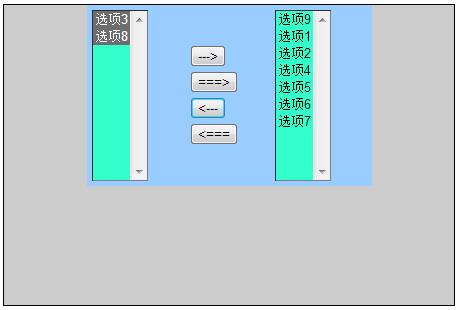
完整程式碼:
<html> <head> <meta http-equiv="Content-Type" content="text/html; charset=gb2312" /> <title>listbox左右移動</title> </head> <body> <div style="background-color:#CCC; width:450px; height:300px; margin:150px,0,0,450px; border:1px solid"> <table align="center" width="285" height="169" bgcolor="#99CCFF"> <tr> <td width="100"> <select name="first" id="first" size="10" multiple="multiple" style="background-color:#3FC;"> <option value="選項1">選項1</option> <option value="選項2">選項2</option> <option value="選項3">選項3</option> <option value="選項4">選項4</option> <option value="選項5">選項5</option> <option value="選項6">選項6</option> <option value="選項7">選項7</option> <option value="選項8">選項8</option> </select> </td> <td width="85" valign="middle"> <input name="add" id="add" type="button" value="--->"/> <input name="add_all" id="add_all" type="button" value="===>"/> <input name="remove" id="remove" type="button" value="<---"/> <input name="remove_all" id="remove_all" type="button" value="<==="/> </td> <td width="100" align="left"> <select name="second" id="second" size="10" multiple="multiple" style="background-color:#3FC;"> <option value="選項9">選項9</option> </select> </td> </tr> </table> </div> </body> <script type="text/javascript"> //左移右 /*<input name="add" id="add" type="button" value="--->"/>*/ document.getElementById("add").onclick = function add() { var firstSel = document.getElementById("first"); var option = firstSel.getElementsByTagName("option"); //javascript的數組是動態數組,長度是可以變的。 //所以先取得下拉列表的長度,避免option被移走後長度變小,導致後面循環終止,出現beg var oplength=option.length; var secondSel = document.getElementById("second"); for(i=0;i<oplength;i++) { /* selectedIndex: 該下標返回下拉列表的索引值 注: 如果有多個被選中的情況下,永遠返回第一個選中的索引值,索引最小的那個 如果沒有被選中的情況下,返回-1 selectedIndex是<select>的屬性 */ if(firstSel.selectedIndex!=-1) { secondSel.appendChild(option[firstSel.selectedIndex]); } } } /*<input name="add_all" id="add_all" type="button" value="===>"/>*/ document.getElementById("add_all").onclick = function addAll() { var firstSel = document.getElementById("first"); var option = firstSel.getElementsByTagName("option"); //javascript的數組是動態數組,長度是可以變的。 //所以先取得下拉列表的長度,避免option被移走後長度變小,導致後面循環終止,出現beg var oplength=option.length; var secondSel = document.getElementById("second"); for(i=0;i<oplength;i++) { /*因為javascript的數組是動態數組,長度是可以變的。所以當移走全部把數 組的值移走(一個一個的移走,數組長度馬上-1,所以數組下標也是-1.因次我們要把每次移的是走下標為0的那個 數,這樣才保證可以全部移走)*/ secondSel.appendChild(option[0]); } } /*雙擊後把option移到右邊*/ document.getElementById("first").ondblclick = function dblclick() { /*方法一*/ /* var firstSel = document.getElementById("first"); var option = firstSel.getElementsByTagName("option"); //javascript的數組是動態數組,長度是可以變的。 //所以先取得下拉列表的長度,避免option被移走後長度變小,導致後面循環終止,出現beg var oplength=option.length; var secondSel = document.getElementById("second"); for(i=0;i<oplength;i++) { //雙擊可以看成:第一次點擊選中,第二次點擊移動 secondSel.appendChild(option[firstSel.selectedIndex]); } */ /*方法二*/ /* this: this表示document.getElementById("first") 下拉列表 this.selectedIndex表示下拉列表選中的項 */ var secondSel = document.getElementById("second"); secondSel.appendChild(this[this.selectedIndex]); } //右移左 /*<input name="remove" id="remove" type="button" value="<---"/>*/ document.getElementById("remove").onclick = function remove() { var secondSel = document.getElementById("second"); var firstSel = document.getElementById("first"); var option = secondSel.getElementsByTagName("option"); //javascript的數組是動態數組,長度是可以變的。 //所以先取得下拉列表的長度,避免option被移走後長度變小,導致後面循環終止,出現beg var oplength=option.length; for(i=0;i<oplength;i++) { /* selectedIndex: 該下標返回下拉列表的索引值 注: 如果有多個被選中的情況下,永遠返回第一個選中的索引值,索引最小的那個 如果沒有被選中的情況下,返回-1 selectedIndex是<select>的屬性 */ if(secondSel.selectedIndex!=-1) { firstSel.appendChild(option[secondSel.selectedIndex]); } } } /*<input name="remove_all" id="remove_all" type="button" value="<==="/>*/ document.getElementById("remove_all").onclick = function remove_all() { var secondSel = document.getElementById("second"); var firstSel = document.getElementById("first"); var option = secondSel.getElementsByTagName("option"); //javascript的數組是動態數組,長度是可以變的。 //所以先取得下拉列表的長度,避免option被移走後長度變小,導致後面循環終止,出現beg var oplength=option.length; for(i=0;i<oplength;i++) { /*因為javascript的數組是動態數組,長度是可以變的。所以當移走全部把數 組的值移走(一個一個的移走,數組長度馬上-1,所以數組下標也是-1.因次我們要把每次移的是走下標為0的那個 數,這樣才保證可以全部移走)*/ firstSel.appendChild(option[0]); } } /*雙擊後把option移到右邊*/ document.getElementById("second").ondblclick = function dblclick() { /*方法一*/ /* var secondSel = document.getElementById("second"); var firstSel = document.getElementById("first"); var option = secondSel.getElementsByTagName("option"); //javascript的數組是動態數組,長度是可以變的。 //所以先取得下拉列表的長度,避免option被移走後長度變小,導致後面循環終止,出現beg var oplength=option.length; for(i=0;i<oplength;i++) { //雙擊可以看成:第一次點擊選中,第二次點擊移動 firstSel.appendChild(option[secondSel.selectedIndex]); } */ /*方法二*/ /* this: this表示document.getElementById("second") 下拉列表 this.selectedIndex表示下拉列表選中的項 */ var firstSel = document.getElementById("first"); firstSel.appendChild(this[this.selectedIndex]); } </script> </html> 程式碼的關鍵觀念有兩個:一是 selectedIndex 屬性會回傳當前選中項的索引(多選時取最小索引,無選取時為 -1);二是 JavaScript 的 NodeList 是「動態」的,一旦搬移 option,長度會立即改變,因此迴圈前必須先記住原始長度,全部搬移時則固定取索引 0 的元素,才能避免漏移。透過 appendChild 把 option 從一個 select 掛到另一個 select,即可完成左右移動。註解寫得很詳細,希望對大家有所幫助。
- 上一篇文章: JavaScript 如何判斷 DIV 內容是否為空?
- 下一篇文章: 取得 DIV 內部內容報錯的原因分析與解法