用 SweetAlert 外掛打造精美的訊息警告框
編輯:關於JavaScript
今天推薦一款相當出色的訊息警告框——SweetAlert。它是一款不依賴 jQuery 的原生 JS 提示框,風格近似 Bootstrap,不僅美觀,還高度可自訂,支援設定標題、提示類型、內容圖片、確認/取消按鈕文字,以及點擊後的回呼函式等。與傳統 alert 相比:
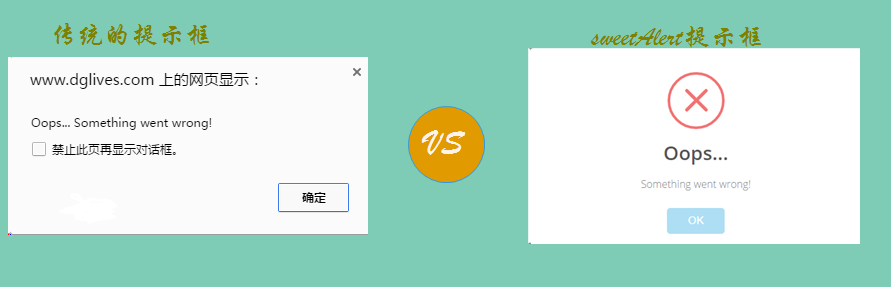
SweetAlert 能在頁面自動居中,支援桌面、行動與平板環境,且高度可自訂。以下看具體用法。
HTML
先引入對應的 js 與 css,此插件不需 jQuery 支援:
<link rel="stylesheet" type="text/css" href="https://sandbox.runjs.cn/uploads/rs/499/ixc5vbvz/sweetalert.css"/> <script src="https://sandbox.runjs.cn/uploads/rs/499/ixc5vbvz/sweetalert.min.js"></script>
接著放置六個不同的按鈕:
<div class="demo_1"> 基本示例:<button>點擊這裡</button> </div> <div class="demo_2"> 提示成功:<button>點擊這裡</button> </div> <div class="demo_3"> 提示失敗:<button>點擊這裡</button> </div> <div class="demo_4"> 提示確認:<button>點擊這裡</button> </div> <div class="demo_5"> 定義內容:<button>點擊這裡</button> </div> <div class="demo_6"> 確認輸入:<button>點擊這裡</button> </div>
JavaScript
定義各按鈕的 JS 事件:
$(function() { $(".demo_1 button").click(function() { swal("這是一個信息提示框!"); }); $(".demo_2 button").click(function() { swal("Good!", "彈出了一個操作成功的提示框", "success"); }); $(".demo_3 button").click(function() { swal("OMG!", "彈出了一個錯誤提示框", "error"); }); $(".demo_4 button").click(function() { swal({ title: "您確定要刪除嗎?", text: "您確定要刪除這條數據?", type: "warning", showCancelButton: true, closeOnConfirm: false, confirmButtonText: "是的,我要刪除", confirmButtonColor: "#ec6c62" }, function() { $.ajax({ url: "do.php", type: "DELETE" }).done(function(data) { swal("操作成功!", "已成功刪除數據!", "success"); }).error(function(data) { swal("OMG", "刪除操作失敗了!", "error"); }); }); }); $(".demo_5 button").click(function() { swal({ title: "Good!", text: '自定義<span style="color:red">圖片</span>、<a href="#">HTML內容</a>。<br/>5秒後自動關閉。', imageUrl: "images/thumbs-up.jpg", html: true, timer: 5000, showConfirmButton: false }); }); $(".demo_6 button").click(function() { swal({ title: "輸入框來了", text: "這裡可以輸入並確認:", type: "input", showCancelButton: true, closeOnConfirm: false, animation: "slide-from-top", inputPlaceholder: "填點東西到這裡面吧" }, function(inputValue) { if (inputValue === false) return false; if (inputValue === "") { swal.showInputError("請輸入!"); return false } swal("棒極了!", "您填寫的是: " + inputValue, "success"); }); }); }); 用法相當直覺:最簡單的 swal("訊息") 就能彈出基本提示框;加上標題、內容與類型參數可呈現成功或錯誤樣式;傳入物件設定則能啟用取消按鈕、自訂按鈕文字與顏色,並在回呼中串接 AJAX 完成刪除等真實操作;type 設為 input 還能做出可輸入的互動框,並以 showInputError 提示未填寫。整體而言,SweetAlert 用極少的程式碼就能取代原生 alert,大幅提升提示訊息的視覺與互動品質。
- 上一篇文章: 用 JavaScript 實現響應式 Tab 切換特效
- 下一篇文章: JS 元件系列:Bootstrap Icon 圖標選擇元件詳解