用 jQuery JSONP 做一個仿搜尋引擎的即時建議列表
編輯:關於JavaScript
用 JSONP 串接搜尋建議服務,效果還不錯,只差再加上鍵盤上下鍵的控制。
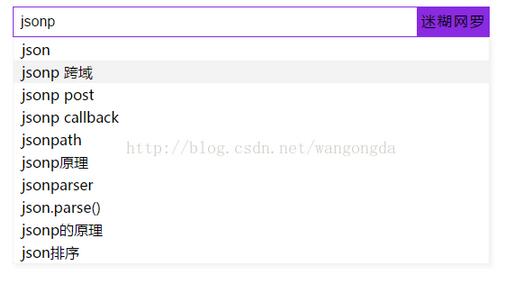
原理是動態建立 <script> 元素,把 src 指向跨域的建議介面,並帶上 cb 參數指定回呼函數名稱;資料回來後由該函數負責渲染下拉清單。因為每次輸入都會帶上隨機參數,請求不會被瀏覽器快取。
 <!DOCTYPE html>
<html>
<head>
<meta charset="utf-8" />
<title>迷糊網羅</title>
<style type="text/css">
* { margin: 0; padding: 0; }
form { position: absolute; left: 50%; top: 40%; }
form input:nth-child(1) {
  width: 450px;
  height: 34px;
  float: left;
  font-size: 16px;
  text-indent: 0.5em;
  outline: none;
  box-sizing: border-box;
}
form input:nth-child(1):focus { border: 1px solid blueviolet; }
form input:nth-child(2) {
  height: 34px;
  float: left;
  background: blueviolet;
  cursor: pointer;
  width: 80px;
  letter-spacing: 2px;
  border: 0;
  font-size: 14px;
  line-height: 34px;
}
#oul {
  position: absolute;
  left: 0;
  top: 34px;
  background: white;
  width: 530px;
  box-shadow: 3px 3px 5px #F3F3F3;
  border: 1px solid #F3F3F3;
  box-sizing: border-box;
  display: none;
}
#oul li:hover { background: #F3F3F3; cursor: pointer; }
</style>
</head>
<body>
<form action="" method="" name="ss">
<input type="" name="ss" id="txt" value="" />
<input type="button" name="ss" id="btn" value="迷糊網羅" />
<ul id="oul"></ul>
</form>
<script type="text/javascript">
//https://sp0.baidu.com/5a1Fazu8AA54nxGko9WTAnF6hhy/su?wd=&cb=&_=1497256697565
//位置調整 習慣就好..
var fm = document.getElementsByTagName('form')[0];
var x = fm.offsetWidth;
var y = fm.offsetHeight;
fm.style.marginLeft = -x / 2 + 'px';
fm.style.marginTop = -y / 2 + 'px';

//獲取操作元素
var txt = document.getElementById("txt");
var oul = document.getElementById("oul");

//動態創建js腳本
txt.onkeyup = function(ev) {
  var value = this.value;
  var newscript = document.createElement("script");
  newscript.src = 'https://sp0.baidu.com/5a1Fazu8AA54nxGko9WTAnF6hhy/su?wd=' + value + '&cb=walk&_=' + Math.random();
  newscript.type = 'text/javascript';
  document.body.appendChild(newscript);
}

//設置回調函數
function walk(walkJson) {
  if(txt.value == 0) {
    oul.style.display = 'none';
  } else {
    oul.style.display = 'block';
    oul.innerHTML = '';
    if(walkJson.s.length <= 10) {
      for(var i = 0; i < walkJson.s.length; i++) {
        var oli = document.createElement('li');
        oli.style.height = 25 + 'px';
        oli.style.width = 100 + '%';
        oli.style.lineHeight = 25 + 'px';
        oli.style.textIndent = 9 + 'px';
        oli.style.listStyle = 'none';
        oli.innerHTML = walkJson.s[i];
        oul.appendChild(oli);
      }
    } else {
      for(var i = 0; i < 10; i++) {
        var oli = document.createElement('li');
        oli.style.height = 25 + 'px';
        oli.style.width = 100 + '%';
        oli.style.lineHeight = 25 + 'px';
        oli.style.textIndent = 9 + 'px';
        oli.style.listStyle = 'none';
        oli.innerHTML = walkJson.s[i];
        oul.appendChild(oli);
      }
    }
  }
}
</script>
</body>
</html>
幾個可以優化的地方:連續快速輸入會產生大量無用的 script 標籤,實務上會加上 debounce 節流,或在下一次請求前移除舊的 script 節點;建議清單若直接以 innerHTML 插入,記得對回傳文字做轉義,避免第三方資料造成 XSS。
- 上一篇文章: vue-router 路由參數刷新後消失怎麼辦:四種解法比較
- 下一篇文章: jQuery DataTables 實作前後端動態分頁