JavaScript 滑鼠事件實戰:抓取座標並做出感應區域效果
編輯:關於JavaScript
本文用一個小範例練習滑鼠事件:當滑鼠移動時抓取當前座標,並在一個模擬區域中即時綁定位移,做出類似「感應器」的視覺效果。同時也示範如何同時兼顧滑鼠與觸控裝置。
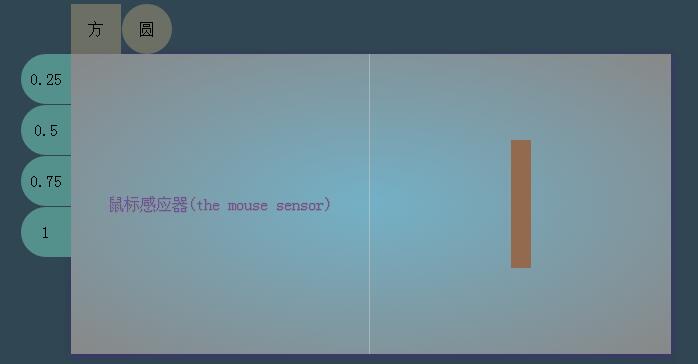
HTML
<!DOCTYPE html>
<html>
<head>
<meta charset="UTF-8">
<title>the mouse</title>
<link rel="stylesheet" href="css/new.css">
</head>
<body>
<div class="main">
  <div class="content">
    <div class="content-nav-top">
      <span onclick="koringz.createclick1(0)">默認</span>
      <span onclick="koringz.createclick1(50)">圓</span>
    </div>
    <div class="content-nav-left">
      <span onclick="koringz.createclick2(0.25)">0.25</span>
      <span onclick="koringz.createclick2(0.5)">0.5</span>
      <span onclick="koringz.createclick2(0.75)">0.75</span>
      <span onclick="koringz.createclick2(1)">1</span>
    </div>
    <div class="box">鼠標感應器(the mouse sensor)</div>
    <div class="block">
      <div class="block_case"></div>
    </div>
  </div>
</div>
<script type="text/javascript" src="js/demo.min/demo.min.js"></script>
</body>
</html>
CSS
* { margin: 0; padding: 0; box-sizing: border-box; }
body {
  position: absolute;
  text-align: center;
  height: 100%;
  width: 100%;
}
.main {
  position: relative;
  margin: 0 auto;
  height: 100%;
  background-color: rgb(48, 70, 82);
}
.main .content {
  position: absolute;
  display: inline-block;
  top: 50%;
  left: 50%;
  margin-left: -300px;
  margin-top: -150px;
  width: 600px;
  height: 300px;
  line-height: 300px;
  background: radial-gradient(ellipse farthest-corner, rgb(115, 176, 198) 0%, #888 100%);
  -webkit-background: radial-gradient(ellipse farthest-corner, rgb(115, 176, 198) 0%, #888 100%);
  box-shadow: 2px 3px 8px rgba(67, 50, 124, .6), 0px 0px 8px rgba(67, 50, 124, .6);
}
.main .content .content-nav-top {
  display: none;
  position: absolute;
  margin-top: -50px;
  height: 50px;
  width: 300px;
}
.main .content .content-nav-top > span {
  display: block;
  float: left;
  font-size: 16px;
  margin-right: 1px;
  width: 50px;
  height: 50px;
  line-height: 50px;
  background-color: rgba(251, 214, 146, .3);
  box-shadow: 0px 4px 13px rgb(222, 222, 222);
  cursor: pointer;
}
.main .content .content-nav-top > span:nth-child(1) { border-radius: 0; }
.main .content .content-nav-top > span:nth-child(2) { border-radius: 50%; }
.main .content .content-nav-left {
  display: none;
  position: absolute;
  margin-left: -50px;
  width: 50px;
  height: 300px;
}
.main .content .content-nav-left > span {
  display: block;
  font-size: 16px;
  margin-bottom: 1px;
  width: 50px;
  height: 50px;
  line-height: 50px;
  background-color: rgb(85, 145, 140);
  box-shadow: 0px 4px 13px rgb(222, 222, 222);
  border-radius: 50% 0 0 50%;
  cursor: pointer;
}
.box {
  position: relative;
  float: left;
  width: 49.9%;
  height: 100%;
  border-right: 1px solid rgba(211, 211, 211, .5);
  color: rgb(99, 84, 168);
  text-shadow: 0px 1px 0px #888, 1px 0px 0px #888, 0px 0px 1px #888;
}
.block { float: right; width: 50%; height: 100%; }
JavaScript
var koringz = (function () {
  var x, y, getmain, getcontent, getbox, getblock, getblock_case,
      getnav_top, block_case_margin_top, block_case_margin_left,
      block_casetostring1, block_casetostring2,
      block_casesubstring1, block_casesubstring2, istouch;

  getmain      = document.querySelector('.main');
  getcontent   = getmain.querySelector('.content');
  getbox       = getcontent.querySelector('.box');
  getblock     = getcontent.querySelector('.block');
  getblock_case = getblock.querySelector('.block_case');
  getnav_top   = getcontent.querySelector('.content-nav-top');
  getnav_left  = getcontent.querySelector('.content-nav-left');

  // 判斷是否為觸控裝置,決定要綁哪個事件
  istouch = 'ontouchstart' in window;

  function get_box() {
    getbox.addEventListener(istouch ? 'touchmove' : 'mousemove', mouseEvent, false);
    getbox.addEventListener(istouch ? 'touchmove' : 'mousemove', nav, false);
  }

  function nav() {
    getnav_top.style.display = 'block';
    getnav_left.style.display = 'block';
  }

  function move_box() {
    getblock_case.style.width = '0px';
    getblock_case.style.height = '0px';
    block_case_margin_left = getblock_case.style.marginLeft = getblock.offsetWidth / 2 + 'px';
    block_case_margin_top  = getblock_case.style.marginTop  = getblock.offsetHeight / 2 + 'px';
    block_casetostring1 = block_case_margin_left.toString();
    block_casetostring2 = block_case_margin_top.toString();
    block_casesubstring1 = block_casetostring1.substring(0, 3);
    block_casesubstring2 = block_casetostring2.substring(0, 3);
  }

  function mouseEvent(e) {
    if (istouch) {
      x = e.touches[0].pageX;
      y = e.touches[0].pageY;
      e.preventDefault();
    } else {
      x = e.offsetX;
      y = e.offsetY;
    }
    getblock_case.style.width  = x + 'px';
    getblock_case.style.height = y + 'px';
    getblock_case.style.marginLeft = (block_casesubstring1 - x / 2) + 'px';
    getblock_case.style.marginTop  = (block_casesubstring2 - y / 2) + 'px';
    getblock_case.style.backgroundColor = "rgba(147, 106, 77, 1)";
  }

  window.onload = function () {
    move_box();
    get_box();
  };

  var click = function () {
    this.borderradius = function (num) {
      if (typeof num != 'number') return false;
      if (num == 0) {
        getblock_case.style.borderRadius = num;
      } else if (num > 0) {
        getblock_case.style.borderRadius = num + '%';
      }
    };
    this.opacitas = function (num) {
      if (typeof num == 'number') {
        getblock_case.style.opacity = num;
      } else {
        return false;
      }
    };
  };

  var Click = new click();
  return {
    createclick1: Click.borderradius,
    createclick2: Click.opacitas
  };
})();
幾個值得記下的觀念
offsetX 與 pageX 的差別是這類效果的關鍵。pageX 是相對整個文件的座標,offsetX 則是相對事件目標元素的座標。要在容器內部定位,用 offsetX 最省事;若元素有 border 或 padding,或事件目標可能是子元素,offsetX 就可能不準,此時應改用 e.pageX - target.getBoundingClientRect().left。
觸控裝置的適配靠 'ontouchstart' in window 偵測,觸控時要從 e.touches[0] 取座標,並呼叫 preventDefault() 避免頁面跟著滾動。現代做法也可以直接用 Pointer Events(pointermove)一次搞定滑鼠、觸控與觸控筆。
用 IIFE 建立私有作用域,只把 createclick1、createclick2 兩個方法公開出去,是避免全域污染的常見手法。
這個框架很容易延伸:把游標換成自訂圖示、把方塊改成圓形或線條、加上 transition 讓位移更平順,都能快速做出不同風格的效果。