用 JS 實作可關閉的對聯廣告效果
編輯:關於JavaScript
本文要分享的是一款用 JavaScript 實作的對聯廣告範例,完整程式碼一併附上,供大家參考動手試做。
這是相當經典的一組對聯廣告程式碼,最大的亮點是內建關閉按鈕,使用者可以自行把廣告關掉,不會造成過度打擾。此外,廣告的垂直位置會隨著捲軸滾動自動定位——也就是說,當你拖曳瀏覽器捲軸時,左右兩側的廣告會一路跟著顯示,不會被捲走隱藏。這正是目前許多網站仍在使用的對聯廣告寫法。
運作成果如下圖所示:
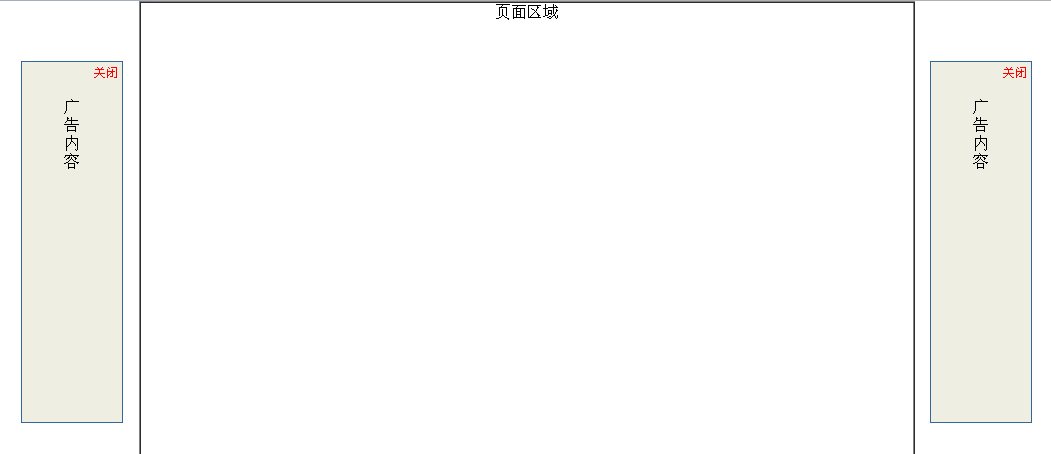
線上展示位置:
https://demo.jb51.net/js/2015/js-close-able-2adv-style-codes/
核心程式碼如下:
<html> <head> <title>對聯廣告</title> <meta http-equiv="Content-Type" content="text/html; charset=gb2312"> </head> <body style="margin:0px;"> <div align="center"> <center> <table border="1" width="776" height="3000" cellspacing="0" cellpadding="0"> <tr> <td width="100%" valign="top"><div align="center">頁面區域</div></td> </tr> </table> </center> </div> <SCRIPT LANGUAGE="JavaScript"> <!-- var showad = true; var Toppx = 60;//上端位置 var AdDivW = 100;//寬度 var AdDivH = 360;//高度 var PageWidth = 800;//這個參數決定是否出現左右滾動條 var MinScreenW = 1024; //顯示廣告的最小屏幕寬度象素 var ClosebuttonHtml = '<div align="right" style="position: absolute;top:0px;right:0px;margin:2px;padding:2px;z-index:2000;"><a href="javascript:;" onclick="hidead()" style="color:red;text-decoration:none;font-size:12px;">關閉</a></div>' var AdContentHtml = '<div align="center"><br><br>廣<br>告<br>內<br>容</div>'; document.write ('<div id="Javascript.LeftDiv" style="position: absolute;border: 1px solid #336699;background-color:#EEEEE2;z-index:1000;width:'+AdDivW+'px;height:'+AdDivH+'px;top:-1000px;word-break:break-all;display:none;">'+ClosebuttonHtml+'<div>'+AdContentHtml+'</div></div>'); document.write ('<div id="Javascript.RightDiv" style="position: absolute;border: 1px solid #336699;background-color:#EEEEE2;z-index:1000;width:'+AdDivW+'px;height:'+AdDivH+'px;top:-1000px;word-break:break-all;display:none;">'+ClosebuttonHtml+'<div>'+AdContentHtml+'</div></div>'); function scall(){ if(!showad){return;} if (window.screen.width<MinScreenW){ alert("臨時提示:\n\n顯示器分辨率寬度小於"+MinScreenW+",不顯示廣告"); showad = false; document.getElementById("Javascript.LeftDiv").style.display="none"; document.getElementById("Javascript.RightDiv").style.display="none"; return; } var Borderpx = ((window.screen.width-PageWidth)/2-AdDivW)/2; document.getElementById("Javascript.LeftDiv").style.display=""; document.getElementById("Javascript.LeftDiv").style.top=document.body.scrollTop+Toppx; document.getElementById("Javascript.LeftDiv").style.left=document.body.scrollLeft+Borderpx; document.getElementById("Javascript.RightDiv").style.display=""; document.getElementById("Javascript.RightDiv").style.top=document.body.scrollTop+Toppx; document.getElementById("Javascript.RightDiv").style.left=document.body.scrollLeft+document.body.clientWidth-document.getElementById("Javascript.RightDiv").offsetWidth-Borderpx; } function hidead() { showad = false; document.getElementById("Javascript.LeftDiv").style.display="none"; document.getElementById("Javascript.RightDiv").style.display="none"; } window.onscroll=scall; window.onresize=scall; window.onload=scall; //--> </SCRIPT> </body> </html>
這段程式把左右兩個廣告區塊綁定到 window 的 onscroll、onresize 與 onload 事件上,每次捲動或視窗尺寸改變時重新計算位置,因此廣告能時時貼合在畫面兩側;而點擊「關閉」觸發的 hidead 函式則把 showad 設為 false 並隱藏區塊,達到可關閉的效果。希望本文對你的 JavaScript 開發有所幫助。