本文實現的是一款經典的樹形菜單,文件夾圖標的樣式處理得尤其到位,折疊與展開的手感也相當流暢自然。它的另一個亮點在於「按需渲染」——子節點並非一次性全部生成,而是等到用戶首次點擊展開時才動態創建,數據量大時能有效減輕首屏壓力。
先來看看運行效果截圖:
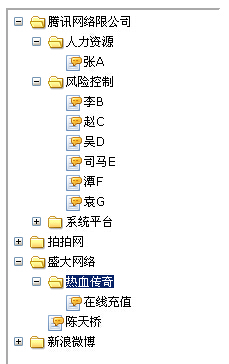
在線演示地址:
https://demo.jb51.net/js/2015/js-file-tree-style-menu-codes/
實現思路
Tree 構造函數接收數據和容器 id,內部定義 app 方法封裝「創建元素並掛到父節點」這一重複動作,然後調用 create 開始遞歸。
create 的邏輯是:遍歷當前層級的數據,每項生成一組 dl/dt/dd。dt 顯示名稱,dd 留空作為子容器。如果該節點帶有 s(children)屬性,就給 dt 加上 node-close 類並綁定點擊事件。點擊時先判斷 dd 是否已有子節點:沒有則調用 host.create 動態生成並切換為 node-open;已有則只切換 display 與背景類名。
dt 的三種背景狀態(默認、node-close、node-open)由 CSS 通過 background-position 從同一張精靈圖中切出,這也是文件夾圖標能準確對位的原因。
完整代碼如下:
<!DOCTYPE html PUBLIC "-//W3C//DTD XHTML 1.0 Transitional//EN" "https://www.w3.org/TR/xhtml1/DTD/xhtml1-transitional.dtd"> <html xmlns="https://www.w3.org/1999/xhtml"> <head> <title>簡單的文件樹效果</title> <meta http-equiv="Content-Type" content="text/html; charset=utf-8" /> <style type="text/css"> .tree{width:200px;border:2px inset #fff;height:400px;padding:5px;overflow:auto;} .tree dd,.tree dt, .tree dl{margin:0;padding:0;overflow:hidden;} .tree dd{margin-left:18px;} .tree dt{background:url(images/tree-bg.png) no-repeat 0 0px;padding-left:35px;line-height :20px;height:20px;} .tree dt.node-close{background-position: 0 -24px;} .tree dt.node-open{background-position: 0 -58px;} .tree dt a{color:#000;text-decoration:none;font: 12px/1 verdana;line-height :12px;_line-height :16px;} .tree dt a:hover{background:#0A246A;color:#fff;} </style> </head> <body> <div id="esunTree" class="tree"></div> </body> <script type="text/javascript"> try{document.execCommand("BackgroundImageCache",false,true)}catch(e){}; function Tree(data, el) { this.app=function(par,tag){return par.appendChild(document.createElement(tag))}; this.create(document.getElementById(el),data) }; Tree.fn = Tree.prototype = { create: function (par,group){ var host=this, length = group.length; for (var i = 0; i < length; i++) { var dl =this.app(par,'DL'), dt = this.app(dl,'DT'), dd = this.app(dl,'DD'); dt.innerHTML='<a href="javascript:void(0)">'+group[i]['t']+'</a>'; if (!group[i]['s'])continue; dt.group=group[i]['s']; dt.className+=" node-close"; dt.onclick=function (){ var dd= this.nextSibling; if (!dd.hasChildNodes()){ host.create(dd,this.group); this.className='node-open' }else{ var set=dd.style.display=='none'?['','node-open']:['none','node-close']; dd.style.display=set[0]; this.className=set[1] } } } } }; var data=[{ t:'騰訊網絡限公司',s:[ {t:'人力資源',s:[{t:'張A'}]}, {t:'風險控制',s:[{t:'李B'},{t:'趙C'},{t:'吳D'},{t:'司馬E'},{t:'潭F'},{t:'袁G'}]}, {t:'系統平台',s:[{t:'資訊組',s:[{t:'王五'}]},{t:'游戲組',s:[{t:'肖十三'}]}]} ] }, {t:'拍拍網',s:[{t:'胡一刀'}]}, {t:'盛大網絡',s:[{t:'熱血傳奇',s:[{t:'在線充值'}]},{t:'陳天橋'}]}, {t:'新浪微博',s:[{t:'鳳姐'}]} ]; var et=new Tree(data,'esunTree'); //]]> </script> </html>
優缺點與改進方向
這款菜單最大的短板正如其名——數據硬編碼在 JS 數組裡,每次改動菜單內容都得動代碼。改進方式很直接:把 data 換成 ajax 請求的結果,甚至在展開節點時異步拉取該節點的子數據,就能做成真正按需加載的異步樹。
另外幾處細節也可以打磨:dt.onclick 裡用 this.nextSibling 取 dd 依賴了標籤的嚴格順序,改成查詢更穩妥;innerHTML 直接拼接數據存在 XSS 風險,應改用 textContent;開頭那句 document.execCommand 是為了修 IE 的背景圖緩存問題,如今可以刪除;href="javascript:void(0)" 也不是好做法,用 button 或給 a 加 role 更利于無障礙訪問。
以上就是這款經典文件樹菜單的完整實現與分析,希望對大家的 JavaScript 開發有所幫助。