cocos2d-x 中的骨骼動畫相關代碼位於 cocos → editor-support → cocostudio 目錄下。Windows 環境可以借助篩選器理清文件結構,Mac 下則是全部平鋪在一起,瀏覽起來稍嫌費力。整體目錄劃分如下:
armature(目錄): animation(目錄):動畫控制相關。 CCProcessBase(文件): ProcessBase(類):CCTween和ArmatureAnimation的基類。 CCTWeen(文件): Tween(類):控制flash裡一個layer的動畫。 CCArmatureAnimation(文件): ArmatureAnimation(類):控制整個動畫,內有多個Tween。 datas(目錄):xml或json轉成c++中直接用的數據結構。 CCDatas(文件): BaseData(類):BoneData、FrameData的基類,包含大小位置顏色等信息。 DisplayData(類): SpriteDisplayData、ArmatureDisplayData、ParticleDisplayData的基類。 SpriteDisplayData(類):骨骼中的顯示數據。 ArmatureDisplayData(類): ParticleDisplayData(類): BoneData(類):單個骨骼數據,flash中一個layer是一個骨骼。 ArmatureData(類):骨骼數據,整個骨骼結構數據。 FrameData(類):關鍵幀數據。 MovementBoneData(類):帶有關鍵幀的骨骼數據。 MovementData(類):一個完整動畫數據。 AnimationData(類):組動畫數據,包含多個MovementData。 ContourData(類): TextureData(類):顯示圖片數據。 utils(目錄): CCArmatureDataManager(文件): RelativeData(類): ArmatureDataManager(類):管理ArmatureData、AnimationData、TextureData。 CCArmatureDefine(文件): CCDataReaderHelper(文件): _AsyncStruct(類): _DataInfo(類): DataReaderHelper(類):這正解析xml或json的類。 CCSpriteFrameCacheHelper(文件): SpriteFrameCacheHelper(類): CCTransformHelp(文件): TransformHelp(類):矩陣運算。 CCUtilMath(文件): CCArmature(文件): Armature(類):控制整個骨骼動畫,內有ArmatureAnimation和ArmatureData。 CCBone(文件): Bone(類):骨骼控制類 display(目錄):顯示的圖片管理。 CCBatchNode(文件): BatchNode(類): CCDecorativeDisplay(文件): DecorativeDisplay(類): CCDisplayFactory(文件): DisplayFactory(類): CCDisplayManager(文件): DisplayManager(類): CCSkin(文件): Skin(類): physics(目錄):物理引擎相關,不分析。 ColliderFilter(文件): ColliderFilter(類): ColliderBody(類): ColliderDetecotor(類)
一、數據結構:從底層往上讀
先看數據層的 UML。整體依賴關係很清晰:ArmatureDataManager 依賴 DataReaderHelper,把 Flash 導出的 xml 解析成程序可直接使用的各類 XXData。每個 XXData 對應 xml 中的某個節點,比如 FrameData 對應的是 <animation><mov><b><f> 這樣的層級。
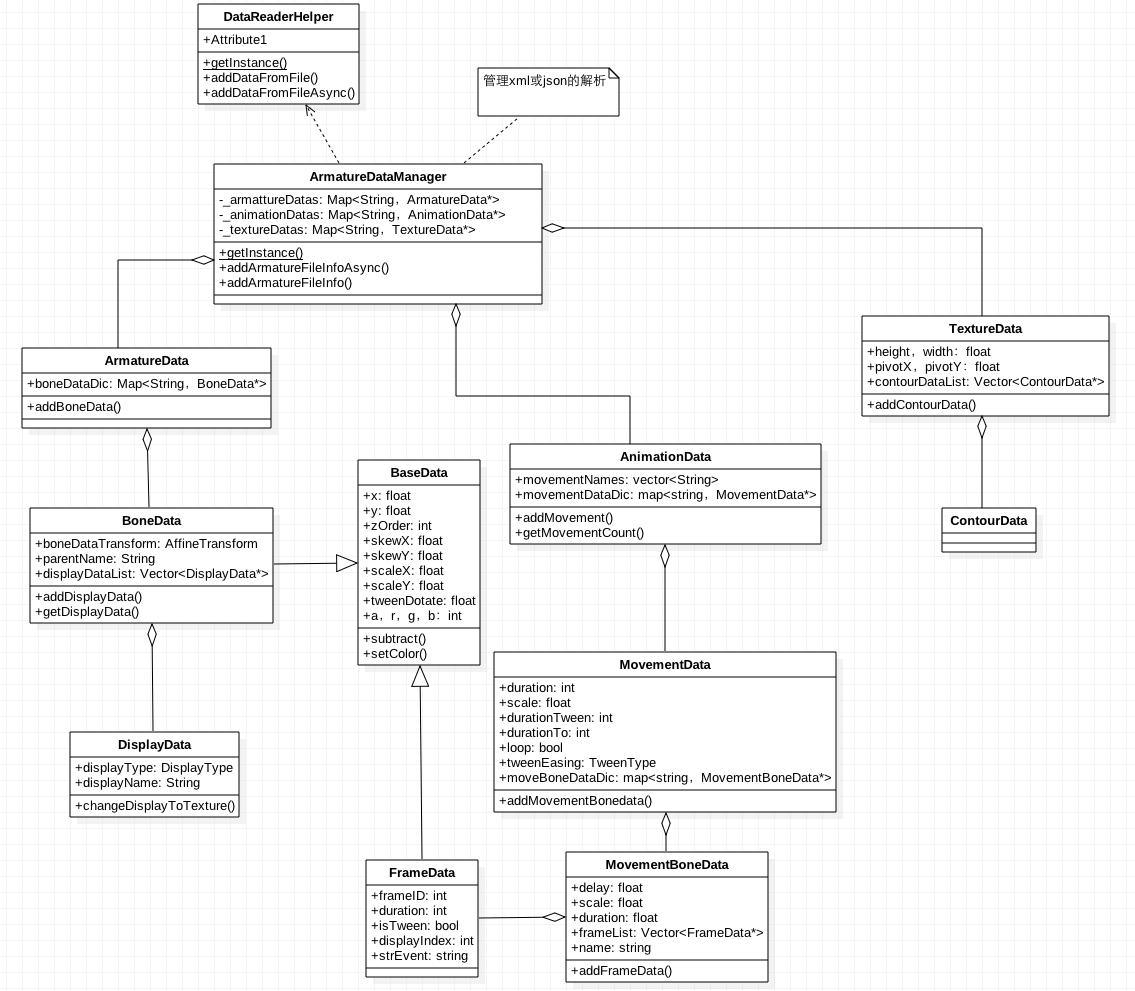
BaseData
用來描述骨骼或幀的位置、旋轉、顏色與縮放,是 BoneData 和 FrameData 的共同父類:
BaseData.h class BaseData : public cocosd::Ref { public: //Calculate two BaseData's between value(to - from) and set to self virtual void subtract(BaseData *from, BaseData *to, bool limit); public: //位置,xml的x,y float x; float y; //xml中z int zOrder; //旋轉,xml的kX,kY float skewX; float skewY; //縮放,xml的cX,cY float scaleX; float scaleY; //啥?? float tweenRotate; //顏色的變化屬性 bool isUseColorInfo; int a, r, g, b; };
從下文可知 BoneData 對應 xml 中的 <armature><b> 節點,FrameData 對應 <f> 節點,兩者都具備 x、y、kX、kY、cX、cY、pX、pY、z 這批屬性,BaseData 正是把這些公共字段抽了出來。
BoneData
class BoneData : public BaseData { public: void addDisplayData(DisplayData *displayData); DisplayData *getDisplayData(int index); public: std::string name; //! the bone's name std::string parentName; //! the bone parent's name //! save DisplayData informations for the Bone cocosd::Vector<DisplayData*> displayDataList; //仿射變換,程序裡好像沒用這個屬性 cocosd::AffineTransform boneDataTransform; };
其中 displayDataList 用來裝這根骨骼上的皮膚。DisplayData 對應 xml 的 <b><d> 節點,一根骨骼可以掛多個皮膚,換裝功能正是靠這個列表實現的。
FrameData
class FrameData : public BaseData { public: int frameID; //xml中dr,這一幀長度 int duration; //不知要他干啥 bool isTween; //xml中dI,顯示哪個圖 int displayIndex; };
對應 <f> 節點,也就是 Flash 裡的關鍵幀信息。duration 表示這一幀持續多少幀,displayIndex 決定該幀顯示哪張圖,isTween 則標記是否需要做插值。
DisplayData 家族
DisplayData 是 SpriteDisplayData、ArmatureDisplayData、ParticleDisplayData 三者的父類,統一表示「展示節點」的信息。
ArmatureData
class ArmatureData : public cocosd::Ref { public: //添加骨骼信息 void addBoneData(BoneData *boneData); BoneData *getBoneData(const std::string& boneName); public: std::string name; //多個骨頭信息 cocosd::Map<std::string, BoneData*> boneDataDic; float dataVersion; };
對應 <armature> 節點,內部用字典裝着這個骨骼動畫的所有骨頭,可以理解為一副骨架。
AnimationData
class AnimationData : public cocosd::Ref { public: void addMovement(MovementData *movData); MovementData *getMovement(const std::string& movementName); ssize_t getMovementCount(); public: //<animation name="Dragon">中的name std::string name; //所有帶幀標簽的動畫map cocosd::Map<std::string, MovementData*> movementDataDic; //所有帶幀標簽的動畫名 std::vector<std::string> movementNames; };
對應 <animation> 節點,內含多個 MovementData。MovementData 對應 xml 中的 mov,也就是 Flash 裡一個帶幀標籤的動畫片段。
MovementData 與 MovementBoneData
class MovementData : public cocosd::Ref { public: void addMovementBoneData(MovementBoneData *movBoneData); MovementBoneData *getMovementBoneData(const std::string& boneName); public: std::string name; //xml 中 dr int duration; //這怎麼有個scale?? float scale; //xml中to int durationTo; //xml中drTW int durationTween; //xml中lp bool loop; //帶幀信息的骨骼 cocosd::Map<std::string, MovementBoneData*> movBoneDataDic; };
class MovementBoneData : public cocosd::Ref { void addFrameData(FrameData *frameData); FrameData *getFrameData(int index); public: //xml中的dl float delay; //xml中的sc float scale; //這個和MovementData中的duration是不是一個?? float duration; std::string name; //關鍵幀信息 cocosd::Vector<FrameData*> frameList; };
MovementBoneData 對應 <mov><b>,裡面的 frameList 就是這根骨骼的關鍵幀序列。delay 對應 xml 的 dl,表示該骨骼動畫的延遲播放幀數。
xml 各節點與 XXData 的對應關係彙總如下表,字段含義可參考前一篇文章:

二、數據是怎麼被解析出來的
ArmatureDataManager 是個單例,內部就靠着 armarureDatas、animationDatas、_textureDatas 三個 map 存數據。使用動畫時,各處都會向它索取所需的數據。
class ArmatureDataManager : public cocosd::Ref { public: //單例 static ArmatureDataManager *getInstance(); static void destroyInstance(); public: void addArmatureData(const std::string& id, ArmatureData *armatureData, const std::string& configFilePath = ""); ArmatureData *getArmatureData(const std::string& id); void removeArmatureData(const std::string& id); void addAnimationData(const std::string& id, AnimationData *animationData, const std::string& configFilePath = ""); AnimationData *getAnimationData(const std::string& id); void removeAnimationData(const std::string& id); void addTextureData(const std::string& id, TextureData *textureData, const std::string& configFilePath = ""); TextureData *getTextureData(const std::string& id); void removeTextureData(const std::string& id); void addArmatureFileInfo(const std::string& configFilePath); const cocosd::Map<std::string, ArmatureData*>& getArmatureDatas() const; const cocosd::Map<std::string, AnimationData*>& getAnimationDatas() const; const cocosd::Map<std::string, TextureData*>& getTextureDatas() const; protected: void addRelativeData(const std::string& configFilePath); RelativeData *getRelativeData(const std::string& configFilePath); private: cocosd::Map<std::string, ArmatureData*> _armarureDatas; cocosd::Map<std::string, AnimationData*> _animationDatas; cocosd::Map<std::string, TextureData*> _textureDatas; std::unordered_map<std::string, RelativeData> _relativeDatas; };
那三個 map 是怎麼填上的?只要執行一句:
ArmatureDataManager::getInstance()->addArmatureFileInfo(“dragon.xml”);
addArmatureFileInfo 的實現把活兒轉交給了 DataReaderHelper:
void ArmatureDataManager::addArmatureFileInfo(const std::string& configFilePath) { addRelativeData(configFilePath); _autoLoadSpriteFile = true; DataReaderHelper::getInstance()->addDataFromFile(configFilePath); }
DataReaderHelper 裡有一堆 decodeXXX 方法(decodeArmature、decodeBone 等),分別負責解析 xml 的某個節點。addDataFromFile 先按後綴判斷格式:
void DataReaderHelper::addDataFromFile(const std::string& filePath) { //省略一些代碼 DataInfo dataInfo; dataInfo.filename = filePathStr; dataInfo.asyncStruct = nullptr; dataInfo.baseFilePath = basefilePath; if (str == ".xml") { DataReaderHelper::addDataFromCache(contentStr, &dataInfo); } else if(str == ".json" || str == ".ExportJson") { DataReaderHelper::addDataFromJsonCache(contentStr, &dataInfo); } else if(isbinaryfilesrc) { DataReaderHelper::addDataFromBinaryCache(contentStr.c_str(),&dataInfo); } CC_SAFE_DELETE_ARRAY(pBytes); }
xml 走的是 addDataFromCache,裡面有三個 while 循環:
void DataReaderHelper::addDataFromCache(const std::string& pFileContent, DataInfo *dataInfo) { tinyxml::XMLDocument document; document.Parse(pFileContent.c_str()); tinyxml::XMLElement *root = document.RootElement(); CCASSERT(root, "XML error or XML is empty."); root->QueryFloatAttribute(VERSION, &dataInfo->flashToolVersion); /* * Begin decode armature data from xml */ tinyxml::XMLElement *armaturesXML = root->FirstChildElement(ARMATURES); tinyxml::XMLElement *armatureXML = armaturesXML->FirstChildElement(ARMATURE); while(armatureXML) { ArmatureData *armatureData = DataReaderHelper::decodeArmature(armatureXML, dataInfo); if (dataInfo->asyncStruct) { _dataReaderHelper->_addDataMutex.lock(); } ArmatureDataManager::getInstance()->addArmatureData(armatureData->name.c_str(), armatureData, dataInfo->filename.c_str()); armatureData->release(); if (dataInfo->asyncStruct) { _dataReaderHelper->_addDataMutex.unlock(); } armatureXML = armatureXML->NextSiblingElement(ARMATURE); } /* * Begin decode animation data from xml */ tinyxml::XMLElement *animationsXML = root->FirstChildElement(ANIMATIONS); tinyxml::XMLElement *animationXML = animationsXML->FirstChildElement(ANIMATION); while(animationXML) { AnimationData *animationData = DataReaderHelper::decodeAnimation(animationXML, dataInfo); if (dataInfo->asyncStruct) { _dataReaderHelper->_addDataMutex.lock(); } ArmatureDataManager::getInstance()->addAnimationData(animationData->name.c_str(), animationData, dataInfo->filename.c_str()); animationData->release(); if (dataInfo->asyncStruct) { _dataReaderHelper->_addDataMutex.unlock(); } animationXML = animationXML->NextSiblingElement(ANIMATION); } /* * Begin decode texture data from xml */ tinyxml::XMLElement *texturesXML = root->FirstChildElement(TEXTURE_ATLAS); tinyxml::XMLElement *textureXML = texturesXML->FirstChildElement(SUB_TEXTURE); while(textureXML) { TextureData *textureData = DataReaderHelper::decodeTexture(textureXML, dataInfo); if (dataInfo->asyncStruct) { _dataReaderHelper->_addDataMutex.lock(); } ArmatureDataManager::getInstance()->addTextureData(textureData->name.c_str(), textureData, dataInfo->filename.c_str()); textureData->release(); if (dataInfo->asyncStruct) { _dataReaderHelper->_addDataMutex.unlock(); } textureXML = textureXML->NextSiblingElement(SUB_TEXTURE); } }
三個 while 分別調用 decodeArmature、decodeAnimation、decodeTexture,生成對應的 Data 對象後再 add 進 ArmatureDataManager 的三個 map。每個 decodeXXX 內部又會調用更細粒度的 decodeXX 逐層構建。值得留意的是 asyncStruct 分支中的加鎖處理——這說明解析支持異步進行,多線程寫入同一個 map 時必須互斥。
三、Armature:動畫是怎麼跑起來的
數據準備好之後,使用起來非常直觀:
armature = Armature::create("Dragon"); armature->getAnimation()->play("walk"); armature->getAnimation()->setSpeedScale(); armature->setPosition(VisibleRect::center().x, VisibleRect::center().y * .f); armature->setScale(.f); addChild(armature);
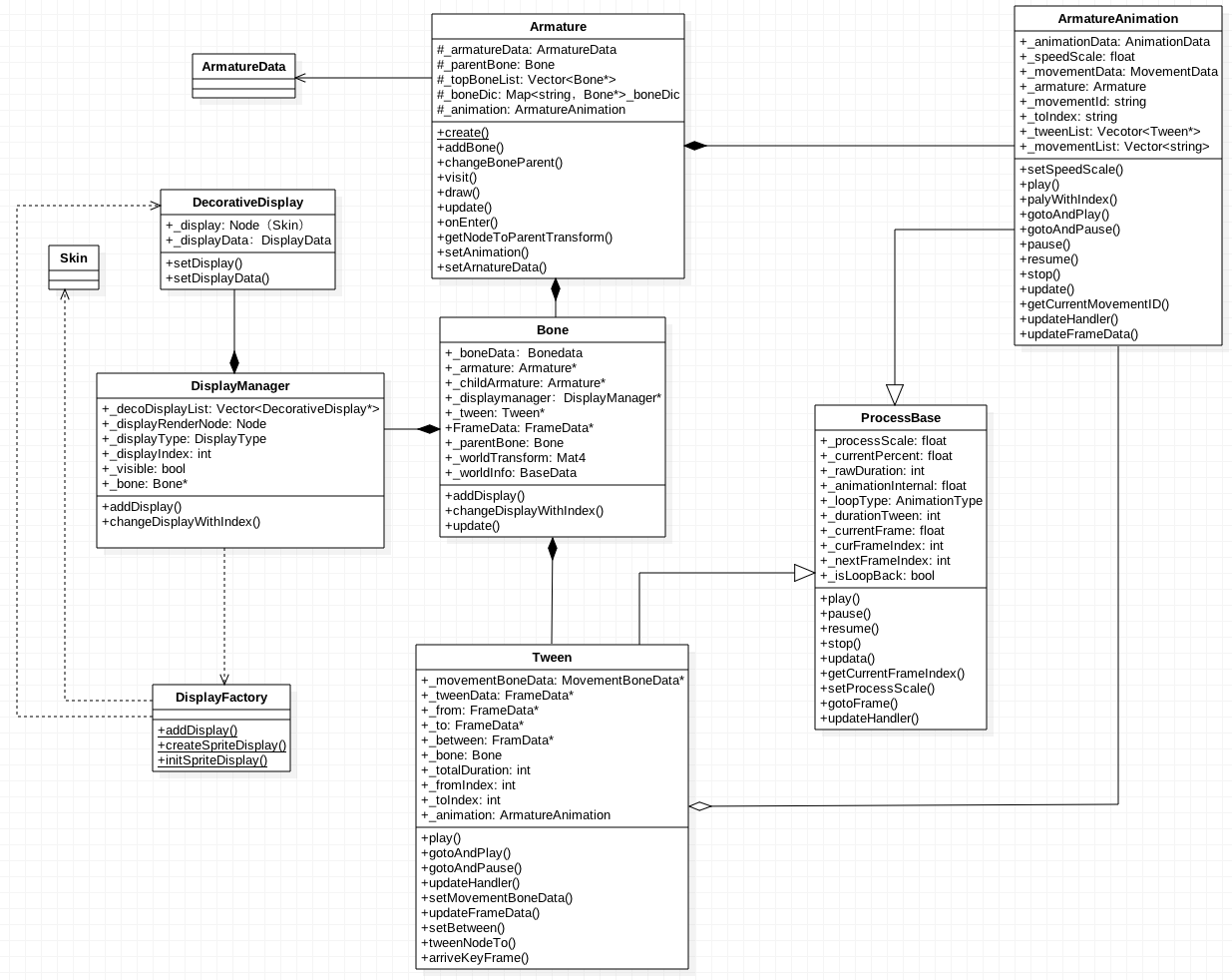
Armature 的關鍵成員分兩類:_armatureData 是要展示的骨骼數據,_animation 是 ArmatureAnimation 型的動畫控制器。ArmatureAnimation 管的是 xml 的 mov 節點,而每根 Bone 內部持有的 Tween 對應 b 節點(即 MovementBoneData)。
class Armature: public cocosd::Node, public cocosd::BlendProtocol { protected: //要展示動畫的ArmatureData ArmatureData *_armatureData; BatchNode *_batchNode; Bone *_parentBone; float _version; mutable bool _armatureTransformDirty; //所有Bone cocosd::Map<std::string, Bone*> _boneDic; cocosd::Vector<Bone*> _topBoneList; cocosd::BlendFunc _blendFunc; cocosd::Vec _offsetPoint; cocosd::Vec _realAnchorPointInPoints; //動畫控制器 ArmatureAnimation *_animation; };
Bone
class Bone: public cocosd::Node { protected: BoneData *_boneData; //! A weak reference to the Armature Armature *_armature; //! A weak reference to the child Armature Armature *_childArmature; DisplayManager *_displayManager; /* * When Armature play an animation, if there is not a MovementBoneData of this bone in this MovementData, this bone will be hidden. * Set IgnoreMovementBoneData to true, then this bone will also be shown. */ bool _ignoreMovementBoneData; cocosd::BlendFunc _blendFunc; bool _blendDirty; Tween *_tween; //! Calculate tween effect //! Used for making tween effect in every frame FrameData *_tweenData; Bone *_parentBone; //! A weak reference to its parent bool _boneTransformDirty; //! Whether or not transform dirty //! self Transform, use this to change display's state cocosd::Mat _worldTransform; BaseData *_worldInfo; //! Armature's parent bone Bone *_armatureParentBone; };
這裡的關鍵是 _tweenData:它是每一幀都會被重算的當前骨骼狀態,後續由它推導出 _worldInfo 與 _worldTransform,供 Skin 取用。而 _tween 則持有整段骨骼動畫的數據。
Tween
class Tween : public ProcessBase{ protected: //! A weak reference to the current MovementBoneData. The data is in the data pool MovementBoneData *_movementBoneData; FrameData *_tweenData; //! The computational tween frame data, //! A weak reference to the Bone's tweenData FrameData *_from; //! From frame data, used for calculate between value FrameData *_to; //! To frame data, used for calculate between value // total diff guan FrameData *_between; //! Between frame data, used for calculate current FrameData(m_pNode) value Bone *_bone; //! A weak reference to the Bone TweenType _frameTweenEasing; //! Dedermine which tween effect current frame use int _betweenDuration; //! Current key frame will last _betweenDuration frames // 總共運行了多少幀 guan int _totalDuration; int _fromIndex; //! The current frame index in FrameList of MovementBoneData, it's different from m_iFrameIndex int _toIndex; //! The next frame index in FrameList of MovementBoneData, it's different from m_iFrameIndex ArmatureAnimation *_animation; bool _passLastFrame; //! If current frame index is more than the last frame's index };
_tweenData 是 Bone 中同名成員的引用,插值計算的結果直接寫回骨骼。_from 與 _to 是前後兩個關鍵幀,_between 是他們的差值,_frameTweenEasing 決定採用哪種緩動曲線。
ArmatureAnimation
class ArmatureAnimation : public ProcessBase { protected: //! AnimationData save all MovementDatas this animation used. AnimationData *_animationData; MovementData *_movementData; //! MovementData save all MovementFrameDatas this animation used. Armature *_armature; //! A weak reference of armature std::string _movementID; //! Current movment's name int _toIndex; //! The frame index in MovementData->m_pMovFrameDataArr, it's different from m_iFrameIndex. cocos2d::Vector<Tween*> _tweenList; }
_tweenList 裝着所有骨骼的 Tween——把每根骨頭的運動合到一起,就構成了完整的動畫。
四、每幀更新的完整調用鏈
addChild(armature) 之後,Armature 的 onEnter 會被觸發(Node 進入舞台時調用),onEnter 內部調 scheduleUpdate,最終走到 _scheduler->scheduleUpdate,於是引擎每幀都會調用 Armature::update:
void Armature::update(float dt) { _animation->update(dt); for(const auto &bone : _topBoneList) { bone->update(dt); } _armatureTransformDirty = false; }
先讓動畫控制器推進,再遍歷頂層骨骼。ArmatureAnimation::update 把推進工作分給每個 Tween:
void ArmatureAnimation::update(float dt) { ProcessBase::update(dt); for (const auto &tween : _tweenList) { tween->update(dt); } //省略一堆代碼 }
ProcessBase::update 內部又會調 updateHandler,Tween 的版本在算出百分比後決定是否做緩動:
void Tween::updateHandler() { //省略一堆代碼 if (_loopType > ANIMATION_TO_LOOP_BACK) { percent = updateFrameData(percent); } if(_frameTweenEasing != ::cocosd::tweenfunc::TWEEN_EASING_MAX) { tweenNodeTo(percent); } }
tweenNodeTo 才是真正的插值計算,默認寫入的就是 Bone 的 _tweenData:
FrameData *Tween::tweenNodeTo(float percent, FrameData *node) { node = node == nullptr ? _tweenData : node; if (!_from->isTween) { percent = ; } node->x = _from->x + percent * _between->x; node->y = _from->y + percent * _between->y; node->scaleX = _from->scaleX + percent * _between->scaleX; node->scaleY = _from->scaleY + percent * _between->scaleY; node->skewX = _from->skewX + percent * _between->skewX; node->skewY = _from->skewY + percent * _between->skewY; _bone->setTransformDirty(true); if (node && _between->isUseColorInfo) { tweenColorTo(percent, node); } return node; }
繞了一大圈,骨骼的 _tweenData 終於在每幀被更新,同時把骨骼標記為 transform 髒。接着 Bone::update 根據 tweenData 算出 worldInfo 與 worldTransform,並刷新 Skin:
void Bone::update(float delta) { if (_parentBone) _boneTransformDirty = _boneTransformDirty || _parentBone->isTransformDirty(); if (_armatureParentBone && !_boneTransformDirty) { _boneTransformDirty = _armatureParentBone->isTransformDirty(); } if (_boneTransformDirty) { if (_dataVersion >= VERSION_COMBINED) { TransformHelp::nodeConcat(*_tweenData, *_boneData); _tweenData->scaleX -= ; _tweenData->scaleY -= ; } _worldInfo->copy(_tweenData); _worldInfo->x = _tweenData->x + _position.x; _worldInfo->y = _tweenData->y + _position.y; _worldInfo->scaleX = _tweenData->scaleX * _scaleX; _worldInfo->scaleY = _tweenData->scaleY * _scaleY; _worldInfo->skewX = _tweenData->skewX + _skewX + _rotationZ_X; _worldInfo->skewY = _tweenData->skewY + _skewY - _rotationZ_Y; if(_parentBone) { applyParentTransform(_parentBone); } else { if (_armatureParentBone) { applyParentTransform(_armatureParentBone); } } TransformHelp::nodeToMatrix(*_worldInfo, _worldTransform); if (_armatureParentBone) { _worldTransform = TransformConcat(_worldTransform, _armature->getNodeToParentTransform()); } } DisplayFactory::updateDisplay(this, delta, _boneTransformDirty || _armature->getArmatureTransformDirty()); for(const auto &obj: _children) { Bone *childBone = static_cast<Bone*>(obj); childBone->update(delta); } _boneTransformDirty = false;
這裡有兩個值得注意的設計:一是開頭連續三個 if 都在向上傳播髒標記,父骨骼動了子骨骼就得重算,形成自然的依賴傳遞;二是末尾遞歸更新所有子骨骼,最後才把自身的髒標記清掉。
五、渲染:圖片是怎麼畫出來的
Armature 作為 Node,進入渲染流程時會調用它的 draw,裡面遍歷骨骼並繪製各自的顯示節點:
void Armature::draw(cocosd::Renderer *renderer, const Mat &transform, uint_t flags) { if (_parentBone == nullptr && _batchNode == nullptr) { // CC_NODE_DRAW_SETUP(); } for (auto& object : _children) { if (Bone *bone = dynamic_cast<Bone *>(object)) { Node *node = bone->getDisplayRenderNode(); if (nullptr == node) continue; switch (bone->getDisplayRenderNodeType()) { case CS_DISPLAY_SPRITE: { Skin *skin = static_cast<Skin *>(node); skin->updateTransform(); BlendFunc func = bone->getBlendFunc(); if (func.src != _blendFunc.src || func.dst != _blendFunc.dst) { skin->setBlendFunc(bone->getBlendFunc()); } else { skin->setBlendFunc(_blendFunc); } skin->draw(renderer, transform, flags); } break; case CS_DISPLAY_ARMATURE: { node->draw(renderer, transform, flags); } break; default: { node->visit(renderer, transform, flags); // CC_NODE_DRAW_SETUP(); } break; } } else if(Node *node = dynamic_cast<Node *>(object)) { node->visit(renderer, transform, flags); // CC_NODE_DRAW_SETUP(); } } }
注意 CS_DISPLAY_SPRITE 分支里對混合函數的判斷:只有在骨骼自帶的 blendFunc 與 Armature 級別不同時才覆蓋,否則沿用整體設置,避免反復調用 setBlendFunc 造成不必要的狀態切換。
最終 Skin::draw 把剛剛更新好的 _quad 提交給渲染器:
{ Mat mv = Director::getInstance()->getMatrix(MATRIX_STACK_TYPE::MATRIX_STACK_MODELVIEW); //TODO implement z order _quadCommand.init(_globalZOrder, _texture->getName(), getGLProgramState(), _blendFunc, &_quad, , mv); renderer->addCommand(&_quadCommand); }
小結
把整個鏈路串起來看:DataReaderHelper 解析 xml 生成各類 Data → ArmatureDataManager 集中管理 → Armature 綁定數據與動畫控制器 → 每幀 Armature::update 驅動 Animation 與 Bone → Tween 插值算出骨骼當前狀態 → Bone 據此計算世界變換並刷新 Skin → draw 階段提交渲染命令。
三篇文章寫得比較粗,有些細節我自己也沒完全弄明白,但實際開發中若沒有定製需求,理解到八成也就夠用了,剩下的細節等真正需要改動時再回頭深究即可。希望這一系列分析能給大家建立起對 cocos2d-x 骨骼動畫的整體認識。