這份範例做的是側邊型的折疊選單:滑鼠移上標題就展開,移開就自動收起,行為與 QQ 那種可折疊好友列表相當接近,因此常被用在後台管理系統的方塊選單上。效果由 JavaScript 控制 display 切換,再搭配 CSS 完成配色與邊框變化。
運行效果如下:
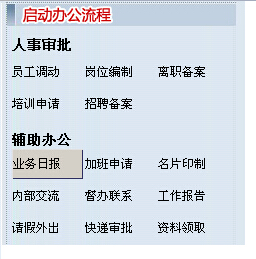
線上預覽:https://demo.jb51.net/js/2015/js-hover-show-hidden-menu-style-codes/
核心腳本
實際參與折疊的只有三個函式,其餘都是這個後台系統自己的樣式與視窗工具:
 <SCRIPT language="javascript">
// 滑鼠移入某個項目時,把它的三種狀態樣式依序換上
function Mover(it) { it.className = "FlowList_ContentTdOver"; }
function Mout(it)  { it.className = ""; }
function Mdown(it) { it.className = "FlowList_ContentTdDown"; }

// 展開/收合「輔助辦公」區塊
var falg = true;
function show(){ document.getElementById("sam_tops").style.display = "block"; }
function hide(){ document.getElementById("sam_tops").style.display = "none"; }
</SCRIPT>
折疊的機制非常直白:#sam_tops 這個容器預設是 display:none,而觸發它的標題與容器本身都綁上了 onMouseOver="show()" 與 onMouseOut="hide()"。把事件同時掛在標題和內容上,是為了避免滑鼠從標題移動到內容的途中因為短暫離開而閃退。
結構
 <TABLE border="0" width="100%">
 <TBODY>
 <TR>
  <TD height="25" width="2"> </TD>
  <TD vAlign="bottom" width="209" align="left">
   <B>人事審批</B>
  </TD>
 </TR>
 </TBODY>
</TABLE>

<TABLE border="0" width="95%">
 <TBODY>
 <TR>
  <TD height="30"> </TD>
  <TD style="CURSOR: hand" width="33%"
      onmouseover="javascript:Mover(this);" onmouseout="javascript:Mout(this);"
      onmousedown="javascript:Mdown(this);"
      onclick="javascript:HrefLink('0','FlowFrame.jsp?action=0&flowInid=156');">
   <SPAN class="STYLE3">員工調動</SPAN>
  </TD>
  <td style="CURSOR: hand" width="33%"><SPAN class="STYLE3">崗位編制</SPAN></td>
  <td style="CURSOR: hand" width="33%"><SPAN class="STYLE3">離職備案</SPAN></td>
 </TR>
</TBODY>
</TABLE>

<TABLE border="0" width="100%">
 <TBODY>
 <TR>
  <TD height="25" width="2"> </TD>
  <TD vAlign="bottom" width="209" align="left">
   <B class="sam_tops_button" onMouseOver="show()" onMouseOut="hide()">
    輔助辦公
   </B>
  </TD>
 </TR>
 </TBODY>
</TABLE>

<DIV style="DISPLAY: none; margin-top:-3px;" id="sam_tops"
     class="sam_tops_a" onMouseOver="show()" onMouseOut="hide()">
 <TABLE border="0" width="95%">
  <TBODY>
  <TR>
   <TD height="30"> </TD>
   <td style="CURSOR: hand" width="33%"><SPAN class="STYLE3">業務日報</SPAN></td>
   <td style="CURSOR: hand" width="33%"><SPAN class="STYLE3">加班申請</SPAN></td>
   <td style="CURSOR: hand" width="33%"><SPAN class="STYLE3">名片印制</SPAN></td>
  </TR>
  <tr>
   <td style="CURSOR: hand" width="33%"><SPAN class="STYLE3">內部交流</SPAN></td>
   <td style="CURSOR: hand" width="33%"><SPAN class="STYLE3">督辦聯系</SPAN></td>
   <td style="CURSOR: hand" width="33%"><SPAN class="STYLE3">工作報告</SPAN></td>
  </tr>
  <tr>
   <td style="CURSOR: hand" width="33%"><SPAN class="STYLE3">請假外出</SPAN></td>
   <td style="CURSOR: hand" width="33%"><SPAN class="STYLE3">快遞審批</SPAN></td>
   <td style="CURSOR: hand" width="33%"><SPAN class="STYLE3">資料領取</SPAN></td>
  </tr>
 </TBODY>
</TABLE>
</DIV>
滑鼠移入時的視覺回饋由三個 class 負責:FlowList_ContentTdOut(常態)、FlowList_ContentTdOver(移入)、FlowList_ContentTdDown(按下),三者只在底色與邊框顏色上做差別:
 .FlowList_ContentTdOut {
    border:1px solid #f7f3f7; background-color:#f7f3f7;
    word-wrap:break-word; cursor:hand;
}
.FlowList_ContentTdOver {
    border:1px solid #333366; background-color:#d4d0c8;
    word-wrap:break-word; cursor:hand;
}
.FlowList_ContentTdDown {
    border:1px solid #e0e0e0; background-color:#d4d0c8;
    word-wrap:break-word; cursor:hand;
}
現代化改寫
原範例為了相容早期 IE,混用了 table 排版、language 屬性與 javascript: 前綴的事件寫法,樣式檔也長達數百行。以今日標準重寫,同樣的效果只需要這些:
 <style>
.accordion__head{
    padding:6px 10px; background:#e0e7f8; cursor:pointer;
    border-left:2px solid #333366;
}
.accordion__head:hover{ background:#d2dfff; }
.accordion__body{ display:none; padding:6px 10px; background:#fff; }
.accordion.open .accordion__body{ display:block; }
</style>

<script>
document.querySelectorAll('.accordion__head').forEach(function(head){
    var box = head.parentNode;
    head.addEventListener('mouseenter', function(){ box.classList.add('open'); });
    head.addEventListener('mouseleave', function(){ box.classList.remove('open'); });
});
</script>
三點值得注意:用 classList 取代直接改 className 字串,可避免覆蓋掉其他樣式;把事件綁在整個 .accordion 容器上(含 mouseleave)能解決「滑到內容區就收起」的老問題;若選單項目很多,改用事件委託綁在父容器上會比逐一 addEventListener 更省資源。
另外提醒一個實務細節:折疊選單若只用 hover 觸發,行動裝置上完全無法操作,建議同時綁定 click 事件,並為標題加上 aria-expanded 以照顧無障礙需求。希望對你的 JavaScript 開發有所幫助。
- 上一篇文章: 用 HTML5 Canvas 做刮刮卡:滑鼠與手勢都能刮
- 下一篇文章: Flowplayer 免費網頁視頻播放器:嵌入、設定與自訂指南