用 JS + CSS 打造華麗的 select 下拉菜單
編輯:關於JavaScript
本文分享一個用 JS + CSS 模擬 select 控件的下拉菜單效果。相比瀏覽器默認的下拉框,這個自定義版本在外觀上更加精致美觀,也方便後續按需修改樣式,你甚至可以將它改造成一個純 CSS 的下拉菜單。兼容性方面暫未全面測試,在 IE8 下運行正常。
運行效果截圖如下:
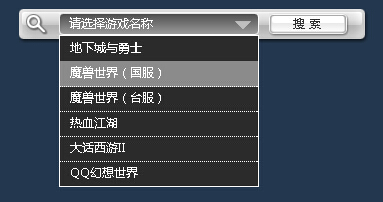
在線演示地址如下:
https://demo.jb51.net/js/2015/js-css-select-control-style-codes/
具體代碼如下:
<!DOCTYPE html PUBLIC "-//W3C//DTD XHTML 1.0 Transitional//EN" "https://www.w3.org/TR/xhtml1/DTD/xhtml1-transitional.dtd"> <html xmlns="https://www.w3.org/1999/xhtml"> <head> <meta http-equiv="Content-Type" content="text/html; charset=utf-8" /> <title>模擬select控件</title> <style> html,body{height:100%;overflow:hidden;} body,div,form,h2,ul,li{margin:0;padding:0;} ul{list-style-type:none;} body{background:#23384e;font:12px/1.5 \5fae\8f6f\96c5\9ed1;} #search,#search form,#search .box,#search .select,#search a{background:url(images/search.jpg) no-repeat;} #search,#search .box,#search form{height:34px;} #search{position:relative;width:350px;margin:10px auto;} #search .box{background-position:right 0;} #search form{background-repeat:repeat-x;background-position:0 -34px;margin:0 20px 0 40px;} #search .select{float:left;color:#fff;width:190px;height:22px;cursor:pointer;margin-top:4px;line-height:22px;padding-left:10px;background-position:0 -68px;} #search a{float:left;width:80px;height:24px;color:#333;letter-spacing:4px;line-height:22px;text-align:center;text-decoration:none;background-position:0 -90px;margin:4px 0 0 10px;} #search a:hover{color:#f60;background-position:-80px -90px;} #search .sub{position:absolute;top:26px;left:40px;color:#fff;width:198px;background:#2b2b2b;border:1px solid #fff;display:none;} #search .sub li{height:25px;line-height:24px;cursor:pointer;padding-left:10px;margin-bottom:-1px;border-bottom:1px dotted #fff;} #search .sub li.hover{background:#8b8b8b;} </style> <script type="text/javascript"> window.onload = function () { var oSelect = document.getElementsByTagName("span")[0]; var oSub = document.getElementsByTagName("ul")[0]; var aLi = oSub.getElementsByTagName("li"); var i = 0; oSelect.onclick = function (event) { var style = oSub.style; style.display = style.display == "block" ? "none" : "block"; //阻止事件冒泡 (event || window.event).cancelBubble = true }; for (i = 0; i < aLi.length; i++) { //鼠標劃過 aLi[i].onmouseover = function () { this.className = "hover" }; //鼠標離開 aLi[i].onmouseout = function () { this.className = ""; }; //鼠標點擊 aLi[i].onclick = function () { oSelect.innerHTML = this.innerHTML } } document.onclick = function () { oSub.style.display = "none"; }; }; </script> </head> <body> <div id="search"> <div class="box"> <form> <span class="select">請選擇游戲名稱</span> <a href="javascript:;">搜索</a> </form> </div> <ul class="sub"> <li>地下城與勇士</li> <li>魔獸世界(國服)</li> <li>魔獸世界(台服)</li> <li>熱血江湖</li> <li>大話西游II</li> <li>QQ幻想世界</li> </ul> </div> </body> </html>
實現要點在於:點擊 span 元素時切換下拉列表的顯示與隱藏,同時阻止事件冒泡避免立即被 document 的點擊事件關閉;鼠標移入移出時切換高亮樣式;點擊某個選項後把它的內容寫入到顯示框中。希望本文能對你的 JavaScript 程序設計有所幫助。
- 上一篇文章: 純 JS 打造自定義右鍵菜單:兩個完整實例
- 下一篇文章: 純 JS 實現簡潔大方的二級下拉菜單
熱門推薦
用 Cookie 實作「記住密碼」:加密、編碼與安全性思考
JavaScript 隱式型別轉換:規則、陷阱與 NaN 的真相
引入 jQuery 後頁面腳本全掛?問題出在 script 標籤的寫法
網址參數編碼:escape 為什麼不該再用,encodeURIComponent 才是正解
純JavaScript實現網頁右下角滑出式提示框
function fn(){} 與 var fn = function(){} 有何不同?函式宣告與函式表達式詳解
JavaScript 的 RequireJS 庫入門指南
用 jQuery 實現選取文字分享到新浪微博
webix + SpringMVC:讓 session 逾時自動跳回登入頁的完整解法