純 JS 實現簡潔大方的二級下拉菜單
編輯:關於JavaScript
本文分享一款簡潔大方的二級下拉菜單的實現思路與完整代碼。菜單的配色可以根據自己的需要隨意定義,這裡重點是提供一種製作二級菜單的思路,整體效果相當實用,而下拉導航菜單也正是網站開發中非常常見的需求。
運行效果截圖如下:
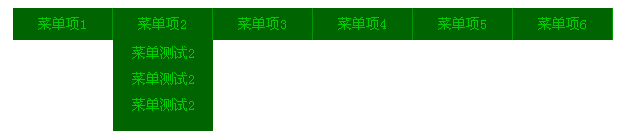
在線演示地址如下:
https://demo.jb51.net/js/2015/js-simple-2level-show-down-menu-codes/
具體代碼如下:
<!DOCTYPE html PUBLIC "-//W3C//DTD XHTML 1.0 Transitional//EN" "https://www.w3.org/TR/xhtml1/DTD/xhtml1-transitional.dtd"> <html xmlns="https://www.w3.org/1999/xhtml"> <head> <title>簡潔大方的二級下拉菜單</title> <meta http-equiv="content-type" content="text/html;charset=gb2312"> <style type="text/css"> *{margin:0;padding:0;font-style:normal;font-family:宋體;} body{text-align:center;font-size:14px;} #content{margin:0 auto;width:600px;} #content #nav{background:#006400;height:32px;margin-top:10px;} #content #nav ul{list-style:none;} #content #nav ul li{float:left;width:100px;line-height:32px;position:relative;} #nav div{width:100px;position:absolute;left:0px;padding-bottom:0px;background:#006400;float:left;height:0;overflow:hidden;} #content #nav li .a{text-decoration:none;color:#00CD00;line-height:32px;display:block;border-right:1px solid #009800;} #nav div a{text-decoration:none;color:#00CD00;line-height:26px;display:block;} #nav div a:hover{background:#005400;} </style> </head> <body> <div id="content"> <div id="nav"> <ul id="supnav"> <li><a href="#" class="a">菜單項1</a> <div> <a href="#">菜單測試1</a> <a href="#">菜單測試1</a> <a href="#">菜單測試1</a> </div> </li> <li><a href="#" class="a">菜單項2</a> <div> <a href="#">菜單測試2</a> <a href="#">菜單測試2</a> <a href="#">菜單測試2</a> </div> </li> <li><a href="#" class="a">菜單項3</a> <div> <a href="#">菜單測試3</a> <a href="#">菜單測試3</a> <a href="#">菜單測試3</a> <a href="#">菜單測試3</a> <a href="#">菜單測試3</a> </div> </li> <li><a href="#" class="a">菜單項4</a> <div> <a href="#">菜單測試4</a> <a href="#">菜單測試4</a> <a href="#">菜單測試4</a> </div> </li> <li><a href="#" class="a">菜單項5</a> <div> <a href="#">菜單測試5</a> <a href="#">菜單測試5</a> <a href="#">菜單測試5</a> <a href="#">菜單測試5</a> </div> </li> <li><a href="#" class="a">菜單項6</a> <div> <a href="#">菜單測試6</a> <a href="#">菜單測試6</a> <a href="#">菜單測試6</a> </div> </li> </ul> </div> </div> <script type="text/javascript"> var supnav=document.getElementById("supnav"); var nav=document.getElementById("nav"); var btns=document.getElementsByTagName("li"); var subnavs=nav.getElementsByTagName("div"); var paddingbottom=20; var defaultHeight=0; function drop(obj,ivalue){ var a=obj.offsetHeight; var speed=(ivalue-obj.offsetHeight)/8; a+=Math.floor(speed); obj.style.height=a+"px"; } window.onload=function(){ for(var i=0;i<btns.length;i++){ btns[i].index=i; btns[i].onmouseover=function(){ var osubnav=subnavs[this.index]; var sublinks=osubnav.getElementsByTagName("a"); if(osubnav.firstChild.tagName==undefined){ var itarheight=parseInt(osubnav.childNodes[1].offsetHeight)*sublinks.length+paddingbottom; }else{ var itarheight=parseInt(osubnav.firstChild.offsetHeight)*sublinks.length+paddingbottom; } clearInterval(this.itimer); this.itimer=setInterval(function(){drop(osubnav,itarheight);},30); } btns[i].onmouseout=function(){ var osubnav=subnavs[this.index]; clearInterval(this.itimer); this.itimer=setInterval(function(){drop(osubnav,defaultHeight);},30); } } } </script> </body> </html>
這個菜單的巧妙之處在於用 JS 動態計算子菜單的目標高度,並通過 setInterval 定時調整高度實現平滑的展開與收起動畫。鼠標移入時二級菜單緩慢下拉,移出時再緩慢收起,過渡自然流暢。希望本文能對你的 JavaScript 程序設計有所幫助。
- 上一篇文章: 用 JS + CSS 打造華麗的 select 下拉菜單
- 下一篇文章: 純 JS 實現點擊向下展開的下拉菜單