把後端框架的依賴注入思想搬到前端:打造 JS 分發器
編輯:關於JavaScript
做後台頁面時,幾乎每個新增、修改、查詢都要寫一遍 AJAX、表單驗證、列表渲染,重複度極高。既然後端框架早就用「分發器 + 依賴注入」把路由、驗證、資料轉換這些橫向關注點抽離出來,為什麼前端不能如法炮製?本文分享一套自己封裝的思路與程式碼,把請求分發、表單驗證、清單渲染整合成一行呼叫。
適用場景
前後端路徑一一對應的後台系統、需要表單內容保存的頁面、需要分頁列表呈現的查詢頁。核心架構由兩塊組成:分發器(dispatcher)與依賴注入(intercept module)。
核心程式碼
j.extend({
  dispatcher: (function () {
    var _route = {},          // 預設路由表
        _module = {           // 可注入的模組
          authenticate: true, // 授權
          validation: true,   // 驗證
          dataTransform: true // 資料轉換
        },
        _state = { error: function () {} },
        _ajax = function () { j.ajax(this) };

    function _container() { return _route; }   // 初始化容器

    function _configuration(config, _tmp_route) {
      if (config) {
        config.module && (_module = $.extend(_module, config.module));
        config.state && (_state = $.extend(_state, config.state));
        config.post && config.post.queryString && (function () {
          if (!/^\?/.test(config.post.queryString)) { _tmp_route += "?"; }
          _tmp_route += config.post.queryString;
        })();
        config.list && (function () {
          config.list = $.extend({
            pageSize: 15,
            wrapped: $('#list-container'),
            searchForm: $('#form-post'),
            searchButton: $('#search-button'),
            post: {}
          }, config.list);
        })();
      }
      return _tmp_route;
    }

    return {
      ajax: new _container(),
      intercept: {
        module: function (module) { $.extend(true, _module, module); },
        route: function (route) {
          if (!$.isEmptyObject(_route)) return;
          $.extend(true, _route, route);
          for (var i in _route) {
            if (_route.hasOwnProperty(i)) {
              var _controller = _route[i];
              for (var k in _controller) {
                if (_controller.hasOwnProperty(k) && j.utils.isFunction(_controller[k])) {
                  (function () {
                    var clone = j.clone(_controller[k]),
                        _tmp_route = '/' + i + "/" + k;
                    _controller[k] = function (config) {
                      var url = _configuration(config, _tmp_route);
                      if (j.utils.isFunction(clone)) { clone.apply(_module, config); }

                      // 授權檢查
                      if (!(_module.authenticate && j.utils.isFunction(_module.authenticate)) && _module.authenticate() || _module.authenticate === true) {
                        console.log('j.ajax.' + i + "." + k + " authenticate failed.");
                        config.state.error();
                        return false;
                      }

                      // 表單驗證
                      if (config.validation) {
                        _module.validation.init(config.validation);
                        config.validation.fireTarget.on('click', function () {
                          if (!_module.validation || !config.validation.formTarget.valid()) return false;
                          var data = _module.dataTransform(!config.post.data ? config.validation.formTarget.serializeJson() : config.post.data);
                          var ajax_data = { url: url, data: data, fireTarget: config.validation.fireTarget };
                          ajax_data = $.extend(ajax_data, config.post);
                          _ajax.call(ajax_data);
                          return false;
                        });
                      }

                      // 清單渲染
                      if (config.list) {
                        if (!$.fn.pagination) {
                          throw new Error('j.dispatcher.intercept.list need jQuery.pagination, please load jQuery.pagination before this file.');
                        }
                        config.list.onChange = function (pageIndex) {
                          var $this = this;
                          this.showLoading();
                          var formData = config.list.searchForm.serializeJson();
                          formData.pageIndex = pageIndex;
                          formData.pageSize = $this.pageSize;
                          var data = _module.dataTransform(!config.list.post.data ? formData : config.list.post.data);
                          var ajax_data = { url: url, data: data };
                          $.extend(true, ajax_data, config.list.post);
                          ajax_data.success = function () {
                            $this.generateData(this.totalRecords, this.list);
                          };
                          j.jsonp(ajax_data);
                        };
                        j.list.table(config.list);
                        config.list.searchButton.on('click', function () {
                          config.list.wrapped.empty();
                          j.list.table(config.list);
                        });
                      }
                    };
                  }());
                }
              }
            }
          }
        }
      }
    };
  }());

  var global = {
    dataTransform: {
      "default": function () {
        if (typeof (arguments[0]) == "object" && Object.prototype.toString.call(arguments[0]).toLowerCase() == "[object object]" && !arguments[0].length) {
          return j.json.toKeyValString(arguments[0], true);
        } else if (j.utils.isString(arguments[0])) {
          return arguments[0];
        } else { return {}; }
      },
      "objectData": function () {
        if (typeof (arguments[0]) == "object" && Object.prototype.toString.call(arguments[0]).toLowerCase() == "[object object]" && !arguments[0].length) {
          return { data: j.json.toString(arguments[0]) };
        } else if (j.utils.isString(arguments[0])) {
          return arguments[0];
        } else { return {}; }
      }
    }
  };
})
注入驗證模組
把 jQuery.validate 包裝成可注入的模組,同時註冊幾個常用的自訂規則:
j.dispatcher.intercept.module({
  authenticate: function () {},
  validation: (function () {
    var hasCongfig = false;
    function _config() {
      if (!$.fn.validate) {
        throw new Error('j.dispatcher.intercept.module.validation need jQuery.validate, please load jQuery.validate before this file.');
      }
      jQuery.validator.addMethod("isPassword", function (value, element) {
        return j.config.reg_phone.test(value);
      }, "請輸入 6-20 密碼,建議由數字、字母和符號組成!");
      jQuery.validator.addMethod("isMobile", function (value, element) {
        return j.config.reg_phone.test(value);
      }, "請正確填寫您的手機號碼");
      jQuery.validator.addMethod("isEamil", function (value, element) {
        return j.config.reg_email.test(value);
      }, "請填寫正確的郵箱地址");
      jQuery.validator.addMethod("isUserName", function (value, element) {
        return j.config.reg_login_name.test(value);
      }, "4-32 位字元,支援漢字、字母、數字、\"-\"、\"_\"組合");
    }
    function _getRequired(parms, filters) {
      if (parms instanceof jQuery && parms.length > 0 && parms[0].tagName == 'FORM') {
        var config = {};
        parms.find('[name]').each(function () {
          if (!filters || filters.indexOf(this.name) == -1) { config[this.name] = { required: true }; }
        });
        return config;
      } else {
        for (var i in parms) {
          if (parms[i]) { parms[i]['required'] = true; }
          else { parms[i] = { required: true }; }
        }
        return parms;
      }
    }
    function _getMessage(parms, filters) {
      if (parms instanceof jQuery && parms.length > 0 && parms[0].tagName == 'FORM') {
        var config = {};
        parms.find('[name]').each(function () {
          if (!filters || filters.indexOf(this.name) == -1) {
            config[this.name] = { required: $(this).attr("data-required-message") };
          }
        });
        return config;
      }
    }
    function _init(config) {
      if (!hasCongfig) { hasCongfig = true; _config(); }
      !config.formTarget && $('#form-post').length > 0 && (config.formTarget = $('#form-post'));
      !config.fireTarget && $('#post-button').length > 0 && (config.fireTarget = $('#post-button'));
      if (!(config.fireTarget && config.fireTarget instanceof jQuery && config.fireTarget[0].type.toUpperCase() == 'SUBMIT'))
        throw new Error("j.validator.init needs config.submitTarget param, its type is submit");
      if (!(config.formTarget && config.formTarget instanceof jQuery && config.formTarget[0].tagName == 'FORM'))
        throw new Error("j.validator.init needs config.formTarget param, its type is form");
      var rules = _getRequired(config.formTarget, config.filters),
          messages = _getMessage(config.formTarget, config.filters);
      config.rulesCallBack && config.rulesCallBack(rules);
      config.messagesCallBack && config.messagesCallBack(messages);
      config.formTarget.validate({ debug: true, rules: rules, messages: messages });
    }
    return {
      init: function (config) { _init(config); },
      validate: function () { return config.formTarget.valid(); }
    };
  }()),
  dataTransform: global.dataTransform.objectData
})

// 註冊路由表,key 對應後端 controller 與 action
j.dispatcher.intercept.route({
  passport: {
    signin: function () { this.dataTransform = global.dataTransform.default; },
    signout: function () {},
    reg: function () {},
    cpwd: function () { this.dataTransform = global.dataTransform.default; }
  },
  company: { save: function () {}, getList: function () {} },
  account: { save: function () {}, saveProfile: function () {}, getList: function () {} },
  partnership: { signup: function () {}, getList: function () {} },
  venue: { getList: function () {}, save: function () {} },
  show: { save: function () {} }
});
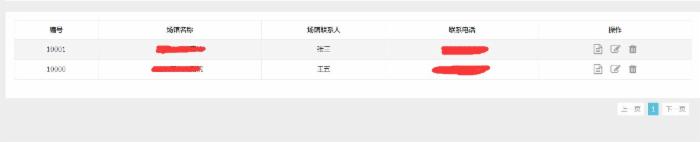
列表頁:一行完成查詢與分頁
j.dispatcher.ajax.account.getList({
  list: {
    header: ['編號', '用戶名', '賬戶類型', '公司類型', '注冊時間', '最後登錄時間', '是否啟用', '操作'],
    rowField: [
      'AccountCode', 'AccountName', 'AccountType', 'CompanyType',
      'RegisterTime', 'LastActivityTime', 'IsAvailable',
      function (item) {
        var html = '<a href="/account/sub?type=edit&id=' + item.Id + '" class="k-table-icon fa-edit mr15" title="編輯資訊"></a>'
                 + '<a href="javascript:;" class="k-table-icon fa-trash" title="刪除賬戶" onclick="operate(this,\'delete\',{ id : \'' + item.Id + '\' })"></a>';
        return html;
      }
    ],
    formatColumn: function (item, data) {
      if (item.IsAvailable != undefined) {
        if (item.IsAvailable == true) {
          return '<a href="javascript:;" onclick="operate(this,\'set\',{ id : \'' + data.Id + '\', isEnable : 0 })" class="k-table-icon glyphicon glyphicon-ok-circle" title="已啟用"></a>';
        } else {
          return '<a href="javascript:;" onclick="operate(this,\'set\',{ id : \'' + data.Id + '\', isEnable : 1 })" class="k-table-icon c-error glyphicon glyphicon-ban-circle" title="已禁用"></a>';
        }
      } else if (item.LastActivityTime) {
        return moment(item.LastActivityTime).format('YYYY-MM-DD HH:mm:SS');
      } else if (item.RegisterTime) {
        return moment(item.RegisterTime).format('YYYY-MM-DD HH:mm:SS');
      }
    },
    rowClick: function () {
      window.location = '/account/detail?accountName=' + encodeURIComponent(this.AccountName);
    }
  }
})
表單保存:連遠端唯一性檢查一起搞定
表單場景更省事,只需宣告驗證規則、訊息文案與成功後的行為:
j.dispatcher.ajax.company.save({
  validation: {
    rulesCallBack: function (rules) {
      rules.Name.remote = {
        url: '/handler/validation.ashx?type=cn',
        type: "post",                  // 提交方式
        data: {
          CompanyName: function () { return encodeURIComponent($("#Name").val()); }   // 編碼資料
        }
      };
      rules.ConfirmParssword.equalTo = "#Password";
      rules.AccountName.remote = {
        url: '/handler/validation.ashx?type=an',
        type: "post",
        data: {
          AccountName: function () { return encodeURIComponent($("#AccountName").val()); }
        }
      };
    },
    messagesCallBack: function (messages) {
      messages.Name.remote = '該公司已經被注冊!';
      messages.AccountName.remote = '該用戶名已經存在!';
      messages.ConfirmParssword.equalTo = '兩次密碼不一致';
    },
    filters: ['Cellphone', 'Email']
  },
  post: {
    success: function () {
      alert(this.message);
      window.location = '/company/list';
    }
  }
});
後端要配合的事其實很少:只要提供與路由約定一致的分發位址即可,例如上面的 /company/save、/account/getList,並依約定回傳 JSON。前端管理框架則是基於 Bootstrap 自建的後台樣板。

這裡用到的 j 是自己封裝的 JS 工具庫(含 ajax、jsonp、json、list.table、utils 等),後續會再另外整理分享。整件事的核心其實只有一句話:把「請求」當成路由,把「驗證、轉換、授權」當成可替換的依賴注入進來,之後新增頁面幾乎不用再碰底層程式碼。
- 上一篇文章: 用 JavaScript 依指定行數印出正方形圖案
- 下一篇文章: JavaScript 常見資料驗證:手機、郵件、身份證一次搞定