自製支援 Ajax 的 JavaScript 表單驗證插件:SimpoValidate 設計解析
編輯:關於JavaScript
表單驗證幾乎每個專案都要寫一次。作者把它抽成一個名為 SimpoValidate 的插件,只要在使用者的輸入框後面放一個 <span class="valid"> 說明規則,插件就會自動完成必填檢查、正則比對、紅框提示與滑鼠移入顯示錯誤訊息,甚至能呼叫後端做即時唯一性檢查。
約定式設計
每個需要驗證的元素後面跟一個 span,透過它的屬性描述規則:
class含valid:需要驗證;含nullable:允許為空rule:驗證規則,可直接寫正則或引用內建規則名(int、number)msg:錯誤提示文字to:要驗證元素的 name;單一元素時可省略,改取前一個兄弟節點ajaxAction:需要後端複核時的請求位址
觸發時機有兩個:點擊提交時顯式呼叫 valid(),以及元素觸發 blur 時單獨驗證。
樣式
.failvalid { border: solid 2px red !important; }
插件主體
SimpoValidate = {
    rules: {
        int:    /^[1-9]\d*$/,
        number: /^[+-]?\d*\.?\d+$/
    },

    // 初始化:為每個 .valid 的 span 找到目標元素並掛上 blur
    init: function () {
        $(".valid").each(function () {
            if ($(this)[0].tagName.toLowerCase() != "span") return;
            var validSpan = $(this);
            var to = validSpan.attr("to");
            var target = to
                ? $("input[name='" + to + "'],select[name='" + to + "'],textarea[name='" + to + "']")
                : validSpan.prev();
            if (target) {
                target.blur(function () { SimpoValidate.validOne(target, validSpan); });
            }
        });
    },

    // 驗證全部,全部通過才回傳 true
    valid: function () {
        SimpoValidate.ajaxCheckResult = true;
        var bl = true;
        $(".valid").each(function () {
            if ($(this)[0].tagName.toLowerCase() != "span") return;
            var validSpan = $(this);
            var to = validSpan.attr("to");
            var target = to
                ? $("input[name='" + to + "'],select[name='" + to + "'],textarea[name='" + to + "']")
                : validSpan.prev();
            if (target && !SimpoValidate.validOne(target, validSpan)) bl = false;
        });
        return bl && SimpoValidate.ajaxCheckResult;
    },

    // 單項驗證
    validOne: function (target, validSpan) {
        SimpoValidate.removehilight(target);
        var rule = SimpoValidate.getRule(validSpan);
        var msg = validSpan.attr("msg");
        var nullable = validSpan.attr("class").indexOf("nullable") == -1 ? false : true;
        var to = validSpan.attr("to");
        var ajaxAction = validSpan.attr("ajaxAction");
        if (!target) return true;

        // checkbox / radio
        if (target[0].tagName.toLowerCase() == "input" &&
            (target.attr("type").toLowerCase() == "checkbox" ||
             target.attr("type").toLowerCase() == "radio")) {
            var checkedInput = $("input[name='" + to + "']:checked");
            if (!nullable && checkedInput.length == 0) {
                SimpoValidate.hilight(target, msg);
                return false;
            }
        }

        // input / select
        if (target[0].tagName.toLowerCase() == "input" ||
            target[0].tagName.toLowerCase() == "select") {
            var val = target.val();
            if (!nullable && $.trim(val) == "") { SimpoValidate.hilight(target, msg); return false; }
            if (nullable && $.trim(val) == "") { SimpoValidate.removehilight(target); return true; }
            if (rule && !new RegExp(rule).test(val)) { SimpoValidate.hilight(target, msg); return false; }
            if (ajaxAction) SimpoValidate.ajaxCheck(target, val, ajaxAction);
        }

        // textarea
        if (target[0].tagName.toLowerCase() == "textarea") {
            var val = target.text();
            if (!nullable && $.trim(val) == "") { SimpoValidate.hilight(target, msg); return false; }
            if (nullable && $.trim(val) == "") { SimpoValidate.removehilight(target); return true; }
            if (rule && !new RegExp(rule).test(val)) { SimpoValidate.hilight(target, msg); return false; }
            if (ajaxAction) SimpoValidate.ajaxCheck(target, val, ajaxAction);
        }
        return true;
    },

    ajaxCheckResult: true,
    ajaxCheck: function (target, value, ajaxAction) {
        var data = new Object();
        data[target.attr("name")] = value;
        $.ajax({
            url: ajaxAction,
            type: "POST",
            data: data,
            async: false,   // 同步,確保 valid() 能拿到結果
            success: function (res) {
                if (res.data == true) {
                    SimpoValidate.removehilight(target);
                } else {
                    SimpoValidate.ajaxCheckResult = false;
                    SimpoValidate.hilight(target, res.data);
                }
            }
        });
    },

    getRule: function (validSpan) {
        switch ($.trim(validSpan.attr("rule"))) {
            case "int":    return this.rules.int;
            case "number": return this.rules.number;
            default:       return validSpan.attr("rule");
        }
    },

    // 加紅框並綁定移入提示
    hilight: function (target, msg) {
        target.addClass("failvalid");
        target.bind("mouseover", function (e) { SimpoValidate.tips(target, msg, e); });
        target.bind("mouseout", function () { SimpoValidate.removetips(); });
    },

    removehilight: function (target) {
        target.unbind("mouseover");
        target.unbind("mouseout");
        target.removeClass("failvalid");
        SimpoValidate.removetips();
    },

    // 跟著滑鼠走的浮動提示
    tips: function (target, text, e) {
        var style = "position: absolute; z-index:99999; left:0; top:0;" +
                    "background-color:#dceaf2; padding:3px; border:solid 1px #6dbde4;" +
                    "visibility:hidden; line-height:20px; font-size:12px;";
        $("body").append("<div class='div-tips' style='" + style + "'>" + text + "</div>");
        var divtips = $(".div-tips");
        divtips.css("visibility", "visible");
        var top  = e.clientY + $(window).scrollTop() - divtips.height() - 18;
        var left = e.clientX;
        divtips.css({ top: top, left: left });
        $(target).mousemove(function (e) {
            divtips.css({
                top:  e.clientY + $(window).scrollTop() - divtips.height() - 18,
                left: e.clientX
            });
        });
    },

    removetips: function () { $(".div-tips").remove(); }
};

$(function () { SimpoValidate.init(); });
在頁面中使用
以一個「修改崗位資訊」的表單為例,只要在欄位後面補上 span 就能聲明規則:
<td>
 <input type="text" class="xinxi_txt" name="postName" value="@post.postName" />
 <span class="valid" msg="必填,且長度不能超過50" rule="^(.|\n){0,50}$"></span>
</td>
<td>
 <input type="text" class="xinxi_txt" name="postCode" value="@post.postCode" />
 <span class="valid" msg="必填,且長度不能超過20" rule="^(.|\n){0,20}$"
       ajaxaction="/HR/PostManage/AjaxCheckPostCode?id=@post.id"></span>
</td>
提交時先跑自訂的 valid(),通過後才送出表單:
function save() {
    if (valid()) { $("#frm").submit(); }
}

function valid() {
    var dept = $("input[name='dept']");
    if (!dept.val()) {
        SimpoValidate.hilight(dept.parent(), "請選擇所屬部門");
    } else {
        SimpoValidate.removehilight(dept.parent());
    }
    return SimpoValidate.valid();
}
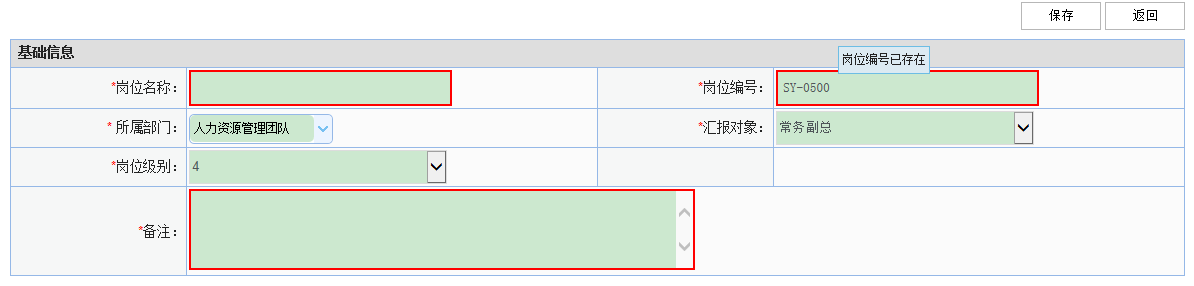
設計上的取捨與可改進處
這個插件最聰明的地方是「用 HTML 屬性當設定檔」,讓表單與規則寫在同一處,維護時一目了然。不過有幾點值得注意:ajaxCheck 用了 async: false 同步請求,會凍結整個頁面,現代做法應改回非同步並用 Promise 串接;$.trim、bind 在 jQuery 3 之後已更名為 trim 與 on;正則規則直接寫在 HTML 屬性中也有 XSS 風險,若 msg 內容來自使用者輸入,務必先做轉義。