JavaScript 實現星星打分效果的方法
編輯:關於JavaScript
本文分享一個常見的星星打分效果,看看如何用 JavaScript 實作。很多網站都有如下圖的評分元件。
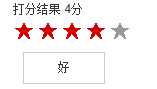
效果詳解:
1. 滑鼠移上時星星點亮,下方文字顯示;移出時星星變灰、文字隱藏。
2. 滑鼠移到某顆星星上,它之前的所有星星都會亮起。
3. 滑鼠移到某顆星星並點擊,顯示打分結果。
程式碼如下:
<!doctype html> <html> <head> <meta charset="gbk"> <title>切換</title> <style> .wrapper{width:300px; margin:10px auto; font:14px/1.5 arial;} /*tab*/ #star{overflow:hidden;} #star li{ float:left; width:20px; height:20px; margin:2px; display:inline; color:#999; font:bold 18px arial; cursor:pointer } #star .act{ color:#c00 } #star_word{ width:80px; height:30px; line-height:30px; border:1px solid #ccc; margin:10px; text-align:center; display:none } </style> <script> window.onload = function(){ var star = document.getElementById("star"); var star_li = star.getElementsByTagName("li"); var star_word = document.getElementById("star_word"); var result = document.getElementById("result"); var i=0; var j=0; var len = star_li.length; var word = ['很差','差','一般',"好","很好"] for(i=0; i<len; i++){ star_li[i].index = i; star_li[i].onmouseover = function(){ star_word.style.display = "block"; star_word.innerHTML = word[this.index]; for(i=0; i<=this.index; i++){ star_li[i].className = "act"; } } star_li[i].onmouseout = function(){ star_word.style.display = "none"; for(i=0; i<len; i++){ star_li[i].className = ""; } } star_li[i].onclick = function(){ result.innerHTML = (this.index+1)+"分"; } } } </script> </head> <body> <div class="wrapper"> 打分結果 <span id="result"></span> <ul id="star"> <li>★</li> <li>★</li> <li>★</li> <li>★</li> <li>★</li> </ul> <div id="star_word">一般</div> </div> </body> </html>
希望本文所述對大家的 JavaScript 程式設計有所幫助。
- 上一篇文章: JavaScript 實現可切換並自動輪播的選項卡效果
- 下一篇文章: JavaScript 實現簡單可切換選項卡效果
熱門推薦
Bootstrap Table 跨表格行拖拽與撤銷(Ctrl+Z)實作全解
JavaScript 打造帶下拉子選單的橫向導覽列
動態載入 JS 檔案:jQuery 與原生兩種做法
不靠 XMLHttpRequest 也能異步載入:iframe 與 script 的偽 Ajax
在 iframe 頁面中操作父窗口:做出可展開收起的浮動圖表層
JavaScript fromCharCode 方法:Unicode 轉字串
用JavaScript下拉選單切換顯示圖片的實作教學
JavaScript 實現網頁背景定時自動變色
Vue.js 學習筆記(2):computed、$children 與 slot 的幾個坑