原生JS實作響應式瀑布流版面
編輯:關於JavaScript
本文分享一個以原生 JavaScript 完成的瀑布流版面,不含任何第三方相依。
原始碼:https://github.com/leozdgao/responsive_waterfall
線上 Demo:https://leozdgao.github.io/demo/responsive_waterfall/
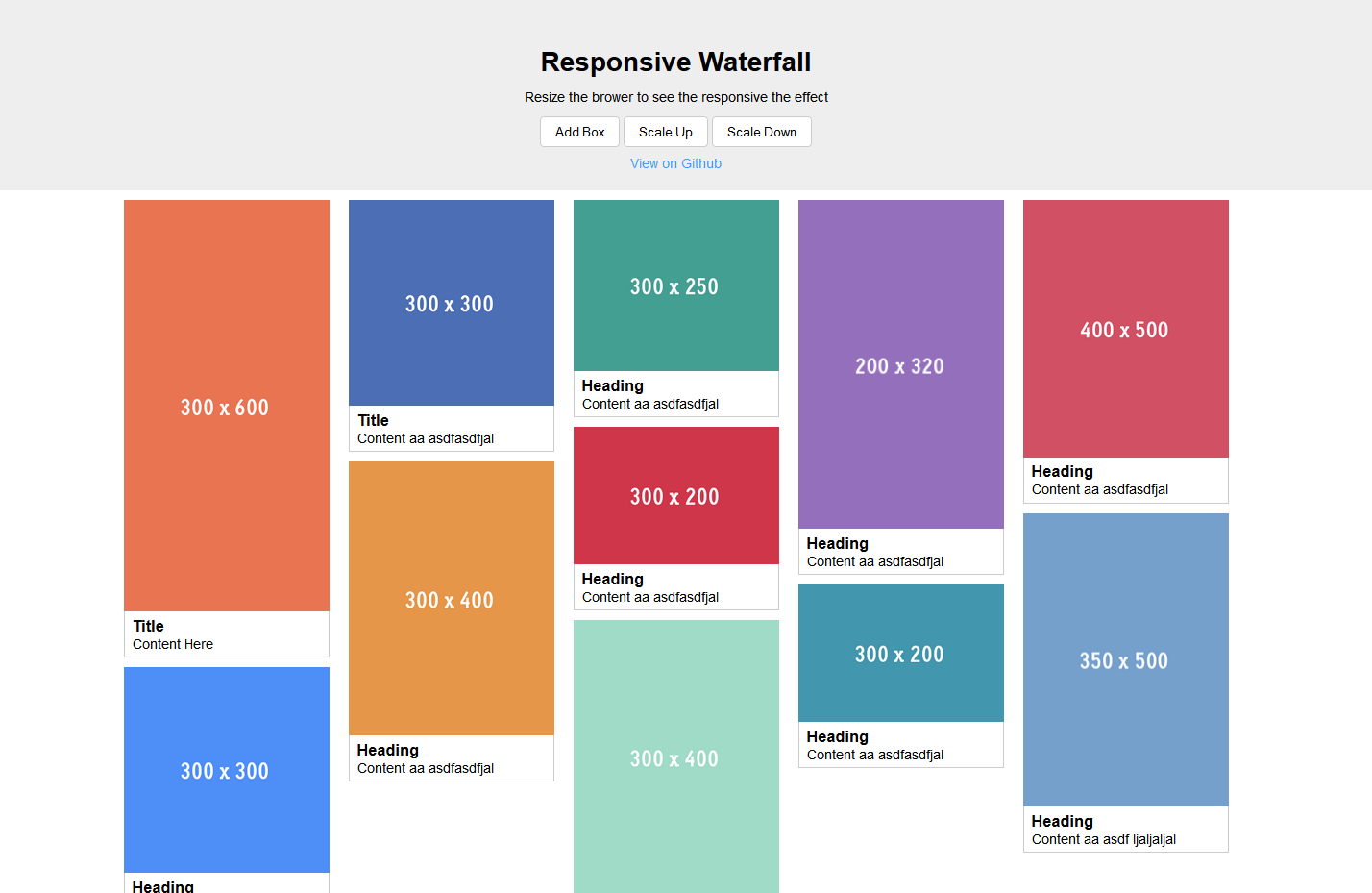
演示圖:
核心程式碼(responsive_waterfall.js)
(function() { var Waterfall = function(opts) { var minBoxWidth; Object.defineProperty(this, 'minBoxWidth', { get: function() { return minBoxWidth; }, set: function(value) { if(value < 100) value = 100; if(value > 1000) value = 1000; minBoxWidth = value; } }); opts = opts || {}; var containerSelector = opts.containerSelector || '.wf-container'; var boxSelector = opts.boxSelector || '.wf-box'; // init properties this.minBoxWidth = opts.minBoxWidth || 250; this.columns = []; this.container = document.querySelector(containerSelector); this.boxes = this.container ? Array.prototype.slice.call(this.container.querySelectorAll(boxSelector)) : []; // compose once in constructor this.compose(); // handle the image or something which might change size after loaded var images = this.container.querySelectorAll('img'), that = this; var clr; for (var i = 0; i < images.length; i++) { var img = images[i]; img.onload = function() { if(clr) clearTimeout(clr); clr = setTimeout(function() { that.compose(true); }, 500); } } window.addEventListener('resize', function() { that.compose(); }); } // compute the number of columns under current setting Waterfall.prototype.computeNumberOfColumns = function() { var num = Math.floor(this.container.clientWidth / this.minBoxWidth); num = num || 1; // at least one column return num; } // init enough columns and set the width Waterfall.prototype.initColumns = function(num) { if(num > 0) { // create column div this.columns = []; var width = (100 / num) + '%'; while(num--) { var column = document.createElement('div'); column.className = 'wf-column'; column.style.width = width; this.columns.push(column); this.container.appendChild(column); } } } // get the index of shortest column Waterfall.prototype.getMinHeightIndex = function() { if(this.columns && this.columns.length > 0) { var min = this.columns[0].clientHeight, index = 0; for (var i = 1; i < this.columns.length; i++) { var columnElem = this.columns[i]; if(columnElem.clientHeight < min) { min = columnElem.clientHeight; index = i; } } return index; } else return -1; } // compose core Waterfall.prototype.compose = function(force) { var num = this.computeNumberOfColumns(); var cols = this.columns.length; if(force || num != cols) { // remove old column for (var i = 0; i < this.columns.length; i++) { var columnElem = this.columns[i]; columnElem.remove(); } // init new column this.initColumns(num); // compose for (var i = 0, l = this.boxes.length; i < l; i++) { var box = this.boxes[i]; this.addBox(box); } } } // add a new box to grid Waterfall.prototype.addBox = function(elem) { // push if new box if(this.boxes.indexOf(elem) < 0) this.boxes.push(elem); var columnIndex = this.getMinHeightIndex(); if(columnIndex > -1) { var column = this.columns[columnIndex]; column.appendChild(elem); } } window.Waterfall = Waterfall; })()
設計思路
整個實作可以拆成三個環節。首先用 computeNumberOfColumns 依容器寬度與最小欄寬算出欄數;接著 initColumns 建立等寬的欄容器;最後 addBox 每次都把新方塊塞進目前「最矮的那一欄」,這正是瀑布流視覺整齊的關鍵。
另外有兩個細節值得注意:圖片載入完成後尺寸會變,因此每張 img 的 onload 都用 debounce 的方式觸發一次 compose(true) 強制重排;視窗 resize 則只需在欄數改變時重排,所以 compose 內部做了欄數比對。
以上就是本文分享的全部內容,希望能幫助大家更熟練地使用 JavaScript。
- 上一篇文章: JavaScript中三個顛覆直覺的運算子
- 下一篇文章: JavaScript變數作用域與作用域鏈詳解