微信小程序網路請求封裝實戰:Content-Type 大小寫踩坑全記錄
編輯:JavaScript技巧
先前寫過一篇關於小程序上拉載入與下拉刷新的文章,這次來談網路請求的封裝,順便記錄一個折騰了我很久的坑。
先說那個坑:Content-Type 的大小寫
官方文件中的範例是這樣寫的:
 wx.request({
   url: 'test.php',   // 僅為示例,並非真實介面位址
   data: {
     x: '',
     y: ''
   },
   header: {
     'Content-Type': 'application/json'
   },
   success: function(res) {
     console.log(res.data)
   }
 })
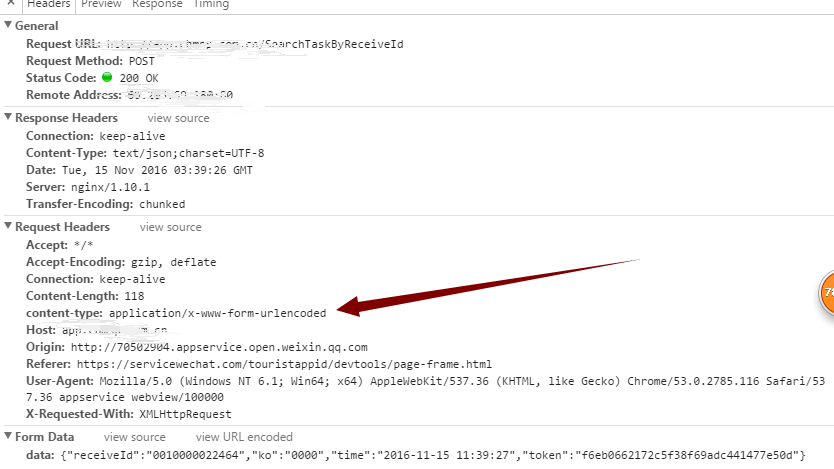
問題就在這裡:header 中的 Content-Type 必須用小寫的 content-type,伺服器才收得到參數。我當初折騰了很久,一度懷疑是後端有問題,把伺服器改來改去仍然無效,最後才發現是這個大小寫的問題。
那時候的現象是:參數被放進 request payload 裡,伺服器端完全拿不到。為了排查,我還寫了一個把 JSON 轉成表單字串的小工具:
 function json2Form(json) {
   var str = [];
   for(var p in json){
     str.push(encodeURIComponent(p) + "=" + encodeURIComponent(json[p]));
   }
   return str.join("&");
 }
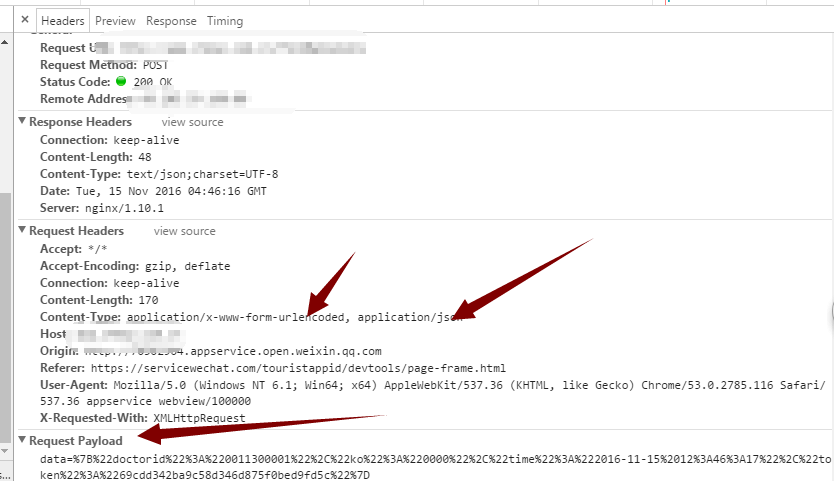
兜了一圈,最後確認就是 content-type 的問題,改成小寫一切正常。這麼厲害的團隊會在這種地方留下低級陷阱,確實讓人哭笑不得。不囉嗦,直接上程式碼。
一、封裝 HTTP 請求
 import util from 'util.js';

 /**
  * url     請求位址
  * success 成功回呼
  * fail    失敗回呼
  */
 function _get(url, success, fail) {
   console.log("------ start --- _get ----");
   wx.request({
     url: url,
     header: {
       // 'Content-Type': 'application/json'
     },
     success: function(res) {
       success(res);
     },
     fail: function(res) {
       fail(res);
     }
   });
   console.log("---- end ----- _get ----");
 }

 /**
  * 以表單格式送出 POST
  */
 function _post_from(url, data, success, fail) {
   wx.request({
     url: url,
     header: {
       'content-type': 'application/x-www-form-urlencoded',
     },
     method: 'POST',
     data: { data: data },
     success: function(res) {
       success(res);
     },
     fail: function(res) {
       fail(res);
     }
   });
 }

 /**
  * 以 JSON 格式送出 POST
  */
 function _post_json(url, data, success, fail) {
   wx.request({
     url: url,
     header: {
       'content-type': 'application/json',
     },
     method: 'POST',
     data: data,
     success: function(res) {
       success(res);
     },
     fail: function(res) {
       fail(res);
     }
   });
 }

 module.exports = {
   _get: _get,
   _post: _post_from,
   _post_json: _post_json
 };
二、測試用例
2.1 GET 請求
 // GET 方式
 let map = new Map();
 map.set('receiveId', '0010000022464');
 let d = json_util.mapToJson(util.tokenAndKo(map));
 console.log(d);

 var url1 = api.getBaseUrl() + 'SearchTaskByReceiveId?data=' + d;
 network_util._get(url1, d, function(res) {
   console.log(res);
   that.setData({ taskEntrys: res.data.taskEntrys });
 }, function(res) {
   console.log(res);
 });
2.2 POST 請求
 // POST 方式
 let map = new Map();
 map.set('receiveId', '0010000022464');
 let d = json_util.mapToJson(util.tokenAndKo(map));
 console.log(d);

 var url1 = api.getBaseUrl() + 'SearchTaskByReceiveId';
 network_util._post(url1, d, function(res) {
   console.log(res);
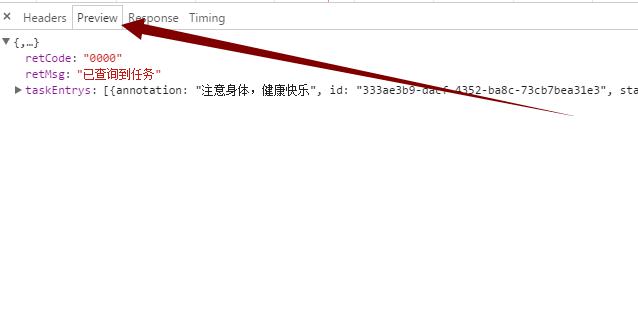
   that.setData({ taskEntrys: res.data.taskEntrys });
 }, function(res) {
   console.log(res);
 });
執行結果
把 GET、表單 POST、JSON POST 三種形式收斂到同一支工具檔中,之後在頁面裡只要呼叫 network_util._get 或 network_util._post 就好,不必每頁重複寫 wx.request 的樣板程式碼。這也順帶讓 header 設定集中管理,避免同一個坑在不同頁面各踩一次。
以上就是本次分享的全部內容,希望對你的開發有所幫助。