JavaScript 裝飾器函數(Decorator)實例詳解
編輯:JavaScript技巧
裝飾器函數的用途是在執行期動態地為函數或物件加上某項功能。相比繼承,它的彈性高得多。
差別在哪裡?用繼承擴充功能,你得先決定好類別的層級結構,而且為了加一個小功能往往要硬寫一個子類;用裝飾器,你可以在執行時才挑選要套哪一層,不必事先把繼承寫死。當功能點變多,繼承的後代類別數量會迅速膨脹,而裝飾器只是把函數一層層包起來而已。
以下三個範例涵蓋了最常見的用法。
1. 動態掛載 onload 監聽
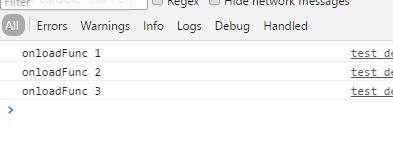
頁面常常需要註冊多個 onload 回呼,直接覆寫 window.onload 會把前一個吃掉。裝飾器思路的解法是:每次註冊時把舊的包住。
function addLoadEvent(fn) {
  var oldEvent = window.onload;
  if (typeof window.onload != 'function') {
    window.onload = fn;
  } else {
    window.onload = function() {
      oldEvent();
      fn();
    };
  }
}

function fn1(){ console.log('onloadFunc 1'); }
function fn2(){ console.log('onloadFunc 2'); }
function fn3(){ console.log('onloadFunc 3'); }

addLoadEvent(fn1);
addLoadEvent(fn2);
addLoadEvent(fn3);
2. 前置與後置執行
直接在 Function.prototype 上加 before 與 after,就能讓任何函數獲得「前面先跑一段、後面再跑一段」的能力。
Function.prototype.before = function(beforfunc) {
  var self = this;
  var outerArgs = Array.prototype.slice.call(arguments, 1);
  return function() {
    var innerArgs = Array.prototype.slice.call(arguments);
    beforfunc.apply(this, innerArgs);
    self.apply(this, outerArgs);
  };
};

Function.prototype.after = function(afterfunc) {
  var self = this;
  var outerArgs = Array.prototype.slice.call(arguments, 1);
  return function() {
    var innerArgs = Array.prototype.slice.call(arguments);
    self.apply(this, outerArgs);
    afterfunc.apply(this, innerArgs);
  };
};

var func = function(name){ console.log('I am ' + name); };
var beforefunc = function(age){ console.log('I am ' + age + ' years old'); };
var afterfunc = function(gender){ console.log('I am a ' + gender); };

var beforeFunc = func.before(beforefunc, 'Andy');
var afterFunc = func.after(afterfunc, 'Andy');

beforeFunc('12');
afterFunc('boy');
主控台依序印出:
I am 12 years old
I am Andy
I am Andy
I am a boy
3. 計算函數執行時間
用 ES2015 語法寫起來更乾淨,搭配剩餘參數與展開運算子,包裝函數幾乎只有骨架。
function log(func){
  return function(...args){
    const start = Date.now();
    let result = func(...args);
    const used = Date.now() - start;
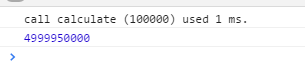
    console.log(`call ${func.name} (${args}) used ${used} ms.`);
    return result;
  };
}

function calculate(times){
  let sum = 0;
  let i = 1;
  while (i < times){
    sum += i;
    i++;
  }
  return sum;
}

runCalculate = log(calculate);
let result = runCalculate(100000);
console.log(result);
這個模式不只用在計時,日誌、快取、效能監控、參數校驗都能用同一招套上去,而且完全不必更動原本的函數內容。
順帶一提,紅極一時的 Node.js 框架 Koa 正是建立在裝飾器與 Generator 之上。理解裝飾器的思路之後,再去看那些語法糖就不會覺得陌生了。
- 上一篇文章: 用 Canvas 畫出一個誇張的 emoji 表情
- 下一篇文章: JavaScript 觀察者模式(發布訂閱)原理與實作