jQuery 搭配 .NET:勾選資料後一鍵打包下載附件
編輯:JQuery入門技巧
做培訓管理系統時遇到一個需求:使用者勾選若干筆資料,一次把對應附件全部打包下載。麻煩的是列表並非 DataGrid,而是後端拼接 HTML 字串後綁定的,所以前端拿不到標準的列選取機制,得自己攢。
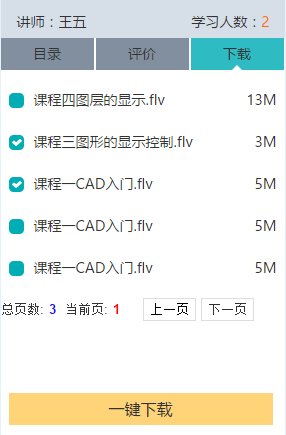
整體思路
- 前端:用 jQuery 取得勾選資料的 id,推進陣列,再把陣列寫進頁面的隱藏欄位。
- 後端:讀取隱藏欄位的值,切出各筆 id,逐一找出附件路徑,打包成壓縮檔回傳。
一、容器
列表由後端動態塞進這個 div:
<div id="downloadInfo" runat="server"></div>
二、前端勾選邏輯
$attach = $("#download-list");
var arr = [];

$attach.on('click', '.no', function () {
    $(this).toggleClass('checked');   // 切換勾選樣式

    if ($(this).hasClass('checked')) {
        var guid = $(this).children("#hidAttachGuid").val();
        arr.push(guid);               // 加入陣列
    } else {
        var guid = $(this).children("#hidAttachGuid").val();
        var n = arr.indexOf(guid);
        if (n != -1) arr.splice(n, 1);  // 從陣列移除
    }

    // 同步給後端要讀的隱藏欄位
    $("[id$='arrayGuid']").val(arr);
});
這裡有兩個細節。第一,事件用 on 委托到 #download-list 上,所以後端動態插入的列也吃得到點擊——若用 bind 直接綁在 .no 上,後生成的列就會失效。第二,id 選擇器在後端拼接的場景裡容易重複,改用 $("[id$='arrayGuid']") 這種後綴比對比較保險。
三、觸發後端下載
因為按鈕也是後端拼出來的,所以 onclick 直接呼叫一個全域函式,再由它去點擊真正的 server 控制項:
<button type='button' class='one-download' onclick='download()'>一鍵下載</button>

<script>
function download() {
    $("#btnDownload").click();
}
</script>
隱藏的 server 控制項與承載陣列的欄位:
<span style="display: none">
  <asp:Button ID="btnDownload" OnClick="btnDownload_Click" Text="確定" runat="server" />
  <input type="text" id="arrayGuid" runat="server" />
</span>
四、後端打包
protected void btnDownload_Click(object sender, EventArgs e)
{
    string attachGuid = arrayGuid.Value;
    string[] sArray = attachGuid.Split(',');

    List<string> list = new List<string>();
    foreach (string i in sArray)
    {
        // 逐一取得需要下載的附件實體路徑
        list.Add(i);
    }

    Download(list, "" + lblCourseName.Text + "相關附件材料.rar");
}
核心的打包方法用 SharpZipLib 的 ZipFile,在記憶體中完成壓縮後直接輸出:
public void Download(IEnumerable<string> files, string zipFileName)
{
    MemoryStream ms = new MemoryStream();
    byte[] buffer = null;

    using (ZipFile file = ZipFile.Create(ms))
    {
        file.BeginUpdate();
        // 透過名稱轉換器把完整路徑只留檔名,避免 zip 內出現一長串資料夾
        file.NameTransform = new MyNameTransfom();

        foreach (var item in files)
        {
            file.Add(item);
        }
        file.CommitUpdate();

        buffer = new byte[ms.Length];
        ms.Position = 0;
        ms.Read(buffer, 0, buffer.Length);
    }

    Response.AddHeader("content-disposition", "attachment;filename=" + zipFileName);
    Response.BinaryWrite(buffer);
    Response.Flush();
    Response.End();
}
名稱轉換器要與 Page_Load 放在同一層:
public class MyNameTransfom : ICSharpCode.SharpZipLib.Core.INameTransform
{
    public string TransformDirectory(string name) { return null; }

    public string TransformFile(string name)
    {
        return Path.GetFileName(name);
    }
}
實務提醒
這套做法能跑,但有幾點在正式環境要留意。檔名編碼:Response 的 filename 若含中文,部分舊版瀏覽器會亂碼,建議改用 HttpUtility.UrlEncode 編碼並補上 filename*=UTF-8''。副檔名一致性:程式產生的是 zip 內容,檔名卻寫成 .rar,格式與副檔名不符,某些解壓縮工具會抱怨,統一改成 .zip 比較妥當。檔案認證:arrayGuid 直接從前端帶入後端就當成路徑使用,若沒有比對使用者權限,等於開了一個任意檔案下載的門;正式上線前務必在後端驗證每個 id 是否屬於當前使用者可存取的範圍。