DataTables 外掛用法與 API 實例大全
編輯:JQuery入門技巧
DataTables 是 jQuery 生態系裡最成熟的分頁表格外掛之一,幾乎把「表格该有的功能」都做完了:分頁、排序、搜尋、多欄排序、AJAX 資料源、狀態保存。以下把常用設定整理成可查閱的清單。
一、零設定啟動
$(document).ready(function () {
    $('#example').dataTable();
});
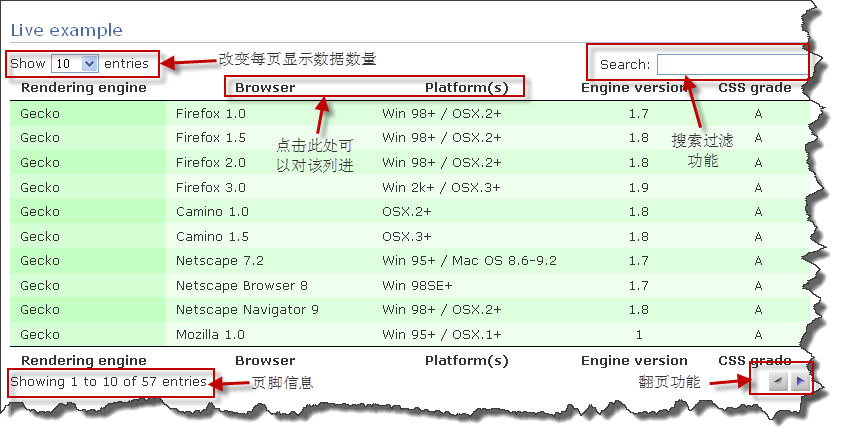
不傳任何參數,DataTables 會自動加上分頁、排序、搜尋與資訊列。這也是它最常被稱道的地方。
二、基礎功能開關
"bPaginate":    true,   // 分頁
"bLengthChange":true,   // 切換每頁筆數
"bFilter":      true,   // 搜尋過濾
"bSort":        false,  // 排序
"bInfo":        true,   // 頁腳資訊
"bAutoWidth":   true    // 自動寬度
三、指定排序欄位
$(document).ready(function () {
    $('#example').dataTable({
        "aaSorting": [[4, "desc"]]    // 以第 4 欄(索引從 0 起)遞減排序
    });
});
四、隱藏欄位
$(document).ready(function () {
    $('#example').dataTable({
        "aoColumnDefs": [
            { "bSearchable": false, "bVisible": false, "aTargets": [2] },
            { "bVisible": false, "aTargets": [3] }
        ]
    });
});
五、調整介面元件位置
$(document).ready(function () {
    $('#example').dataTable({
        "sDom": '<"top"fli>rt<"bottom"p><"clear">'
    });
});
sDom 的字元都有含義:
l— 每頁筆數選擇器f— 搜尋輸入框t— 表格本體i— 資訊列p— 分頁器r— 處理中提示(pRocessing)<...>— 一般 div;<"class"...>— 帶 class 的 div
六、狀態保存
$(document).ready(function () {
    $('#example').dataTable({ "bStateSave": true });
});
開啟後,使用者當前的分頁位置、每頁筆數與排序狀態會寫進 cookie,下次進入頁面自動還原。
七、數字型分頁樣式
$(document).ready(function () {
    $('#example').dataTable({ "sPaginationType": "full_numbers" });
});
八、寬高限制
水平方向:
$(document).ready(function () {
    $('#example').dataTable({
        "sScrollX": "100%",
        "sScrollXInner": "110%",
        "bScrollCollapse": true
    });
});
垂直方向用 sScrollY,兩者同時使用則可讓表頭固定、內容區滾動。
九、中文化
$(document).ready(function () {
    $('#example').dataTable({
        "oLanguage": {
            "sLengthMenu": "每頁顯示 _MENU_ 條記錄",
            "sZeroRecords": "抱歉,沒有找到",
            "sInfo": "從 _START_ 到 _END_ /共 _TOTAL_ 條數據",
            "sInfoEmpty": "沒有數據",
            "sInfoFiltered": "(從 _MAX_ 條數據中檢索)",
            "oPaginate": {
                "sFirst": "首頁", "sPrevious": "前一頁",
                "sNext": "後一頁", "sLast": "尾頁"
            },
            "sProcessing": "處理中..."
        }
    });
});
也可以把語言包放在外部檔案裡讀取:
"oLanguage": { "sUrl": "cn.txt" }
十、自訂每頁筆數選項
$(document).ready(function () {
    $('#example').dataTable({
        "aLengthMenu": [[10, 25, 50, -1], [10, 25, 50, "All"]]
    });
});
十一、控制各欄排序行為
$(document).ready(function () {
    $('#example').dataTable({
        "aoColumns": [
            null,
            { "asSorting": ["asc"] },              // 只能遞增
            { "asSorting": ["desc", "asc", "asc"] },// 首次遞減,之後遞增
            { "asSorting": [] },                   // 不排序
            { "asSorting": [] }
        ]
    });
});
十二、AJAX 資料源
靜態檔案:
$(document).ready(function () {
    $('#example').dataTable({
        "bProcessing": true,
        "sAjaxSource": './arrays.txt'
    });
});
伺服器端處理(分頁、排序、搜尋都交給後端做,適合大資料量):
$(document).ready(function () {
    $('#example').dataTable({
        "bProcessing": true,
        "bServerSide": true,
        "sPaginationType": "full_numbers",
        "sAjaxSource": "./server_processing.php",
        "oLanguage": { "sUrl": "cn.txt" },
        "aoColumns": [
            { "sName": "platform" },
            { "sName": "version" },
            { "sName": "engine" },
            { "sName": "browser" },
            { "sName": "grade" }
        ]
        // 後端可從 $_GET['sColumns'] 取得欄位清單
    });
});
若需要改用 POST 傳送,覆寫 fnServerData:
"fnServerData": function (sSource, aoData, fnCallback) {
    $.ajax({
        "dataType": 'json',
        "type": "POST",
        "url": sSource,
        "data": aoData,
        "success": fnCallback
    });
}
十三、為每一列加上 id 與 class
後端回傳的 JSON 中加入兩個特殊欄位即可:
{
  "DT_RowId": "row_8",
  "DT_RowClass": "gradeA",
  "0": "Gecko",
  "1": "Firefox 1.5",
  "2": "Win 98+ / OSX.2+",
  "3": "1.8",
  "4": "A"
},
十四、其他常見需求
- 多欄排序:按住 Ctrl 點擊多個表頭即可,或使用
aaSorting傳入多組設定。 - 展開列明細:點擊行首的「+」展開該列的詳細資料,做法是動態插入一個
tr並把資料塞進 td。 - 多列選取:搭配
fnRowCallback或自行在td上放 checkbox 並攔截 click 事件(記得event.stopPropagation(),否則會觸發排序)。 - 行內編輯:整合 jEditable 外掛,在
fnDrawCallback裡為 td 掛上編輯功能。 - tooltip:整合 tooltip 外掛,對過長的內容顯示完整文字。
一個必須注意的結構要求
要被 DataTables 處理的 table 必須具備 thead 與 tbody,而且結構要規整(內容可以留空,但標籤不能少)。少了 tbody,DataTables 無法正確掛載資料列,這是新手最常遇到的錯誤。
可附加的參數一覽
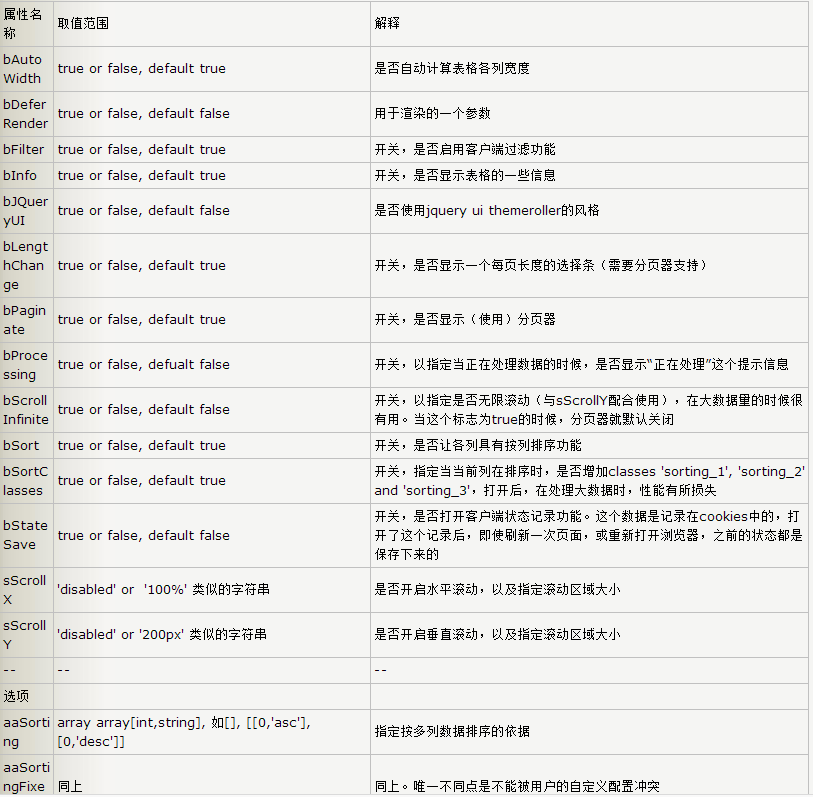
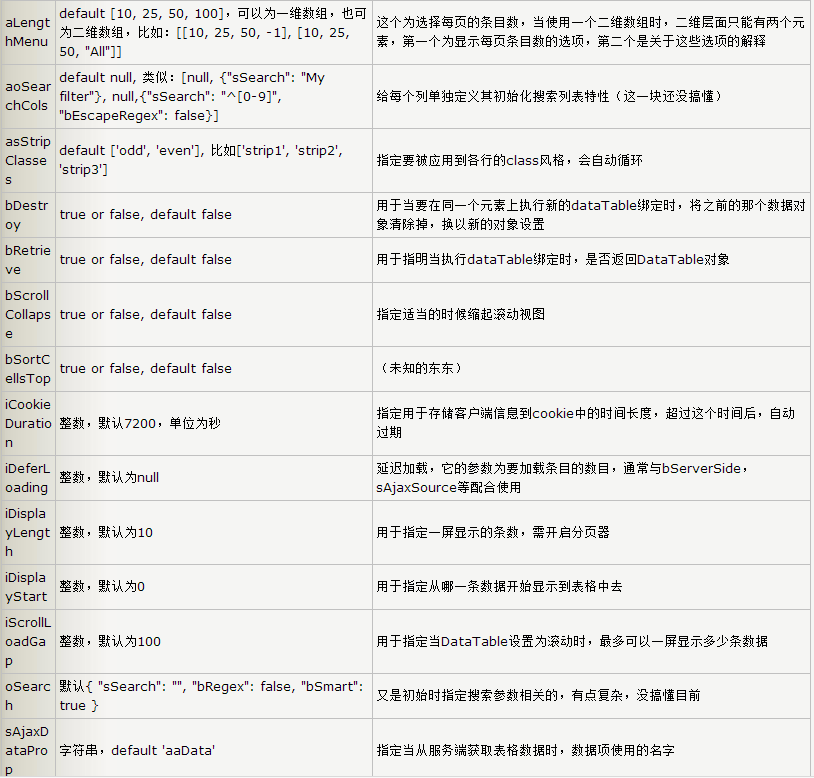
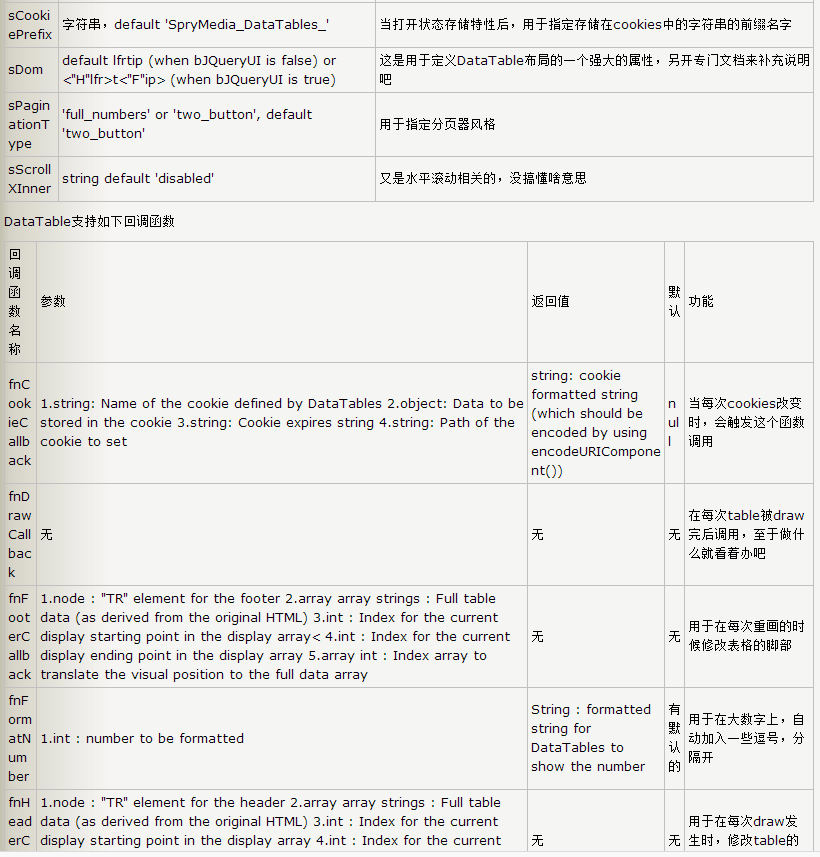
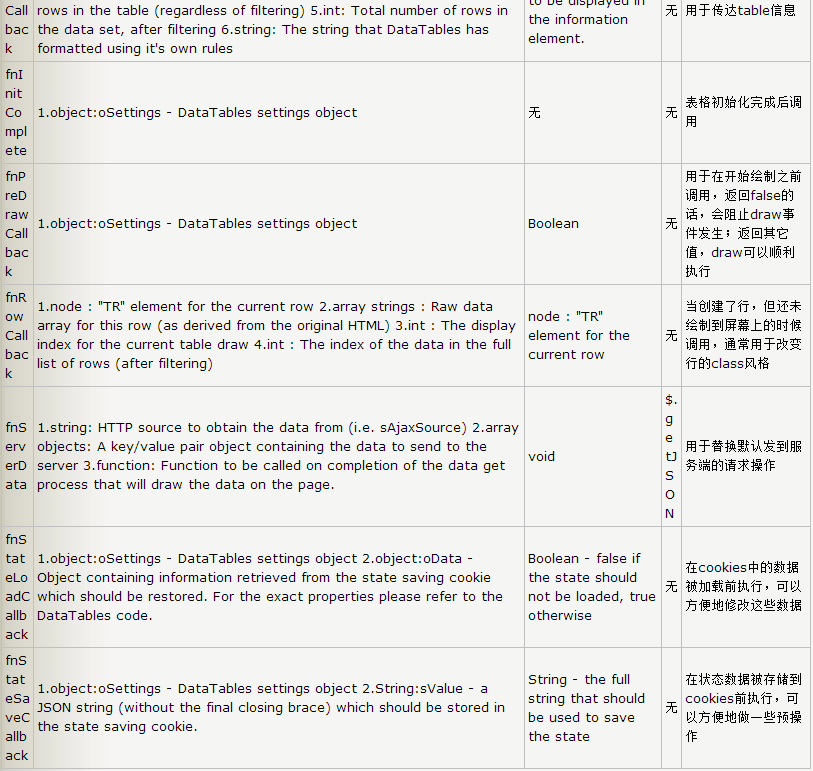
實務選擇上,資料量小(數百筆以內)就用客戶端模式,讓 DataTables 全權處理排序與搜尋,最省事;資料量大就務必開 bServerSide,把分頁與搜尋推到後端,否則一次拉幾萬筆進瀏覽器,排序與搜尋都會卡住。另外,DataTables 的客戶端排序是整個資料集在記憶體中進行的,一旦改用伺服器端模式,aaSorting 這類設定就要由後端參數接手,前端設定會失效。
- 上一篇文章: 用 jQuery UI 實作多選元素的整批拖放與排序
- 下一篇文章: 擴充 EasyUI Tree 的節點搜尋方法(支援名稱模糊比對)