DIV+CSS佈局教程網 >> 網頁腳本 >> JavaScript入門知識 >> jQuery入門知識 >> JQuery入門技巧 >> 使用jquery datatable和bootsrap創建表格實例代碼
使用jquery datatable和bootsrap創建表格實例代碼
編輯:JQuery入門技巧
使用jquery-datatable插件
bootstrap前端框架
json
一.創建demo.html
代碼塊
代碼塊語法遵循標准markdown代碼,例如:
<%@ page language="java" import="java.util.*" pageEncoding="UTF-8"%>
<%@ taglib uri="http://java.sun.com/jsp/jstl/core" prefix="c"%>
<%
  String path = request.getContextPath();
  String basePath = request.getScheme() + "://"
      + request.getServerName() + ":" + request.getServerPort()
      + path + "/";
%>
<!DOCTYPE html>
<html lang="en" class="app">
<head>
<meta charset="utf-8" />
<title>XXX服務平台</title>
<meta name="description"
  content="app, web app, responsive, admin dashboard, admin, flat, flat ui, ui kit, off screen nav" />
<meta name="viewport"
  content="width=device-width, initial-scale=1, maximum-scale=1" />
<link rel="stylesheet"
  href="<%=request.getContextPath()%>/www/AL_app/js/jPlayer/jplayer.flat.css" rel="external nofollow"
  type="text/css" />
<link rel="stylesheet"
  href="<%=request.getContextPath()%>/www/AL_app/css/bootstrap.css" rel="external nofollow"
  type="text/css" />
<link rel="stylesheet"
  href="<%=request.getContextPath()%>/www/AL_app/css/font.css" rel="external nofollow"
  type="text/css" />
<link rel="stylesheet"
  href="<%=request.getContextPath()%>/www/AL_app/css/app.css" rel="external nofollow"
  type="text/css" />
<link rel="stylesheet" href="<%=request.getContextPath()%>/www/AL_app/js/datatables/datatables.css" rel="external nofollow" type="text/css"/>
<!--[if lt IE 9]>
  <script src="js/ie/html5shiv.js"></script>
  <script src="js/ie/respond.min.js"></script>
  <script src="js/ie/excanvas.js"></script>
 <![endif]-->
</head>
<body class=""
<!-- ***********醫用藥典開始************** -->
<section id="content">
     <section class="vbox">
      <section class="scrollable padder">
      <div class="m-b-md">
        <h3 class="m-b-none"></h3>
       </div>
       <div class="m-b-md">
        <h3 class="m-b-none">中醫藥典</h3>
       </div>
       <section class="panel panel-default">
        <header class="panel-heading">
         清單
         <i class="fa fa-info-sign text-muted" data-toggle="tooltip" data-placement="bottom" data-title="ajax to load the data."></i>
        </header>
        <div class="table-responsive">
         <table class="table table-striped m-b-none" data-ride="datatables">
          <thead>
           <tr>
            <th style="width:15%" >序號</th>
            <th style="width:20%">藥名</th>
            <th style="width:20%">拼音簡稱</th>
            <th style="width:15%">用法</th>
            <th style="width:15%">操作</th>
           </tr>
          </thead>
          <tbody>
          </tbody>
         </table>
        </div>
       </section>
      </section>
     </section>
     <a href="#" rel="external nofollow" class="hide nav-off-screen-block" data-toggle="class:nav-off-screen,open" data-target="#nav,html"></a>
    </section>
    <!-- ***********醫用藥典結束************** -->
      </section>
    </section>
  </section>
<script src="<%=request.getContextPath()%>/www/AL_app/js/jquery.min.js"></script>
  <!-- Bootstrap -->
<script src="<%=request.getContextPath()%>/www/AL_app/js/bootstrap.js"></script>
  <!-- App -->
<script src="<%=request.getContextPath()%>/www/AL_app/js/app.js"></script>
<script type="text/javascript"
    src="<%=request.getContextPath()%>/www/AL_app/js/jPlayer/demo.js"></script>
<script src="<%=request.getContextPath()%>/www/AL_app/jh_js/jq.dataTable.js"></script>
<script src="<%=request.getContextPath()%>/www/AL_app/js/datatables/jquery.csv-0.71.min.js"></script>
<script src="<%=request.getContextPath()%>/www/AL_app/drugs/demo.js"></script>
<script src="<%=request.getContextPath()%>/www/AL_app/js/app.plugin.js"></script>
</body>
</html>
二.創建一個drugs.json
{
  "aaData": [
  {
    "序號": "1",
    "藥名": "白術",
    "拼音簡稱": "bzh",
    "用法": "內服",
    "操作": "編輯"
  },
  {
    "序號": "3",
    "藥名": "白術",
    "拼音簡稱": "bzh",
    "用法": "內服",
    "操作": "編輯"
  },
  {
    "序號": "4",
    "藥名": "白術",
    "拼音簡稱": "bzh",
    "用法": "內服",
    "操作": "編輯"
  },
  {
    "序號": "5",
    "藥名": "白術",
    "拼音簡稱": "bzh",
    "用法": "內服",
    "操作": "編輯"
  },
  {
    "序號": "6",
    "藥名": "白術",
    "拼音簡稱": "bzh",
    "用法": "內服",
    "操作": "編輯"
  }
]
三.創建一個demo.js
/** 使用jquery-datatable異步請求數據創建表格 **/
+function ($) { "use strict";
 $(function(){
 // datatable
 $('[data-ride="datatables"]').each(function() {
  var oTable = $(this).dataTable( {
   "bProcessing": true,
   "sAjaxSource": "www/AL_app/drugs/drugs.json",//異步請求json數據
   "sDom": "<'row'<'col-sm-6'l><'col-sm-6'f>r>t<'row'<'col-sm-6'i><'col-sm-6'p>>",
   "sPaginationType": "full",
   //給表格單元的頭信息命名
   "aoColumns": [
    { "mData": "序號" },
    { "mData": "藥名" },
    { "mData": "拼音簡稱" },
    { "mData": "用法" },
    { "mData": "操作" }
   ]
  } );
 });
}(window.jQuery);
四.截圖如下所示
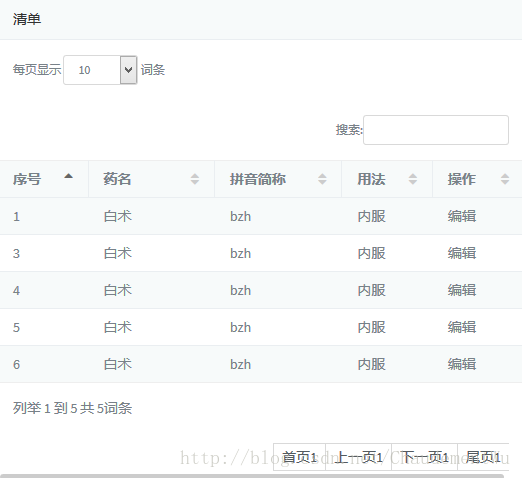
以上所述是小編給大家介紹的使用jquery datatable和bootsrap創建表格實例代碼,希望對大家有所幫助,如果大家有任何疑問請給我留言,小編會及時回復大家的。在此也非常感謝大家對網站的支持!
- 上一頁:鼠標經過出現氣泡框的簡單實例
- 下一頁:jquery編寫日期選擇器
小編推薦
熱門推薦