一、事件冒泡定義
事件冒泡是指在一個對象觸發某類事件(比如單擊onclick事件),如果此對象定義了此事件的處理程序,那麼此事件就會調用這個處理程序,如果沒有定義此事件處理程序或者事件返回true,那麼這個事件會向這個對象的父級對象傳播,從裡到外,甚至它被處理(父級對象所有同類事件都將被激活),或者它到達了對象層級的最頂層,即document對象(有些浏覽器是window).。
二、事件冒泡的作用
事件冒泡允許多個操作被集中處理(把事件處理器添加到一個父級元素上,避免把事件處理器添加到多個子級元素上),它還可以讓你在對象層的不同級別捕獲事件。
三、阻止事件冒泡
事件冒泡機制有時候是不需要的,需要阻止掉,通過event.stopPropagation()來阻止
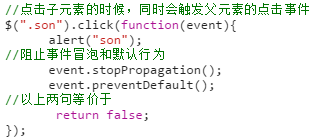
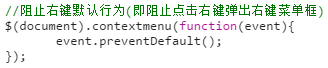
四、阻止默認行為
如:阻止右鍵菜單
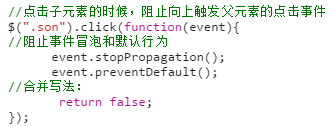
五、合並阻止操作
實際開發中,一般把阻止冒泡和阻止默認行為合並起來寫,合並寫法如下:
六、事件委托
事件委托就是利用冒泡的原理,把事件加到父級上,通過判斷事件來源的子集,執行相應的操作,事件委托首先可以極大減少事件綁定次數,提高性能;其次可以讓新加入的子元素也可以擁有相同的操作。
1、一般綁定事件的寫法:

2、事件委托的寫法:(實際開發中,如果是對大量子元素進行操作時,應該用事件委托的方式,提高性能)

七、取消事件委托
用法:$("委托對象").undelegate()

八、jQuery元素節點操作1、創建節點


2、插入節點
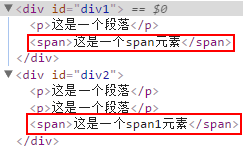
a、append()和appendTo() 在現存元素的內部,從後面插入元素
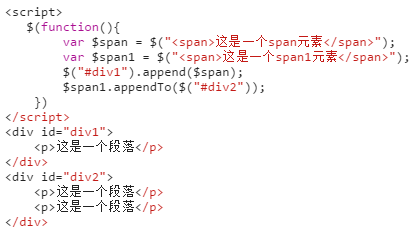
輸出結果為:
b、prepend()和prependTo() 在現存元素的內部,從前面插入元素
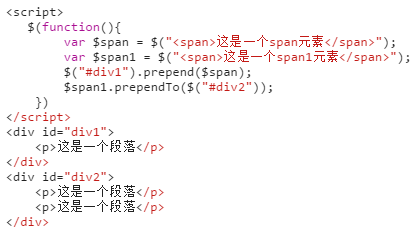
輸出結果:
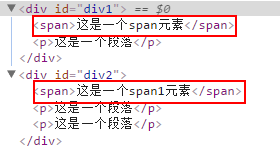
c、after()和insertAfter() 在現存元素的外部,從後面插入元素
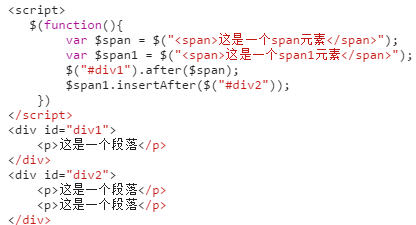
輸出結果:
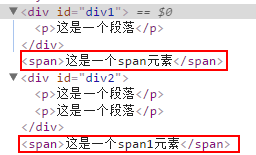
d、before()和insertBefore() 在現存元素的外部,從前面插入元素
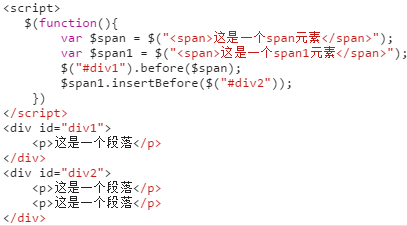
輸出結果:
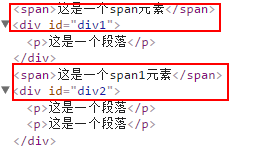
3、刪除節點
$(selector).remove();

4、to do list(計劃列表)實例
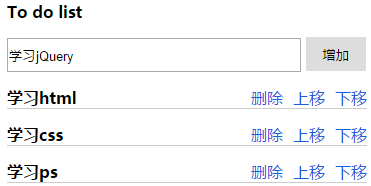
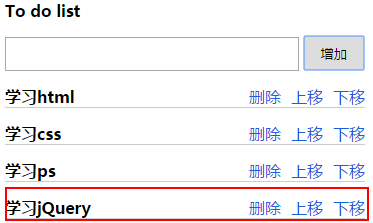
<!DOCTYPE html>
<html lang="en">
<head>
 <meta charset="UTF-8">
 <link rel="stylesheet" href="../css/reset.css" rel="external nofollow" rel="external nofollow" >
 <style>
  .con{
   width:360px;
   margin:30px auto;
  }
  .con > h3{
   margin-bottom:15px;
  }
  .con input{
   width:290px;
   height:30px;
  }
  .con button{
   width:60px;
   height:34px;
   border:0;
  }
  .con ul li{
   display: flex;
   margin-top:15px;
   border-bottom:1px solid #ccc;
   justify-content: space-between;
  }
  .con li p{
   /*清除a元素之間的間隙*/
   font-size:0;
  }
  .con li p a{
   color:#1b5fdd;
   font-size:16px;
   margin-left:10px;
  }
  /*彈框樣式*/
  .pop_con{
   position:fixed;
   top:0;
   right:0;
   bottom:0;
   left:0;
   background:#000;
   display: none;
  }
  .pop{
   width:400px;
   height:220px;
   position:absolute;
   left:50%;
   margin-left:-200px;
   top:50%;
   margin-top:-150px;
   background:#fff;
  }
  .pop .pop_title{
   padding:15px;
   display: flex;
   justify-content: space-between;
  }
  .pop .pop_title a{
   width:36px;
   height:36px;
   line-height:36px;
   border-radius:50%;
   background:#c7254e;
   color:#fff;
   text-align: center;
   position:absolute;
   top:-18px;
   right:-18px;
   transition: all 1s ease;
  }
  .pop_title h3{
   letter-spacing: 2px;
   font-weight: normal;
  }
  .pop_title a:hover{
   transform: rotate(360deg);
  }
  .pop_message{
   height:110px;
   line-height:110px;
   text-align: center;
  }
  .pop_confirm{
   height:36px;
   text-align: center;
  }
  .pop_confirm button{
   height:36px;
   line-height: 36px;
   padding:0 15px;
   background: #c7254e;
   border:none;
   color:#fff;
   outline: none;
  }
 </style>
 <script src="../js/jquery-1.12.4.min.js"></script>
 <script>
  $(function(){
   //聲明變量
   var $input = $("#input");
   $(".pop").click(function(){
    return false;
   });
   $(".pop_confirm").click(function(){
    $(".pop_con").fadeOut();
   });
   $(".close").click(function(){
    $(".pop_con").fadeOut();
   });
   $(".pop_con").click(function(){
    $(this).fadeOut();
   });
   //點擊增加按鈕,新增元素
   $("#add").click(function(){
    var $inputVal = $input.val();
    //如果輸入值為空,出現彈框提示
    if($inputVal == ""){
     $(".pop_con").fadeIn();
     return false
    }
    $input.val("");
    var $li = $("<li><h3>"+$inputVal+"</h3><p><a class='delete' href='javascript:void(0);'>刪除</a><a class='prev' href='javascript:void(0);'>上移</a><a class='next' href='javascript:void(0);'>下移</a></p></li>");
    $("ul").append($li);
   });
   //使用事件委托寫在一起,提高性能
   $("ul").delegate("li a","click",function(){
    //首先判斷點擊的是哪個a
    if($(this).attr("class") == "prev"){
     //判斷是否存在該元素
     if($(this).closest("li").prev().length ==0){
      $(".pop_message").html("已到頂部!");
      $(".pop_con").fadeIn();
      return false
     }
     $(this).closest("li").prev().before($(this).closest("li"));
    }else if($(this).attr("class") == "next"){
     if($(this).closest("li").next().length ==0){
      $(".pop_message").html("已到底部!");
      $(".pop_con").fadeIn();
     }
     $(this).closest("li").next().after($(this).closest("li"));
    }else{
     $(this).closest("li").remove();
    }
   })
  })
 </script>
</head>
<body>
 <div class="con">
  <h3>To do list</h3>
  <input type="text" id="input">
  <button id="add">增加</button>
  <ul class="ul">
   <li>
    <h3>學習html</h3>
    <p>
     <a href="javascript:void(0);" rel="external nofollow" rel="external nofollow" rel="external nofollow" rel="external nofollow" rel="external nofollow" rel="external nofollow" rel="external nofollow" rel="external nofollow" rel="external nofollow" rel="external nofollow" class="delete">刪除</a>
     <a href="javascript:void(0);" rel="external nofollow" rel="external nofollow" rel="external nofollow" rel="external nofollow" rel="external nofollow" rel="external nofollow" rel="external nofollow" rel="external nofollow" rel="external nofollow" rel="external nofollow" class="prev">上移</a>
     <a href="javascript:void(0);" rel="external nofollow" rel="external nofollow" rel="external nofollow" rel="external nofollow" rel="external nofollow" rel="external nofollow" rel="external nofollow" rel="external nofollow" rel="external nofollow" rel="external nofollow" class="next">下移</a>
    </p>
   </li>
   <li>
    <h3>學習css</h3>
    <p>
     <a href="javascript:void(0);" rel="external nofollow" rel="external nofollow" rel="external nofollow" rel="external nofollow" rel="external nofollow" rel="external nofollow" rel="external nofollow" rel="external nofollow" rel="external nofollow" rel="external nofollow" class="delete">刪除</a>
     <a href="javascript:void(0);" rel="external nofollow" rel="external nofollow" rel="external nofollow" rel="external nofollow" rel="external nofollow" rel="external nofollow" rel="external nofollow" rel="external nofollow" rel="external nofollow" rel="external nofollow" class="prev">上移</a>
     <a href="javascript:void(0);" rel="external nofollow" rel="external nofollow" rel="external nofollow" rel="external nofollow" rel="external nofollow" rel="external nofollow" rel="external nofollow" rel="external nofollow" rel="external nofollow" rel="external nofollow" class="next">下移</a>
    </p>
   </li>
   <li>
    <h3>學習ps</h3>
    <p>
     <a href="javascript:void(0);" rel="external nofollow" rel="external nofollow" rel="external nofollow" rel="external nofollow" rel="external nofollow" rel="external nofollow" rel="external nofollow" rel="external nofollow" rel="external nofollow" rel="external nofollow" class="delete">刪除</a>
     <a href="javascript:void(0);" rel="external nofollow" rel="external nofollow" rel="external nofollow" rel="external nofollow" rel="external nofollow" rel="external nofollow" rel="external nofollow" rel="external nofollow" rel="external nofollow" rel="external nofollow" class="prev">上移</a>
     <a href="javascript:void(0);" rel="external nofollow" rel="external nofollow" rel="external nofollow" rel="external nofollow" rel="external nofollow" rel="external nofollow" rel="external nofollow" rel="external nofollow" rel="external nofollow" rel="external nofollow" class="next">下移</a>
    </p>
   </li>
  </ul>
 </div>
 <div class="pop_con">
  <div class="pop">
   <div class="pop_title">
    <h3>提示信息</h3>
    <a href="javascript:void(0);" rel="external nofollow" rel="external nofollow" rel="external nofollow" rel="external nofollow" rel="external nofollow" rel="external nofollow" rel="external nofollow" rel="external nofollow" rel="external nofollow" rel="external nofollow" class="close">X</a>
   </div>
   <div class="pop_message">輸入框不能為空</div>
   <div class="pop_confirm">
    <button>朕知道了</button>
   </div>
  </div>
 </div>
</body>
</html>
九、滾輪事件與函數節流1、jquery.mousewheel插件使用
jquery中沒有滾輪事件,原生js中的鼠標滾輪事件不兼容,可以使用jquery的滾輪事件插件jquery.nousewheel.js。
2、函數節流
javascript中有些事件的觸發頻率非常高,比如onresize事件(jq中是resize),onmousemove事件(jq中是mousemove)以及上面說的鼠標滾輪事件,在短時間內多次觸發執行綁定的函數可以巧妙的使用定時器來減少觸發的次數,實現函數節流。
3、整屏滾動實例
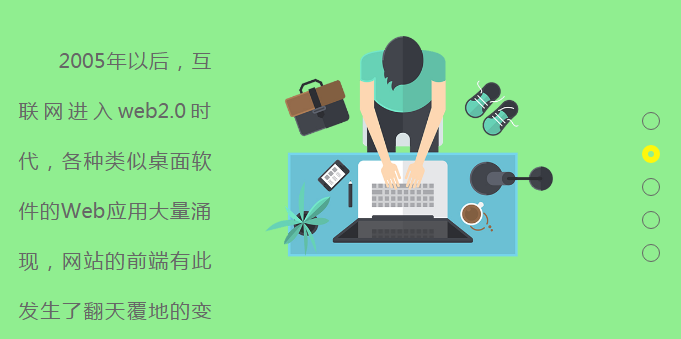
<!DOCTYPE html>
<html lang="en">
<head>
 <meta charset="UTF-8">
 <title>整屏滾動</title>
 <link rel="stylesheet" href="../css/reset.css" rel="external nofollow" rel="external nofollow" >
 <style>
  .page_con{
   width:100%;
   /*必須是固定定位,否則會有問題*/
   position:fixed;
   top:0;
   left:0;
   overflow: hidden;
  }
  .page{
   position:relative;
  }
  .page .main_con{
   width:900px;
   height:400px;
   position:absolute;
   left:50%;
   top:50%;
   margin-top:-200px;
   margin-left:-450px;
  }
  .page .main_con .left_img{
   width:363px;
   height:400px;
  }
  .page .main_con .left_img,.page .main_con .right_img{
   opacity: 0;
   position: relative;
   filter:alpha(opacity = 0);
   transition:all 1s ease 300ms;
  }
  .page .main_con .right_info{
   width:500px;
   height:300px;
  }
  .page .main_con .right_info,.page .main_con .left_info{
   font-size:20px;
   line-height:50px;
   color:#666;
   text-indent:2em;
   text-align:justify;
   position:relative;
   opacity:0;
   filter:alpha(opacity=0);
   transition:all 1000ms ease 300ms;
  }
  .main_con .right_img{
   width:522px;
   height:400px;
   top:-50px;
  }

  .main_con .left_info{
   width:350px;
   height:300px;
   bottom:-50px;
  }
  .main_con .left_img,.main_con .left_info{
   left:-50px;
  }
  .main_con .right_img,.main_con .right_info{
   right:-50px;
  }
  .main_con .center_img{
   opacity: 0;
   filter:alpha(opacity = 0);
   text-align: center;
   transition: all 1s ease 300ms;
  }
  .moving .main_con .left_img,.moving .main_con .left_info,.moving .main_con .center_img{
   left:0;
   opacity: 1;
   filter:alpha(opacity = 100);
  }
  .moving .main_con .center_img{
   transform: scale(0.8);
  }
  .moving .main_con .right_info,.moving .main_con .right_img{
   margin-top:50px;
   right:0;
   opacity: 1;
   filter:alpha(opacity = 100);
  }
  .moving .main_con .right_img{
   /*top:25px;*/
  }
  .page1{
   background:orange;
  }

  .page2{
   background:lightgreen;
  }
  .page3{
   background:cyan;
  }
  .page4{
   background:pink;
  }
  .page5{
   background:lightblue;
  }
  .points{
   width:16px;
   height:176px;
   position:fixed;
   top:50%;
   right:20px;
   margin-top:-88px;
  }
  .points li{
   width:16px;
   height:16px;
   line-height:16px;
   margin-top:15px;
   border:1px solid #666;
   border-radius:50%;
  }
  .points li:hover,.points li.active{
   width:6px;
   height:6px;
   cursor: pointer;
   border:6px solid #fff70c;
  }
 </style>
 <script src="../js/jquery-1.12.4.min.js"></script>
 <script src="../js/jquery.mousewheel.min.js"></script>
 <script>
  $(function(){
   $(".page1").addClass("moving");
   var page = $(".page");
   var len = page.length;
   var currentPage = 0;
   var timer = null;
   //獲取顯示區域的高度
   var $h = $(window).height();
   page.css({height:$h});
   $(window).mousewheel(function(event,dat){
    //向下滑dat為-1,向上滑dat為1
    //清除前面開的定時器,實現函數節流
    clearTimeout(timer);
    timer = setTimeout(function(){
     if(dat == -1){
      currentPage++;
      if(currentPage>len-1){
       //如果大於4的話,就不往下滑
       currentPage=len-1;
      }
     }else{
      currentPage--;
      //判斷當前所在頁是否小於0,如果小於就不往上滑。
      if(currentPage<0){
       currentPage=0;
      }
     }
     $(".page").eq(currentPage).addClass("moving").siblings().removeClass("moving");
     $("ul li").eq(currentPage).addClass("active").siblings().removeClass("active");
     $(".page_con").animate({top:-$h*currentPage},300);
    },200);

   });
   $(".points").delegate("li","click",function (){
    $(".page").eq($(this).index()).addClass("moving").siblings().removeClass("moving");
    $(this).addClass("active").siblings().removeClass("active");
    currentPage = $(this).index()+1;
    //首先判斷下點擊的元素在當前選中的元素的上面還是下面,如果是在上面的話,top值為正值,否則為負值。
    if($(this).index()<$(".active").index()){
     $(".page_con").animate({top:$h*$(this).index()});
    }else{
     $(".page_con").animate({top:-$h*$(this).index()});
    }
   })
  })
 </script>
</head>
<body>
<div class="page_con">
 <div class="page page1">
  <div class="main_con clearfix">
   <div class="page_img float_left left_img">
    <img src="../images/001.png" alt="">
   </div>
   <div class="page_content float_right right_info">
    Web前端開發是從網頁制作演變而來的,名稱上有很明顯的時代特征。在互聯網的演化進程中,網頁制作是Web1.0時代的產物,那是網站的主要內容都是靜態的,用戶使用網站的行為也以浏覽為主。
   </div>
  </div>
 </div>
 <div class="page page2">
  <div class="main_con clearfix">
   <div class="page_content float_left left_info">
    2005年以後,互聯網進入web2.0時代,各種類似桌面軟件的Web應用大量湧現,網站的前端有此發生了翻天覆地的變化。網頁不再只是承載單一的文字和圖片,各種富媒體讓網頁的內容更加生動,網頁上的軟件化的交互形式為用戶提供了更好的使用體驗,這些都是基於前端技術實現的。
   </div>
   <div class="page_img float_right right_img">
    <img src="../images/002.png" alt="">
   </div>
  </div>
 </div>
 <div class="page page3">
  <div class="main_con clearfix">
   <div class="page_img float_left left_img">
    <img src="../images/004.png" alt="">
   </div>
   <div class="page_content float_right right_info">
    Web前端開發是從網頁制作演變而來的,名稱上有很明顯的時代特征。在互聯網的演化進程中,網頁制作是Web1.0時代的產物,那是網站的主要內容都是靜態的,用戶使用網站的行為也以浏覽為主。
   </div>
  </div>
 </div>
 <div class="page page4">
  <div class="main_con clearfix">
   <div class="page_content float_left left_info">
    2005年以後,互聯網進入web2.0時代,各種類似桌面軟件的Web應用大量湧現,網站的前端有此發生了翻天覆地的變化。網頁不再只是承載單一的文字和圖片,各種富媒體讓網頁的內容更加生動,網頁上的軟件化的交互形式為用戶提供了更好的使用體驗,這些都是基於前端技術實現的。
   </div>
   <div class="page_img float_right right_img">
    <img src="../images/003.png" alt="">
   </div>
  </div>
 </div>
 <div class="page page5">
  <div class="main_con">
   <div class="page_img center_img">
    <img src="../images/005.png" alt="">
   </div>
  </div>
 </div>
</div>
<ul class="points">
 <li class="active"></li>
 <li></li>
 <li></li>
 <li></li>
 <li></li>
</ul>
</body>
</html>
以上這篇淺談事件冒泡、事件委托、jQuery元素節點操作、滾輪事件與函數節流就是小編分享給大家的全部內容了,希望能給大家一個參考,也希望大家多多支持。