因為項目需求,在寫了三年 WPF(MVVM)之後又回到 Web 開發。三年時間足以讓前端生態換了一輪:
- 三年前沒怎麼用過 vue;
- 三年前 bootstrap 組件還沒現在成熟;
- 三年前 font awesome 的普及度也沒現在高;
- 三年前可選的 UI 組件更是少得多。
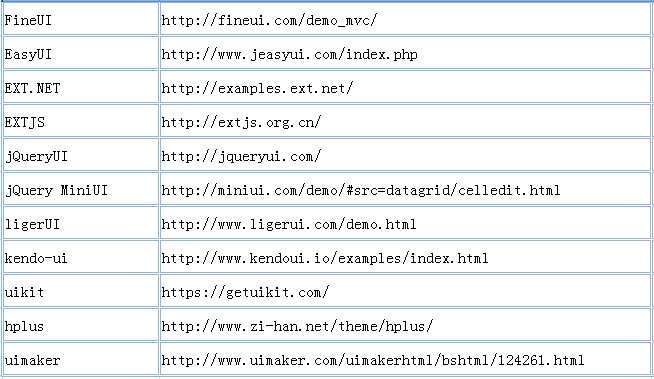
整個項目採用 oracle + dapper + castle + mvc + easyui 的技術組合,這篇重點整理 easyui-datagrid 的實戰要點。
一、關於皮膚定制
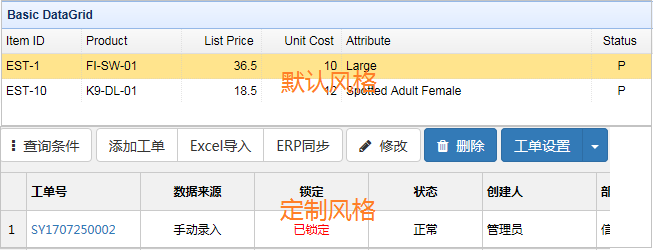
easyui 的默認風格看久了容易視覺疲勞,項目裡我做了個性化定製。自己從零改皮膚工作量不小,我採了個懶:買了幾套第三方 easyui 皮膚,在此基礎上做優化和重構。預算緊的同學可以去下載免費皮膚,效果也湊合。
二、加載數據的兩種方式
方式 A:url 直接綁定後端接口
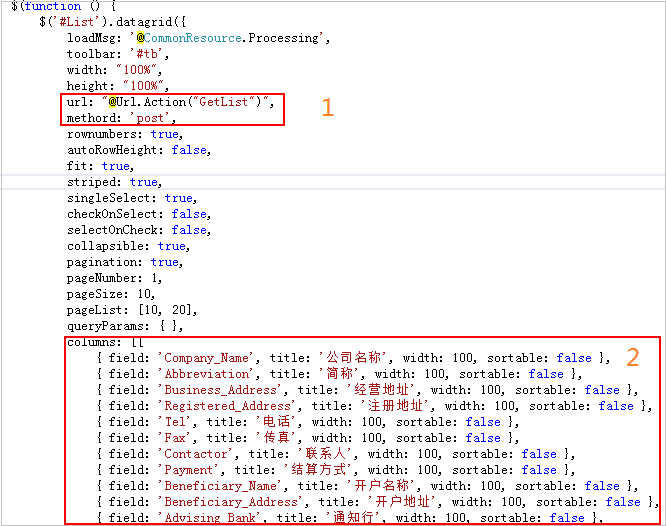
$('#List').datagrid({
  title: '交易公司',
  loadMsg: '@CommonResource.Processing',
  toolbar: '#tb',
  width: '100%',
  height: '100%',
  url: '@Url.Action("GetList")',
  method: 'post',
  rownumbers: true,
  autoRowHeight: false,
  fit: true,
  striped: true,          // 奇偶行不同底色
  singleSelect: true,     // 單選模式
  checkOnSelect: false,
  selectOnCheck: false,
  collapsible: true,
  pagination: true,
  pageNumber: 1,
  pageSize: 10,
  pageList: [10, 20],
  queryParams: {},
  columns: [[
    { field: 'Company_Name', title: '公司名稱', width: 100, sortable: false },
    { field: 'Abbreviation', title: '簡稱', width: 100, sortable: false },
    { field: 'Business_Address', title: '經營地址', width: 100, sortable: false },
    { field: 'Registered_Address', title: '注冊地址', width: 100, sortable: false },
    { field: 'Tel', title: '電話', width: 100, sortable: false },
    { field: 'Fax', title: '傳真', width: 100, sortable: false },
    { field: 'Contactor', title: '聯系人', width: 100, sortable: false },
    { field: 'Payment', title: '結算方式', width: 100, sortable: false },
    { field: 'Beneficiary_Name', title: '開戶名稱', width: 100, sortable: false },
    { field: 'Beneficiary_Address', title: '開戶地址', width: 100, sortable: false },
    { field: 'Advising_Bank', title: '通知行', width: 100, sortable: false },
    { field: 'Bank_Address', title: '銀行地址', width: 100, sortable: false },
    { field: 'Swift_Code', title: '銀行代碼', width: 100, sortable: false },
    { field: 'Beneficiary_Account', title: '銀行賬戶', width: 100, sortable: false },
    { field: 'Company_Chop', title: '電子章', width: 100, sortable: false },
    { field: 'Send_Url', title: '發件郵箱鏈接', width: 100, sortable: false },
    { field: 'Send_Email', title: '發件人郵箱', width: 100, sortable: false },
    { field: 'Remark', title: '備注', width: 100, sortable: false },
    { field: 'Created_By', title: '創建人', width: 100, sortable: false },
    { field: 'Creation_Date', title: '創建日期', width: 100, sortable: false },
    { field: 'Modify_By', title: '修改人', width: 100, sortable: false },
    { field: 'Modify_Date', title: '修改日期', width: 100, sortable: false }
  ]]
});
注意原文裡的 methord 是拼寫錯誤,正確的屬性名是 method。拼錯不會報錯,只會靜默地退回默認的 GET 方式——這類問題排查起來特別費時間。
方式 B:先定義結構,再 loadData 填充
$('#Detail').datagrid({
  loadMsg: '@CommonResource.Processing',
  toolbar: '#tb',
  width: '100%',
  height: '100%',
  rownumbers: true,
  autoRowHeight: false,
  fit: true,
  fitColumns: true,
  striped: true,
  singleSelect: true,
  collapsible: false,
  pagination: false,
  queryParams: {},
  columns: [[
    { field: 'Country_Name', title: '國家名稱', width: 100, sortable: false },
    { field: 'Item_Number', title: '物料編碼', width: 100, sortable: false }
  ]]
});
var returnData = JSON.parse(response.data);
$('#Detail').datagrid('loadData', returnData);
方式 B 適合數據來源不是簡單 URL 的場景,比如依賴前一步的計算結果或需要在前端加工。
三、合併單元格
用戶經常要求同值的連續行合併顯示:

在 onLoadSuccess 裡遍歷比對即可:
onLoadSuccess: function (data) {
  var opts = new Array(
    'Item_Number', 'Country_Name', 'Item_Desc', 'Item_Desc_En',
    'Item_Type', 'Unit', 'Hs_Code', 'Destination_Code',
    'Status', 'Remark', 'Create_User', 'Create_Date'
  );

  var rowsCount = data.rows.length;
  var mark = 1;

  for (var j = 1; j < rowsCount; j++) {
    var preCellVal = data.rows[j - 1]['Material_Id'];
    var currentCellVal = data.rows[j]['Material_Id'];

    if (preCellVal == currentCellVal) {
      mark += 1;
      for (var c = 0; c < opts.length; c++) {
        var columnName = opts[c];
        $(this).datagrid('mergeCells', {
          field: columnName,
          index: j + 1 - mark,
          rowspan: mark
        });
      }
    } else {
      mark = 1;
    }
  }
}
思路是維護一個計數器 mark,遇到相同值就累加並不斷 mergeCells,值變化時重置。實用提醒:合併與排序、分頁天然衝突——排序後相同值可能不再連續,分頁後組可能被切斷。如果業務必須支持排序,更穩妥的做法是在後端就完成分組並返回 rowspan 信息。
四、行與列變色
行變色,用 rowStyler:
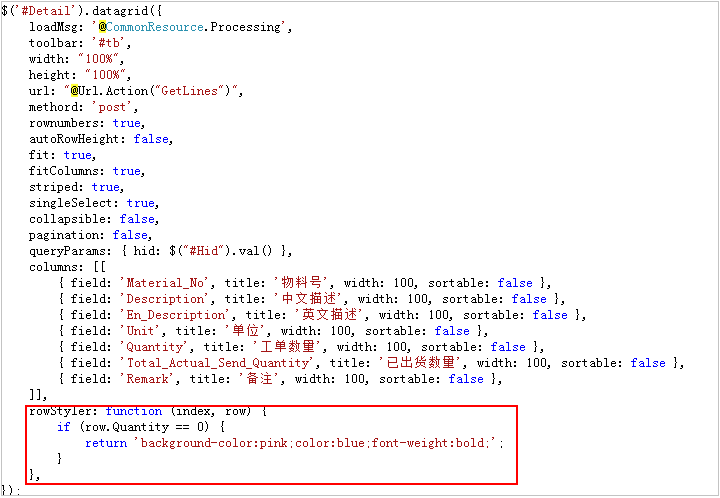
$('#Detail').datagrid({
  loadMsg: '@CommonResource.Processing',
  width: '100%',
  height: '100%',
  url: '@Url.Action("GetLines")',
  method: 'post',
  rownumbers: true,
  autoRowHeight: false,
  fit: true,
  fitColumns: true,
  striped: true,
  singleSelect: true,
  collapsible: false,
  pagination: false,
  queryParams: { hid: $('#Hid').val() },
  columns: [[
    { field: 'Material_No', title: '物料號', width: 100, sortable: false },
    { field: 'Description', title: '中文描述', width: 100, sortable: false },
    { field: 'En_Description', title: '英文描述', width: 100, sortable: false },
    { field: 'Unit', title: '單位', width: 100, sortable: false },
    { field: 'Quantity', title: '工單數量', width: 100, sortable: false },
    { field: 'Total_Actual_Send_Quantity', title: '已出貨數量', width: 100, sortable: false },
    { field: 'Remark', title: '備注', width: 100, sortable: false }
  ]],
  rowStyler: function (index, row) {
    if (row.Quantity == 0) {
      return 'background-color:pink;color:blue;font-weight:bold;';
    }
  }
});
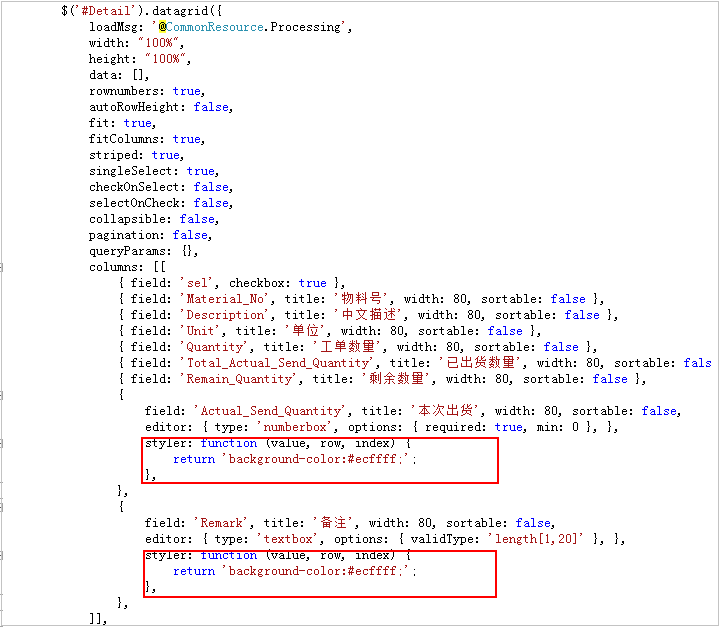
列變色,用列的 styler:
$('#Detail').datagrid({
  loadMsg: '@CommonResource.Processing',
  width: '100%',
  height: '100%',
  data: [],
  rownumbers: true,
  autoRowHeight: false,
  fit: true,
  fitColumns: true,
  striped: true,
  singleSelect: true,
  checkOnSelect: false,
  selectOnCheck: false,
  collapsible: false,
  pagination: false,
  queryParams: {},
  columns: [[
    { field: 'sel', checkbox: true },
    { field: 'Material_No', title: '物料號', width: 80, sortable: false },
    { field: 'Description', title: '中文描述', width: 80, sortable: false },
    { field: 'Unit', title: '單位', width: 80, sortable: false },
    { field: 'Quantity', title: '工單數量', width: 80, sortable: false },
    { field: 'Total_Actual_Send_Quantity', title: '已出貨數量', width: 80, sortable: false },
    { field: 'Remain_Quantity', title: '剩余數量', width: 80, sortable: false },
    {
      field: 'Actual_Send_Quantity',
      title: '本次出貨',
      width: 80,
      sortable: false,
      editor: {
        type: 'numberbox',
        options: { required: true, min: 0 }
      },
      styler: function (value, row, index) {
        return 'background-color:#ecffff;';
      }
    },
    {
      field: 'Remark',
      title: '備注',
      width: 80,
      sortable: false,
      editor: {
        type: 'textbox',
        options: { validType: 'length[1,20]' }
      },
      styler: function (value, row, index) {
        return 'background-color:#ecffff;';
      }
    }
  ]]
});
這裡有個實用技巧:把可編輯列統一加上淺色背景,用戶一眼就能看出哪些格子能改,比任何說明文字都有效。
五、添加工具欄
工具欄通過 toolbar 屬性指定一個容器選擇器,注意必須帶 # 前綴。
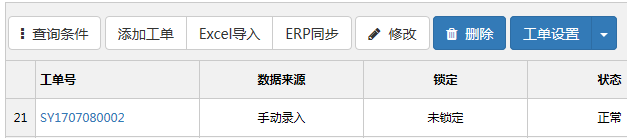
html 代碼:
<div id="tb">
  <a id="condition" href="#" class="btn btn-default more">
    <i class="fa fa-ellipsis-v"></i>  查詢條件
  </a>

  @Html.ToolButton(string.Format(
    @"<a id='btnCreate' href='#' class='btn btn-default'><i class='fa fa-plus'></i>  {0}</a>",
    @CommonResource.Add), ActionCode.Create)

  @Html.ToolButton(string.Format(
    @"<a id='btnEdit' href='#' class='btn btn-default'><i class='fa fa-pencil'></i>  {0}</a>",
    @CommonResource.Edit), ActionCode.Edit)

  @Html.ToolButton(string.Format(
    @"<a id='btnDelete' data-content='Delete 1' href='#' class='btn btn-primary'><i class='fa fa-trash'></i>  {0}</a>",
    @CommonResource.Delete), ActionCode.Delete)
</div>
這裡用 @Html.ToolButton 封裝了一層權限判斷,按 ActionCode 決定按鈕是否渲染——權限控制放在渲染階段而不是點擊階段,可以避免用戶看到不能用的按鈕。
六、增刪改操作
新增一行
function addCallBack(data) {
  $('#List').datagrid('insertRow', {
    index: 0,
    row: data
  });
  layer.msg('@CommonResource.AddSuccess', { icon: 1, time: 1000 });
}
編輯一行
function editCallBack(data) {
  var selectData = $('#List').datagrid('getSelected');
  var selectIndex = $('#List').datagrid('getRowIndex', selectData);

  $('#List').datagrid('updateRow', {
    index: selectIndex,
    row: data
  });
  layer.msg('@CommonResource.ModifySuccess', { icon: 1, time: 1000 });
}
刪除一行
$('#btnLineDelete').click(function () {
  var row = $('#Detail').treegrid('getSelected');

  if (row != null) {
    var rowIndex = $('#Detail').datagrid('getRowIndex', row);
    $('#Detail').datagrid('deleteRow', rowIndex);
    layer.msg('@CommonResource.DeleteSuccess', { icon: 1, time: 1000 });
  } else {
    layer.msg('@CommonResource.Noselectedrecord', { icon: 2, time: 1000 });
  }
});
這裡有個細節值得注意:getSelected 用的是 treegrid,取 rowIndex 用的是 datagrid。同一個表格混用兩套 API 是可以工作的(treegrid 繼承自 datagrid),但可讀性不佳,建議統一。
treegrid 的操作差異
function addCallBack(data) {
  $('#List').treegrid('append', {
    parent: data.Parent_Id,
    data: [{
      Id: data.Id,
      Name: data.Name,
      En_Name: data.En_Name,
      Code: data.Code,
      Enable: data.Enable,
      Sort: data.Sort
    }]
  });
  layer.msg('@CommonResource.AddSuccess', { icon: 1, time: 1000 });
}

function editCallBack(data) {
  var row = $('#List').treegrid('getSelected');

  $('#List').treegrid('update', {
    id: row.Id,
    row: {
      Name: data.Name,
      En_Name: data.En_Name,
      Code: data.Code,
      Enable: data.Enable,
      Sort: data.Sort
    }
  });
  layer.msg('@CommonResource.ModifySuccess', { icon: 1, time: 1000 });
}

$('#btnDelete').click(function () {
  var row = $('#List').treegrid('getSelected');

  if (row != null) {
    layer.confirm('@CommonResource.ConfirmDelete', {
      btn: ['@CommonResource.Sure', '@CommonResource.Cancel'],
      shadeClose: true
    }, function () {
      // 有子節點時不允許刪除
      if (row.ChildCount == 0 || typeof (row.ChildCount) == 'undefined') {
        $.post('@Url.Action("Delete")/' + row.Id, function (data) {
          if (data == '1') {
            $('#List').treegrid('remove', row.Id);
            layer.msg('@CommonResource.DeleteSuccess', { icon: 1, time: 1000 });
          } else {
            layer.msg('@CommonResource.DeleteFailed', { icon: 2, time: 1000 });
          }
        }, 'json');
      } else {
        layer.msg('@CommonResource.HasChildren', { icon: 2, time: 1000 });
      }
    }, function () {});
  } else {
    layer.msg('@CommonResource.Noselectedrecord', { icon: 2, time: 1000 });
  }
});
treegrid 與 datagrid 的主要區別:新增用 append(需指定 parent)、修改用 update(需指定 id)、刪除用 remove(傳 id 而非 index)。另外這裡加了「有子節點不允許刪除」的判斷,這是樹形結構刪除的必要保護。
七、單元格級別的行內編輯
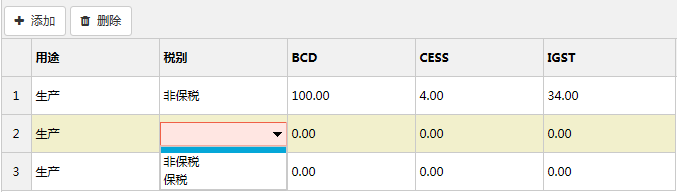
默認的 beginEdit 是整行進入編輯態。如果只想一次編輯一個格子,需要擴展一個方法:
var taxTypeList = JSON.parse($('#taxTypeList').val());
var manufactureList = JSON.parse($('#manufactureList').val());

// 擴展 datagrid 方法:只讓指定列進入編輯態
$.extend($.fn.datagrid.methods, {
  editCell: function (jq, param) {
    return jq.each(function () {
      var opts = $(this).datagrid('options');
      var fields = $(this).datagrid('getColumnFields', true)
        .concat($(this).datagrid('getColumnFields'));

      // 暫存每列的 editor,非目標列置空
      for (var i = 0; i < fields.length; i++) {
        var col = $(this).datagrid('getColumnOption', fields[i]);
        col.editor1 = col.editor;
        if (fields[i] != param.field) {
          col.editor = null;
        }
      }

      $(this).datagrid('beginEdit', param.index);

      // 恢復 editor 配置
      for (var i = 0; i < fields.length; i++) {
        var col = $(this).datagrid('getColumnOption', fields[i]);
        col.editor = col.editor1;
      }
    });
  }
});

var editIndex = -1;

function endEditCal() {
  if (editIndex == -1) return true;

  if ($('#Detail').datagrid('validateRow', editIndex)) {
    $('#Detail').datagrid('endEdit', editIndex);
    editIndex = -1;
    return true;
  }
  return false;
}

$('#Detail').datagrid({
  loadMsg: '@CommonResource.Processing',
  toolbar: '#tb',
  width: '100%',
  height: '100%',
  data: JSON.parse($('#MaterialDetailListStr').val()),
  rownumbers: true,
  autoRowHeight: false,
  fit: true,
  fitColumns: true,
  striped: true,
  singleSelect: true,
  collapsible: false,
  pagination: false,
  queryParams: {},
  columns: [[
    {
      field: 'Material_Use',
      title: '用途',
      width: 100,
      sortable: false,
      formatter: function (value) {
        for (var i = 0; i < manufactureList.length; i++) {
          if (manufactureList[i].Key == value) return manufactureList[i].Value;
        }
        return value;
      },
      editor: {
        type: 'combobox',
        options: {
          valueField: 'Key',
          textField: 'Value',
          data: manufactureList,
          required: true,
          panelHeight: 'auto',
          editable: false
        }
      }
    },
    {
      field: 'Tax_Type',
      title: '稅別',
      width: 100,
      sortable: false,
      formatter: function (value) {
        for (var i = 0; i < taxTypeList.length; i++) {
          if (taxTypeList[i].Key == value) return taxTypeList[i].Value;
        }
        return value;
      },
      editor: {
        type: 'combobox',
        options: {
          valueField: 'Key',
          textField: 'Value',
          data: taxTypeList,
          required: true,
          panelHeight: 'auto',
          editable: false
        }
      }
    },
    {
      field: 'Tax_Bcd', title: 'BCD', width: 100, sortable: false,
      editor: {
        type: 'numberbox',
        options: { required: true, suffix: '%', precision: 2, min: 0, max: 100 }
      }
    },
    {
      field: 'Tax_Cess', title: 'CESS', width: 100, sortable: false,
      editor: {
        type: 'numberbox',
        options: { required: true, suffix: '%', precision: 2, min: 0, max: 100 }
      }
    },
    {
      field: 'Tax_Igst', title: 'IGST', width: 100, sortable: false,
      editor: {
        type: 'numberbox',
        options: { required: true, suffix: '%', precision: 2, min: 0, max: 100 }
      }
    }
  ]],
  @if (Request.Params['Operate'] != 'View') {
    <text>
    onClickCell: function (index, field, value) {
      if (endEditCal()) {
        $(this).datagrid('selectRow', index)
          .datagrid('editCell', { index: index, field: field });
        editIndex = index;
      } else {
        layer.msg('當前行的數據編輯有誤', { icon: 2, time: 1000 });
      }
    },
    onAfterEdit: function (index, row, changes) {
      $(this).datagrid('updateRow', { index: index, row: {} });
      $(this).datagrid('refreshRow', index);
    },
    onLoadSuccess: function (data) {
      for (var index = 0; index < data.rows.length; index++) {
        $(this).datagrid('beginEdit', index);
      }
    },
    </text>
  }
});

$('#btnLineCreate').click(function () {
  if (endEditCal()) {
    editIndex = 0;
    $('#Detail').datagrid('insertRow', { index: editIndex, row: {} });
    $('#Detail').datagrid('selectRow', editIndex);
    $('#Detail').datagrid('beginEdit', editIndex);
  } else {
    layer.msg('當前行的數據編輯有誤', { icon: 2, time: 1000 });
  }
});

$('#btnSave').click(function () {
  var summaryValidate = true;
  var rows = $('#Detail').datagrid('getRows');

  $(rows).each(function (index, itemData) {
    if ($('#Detail').datagrid('validateRow', index)) {
      $('#Detail').datagrid('endEdit', index);
    } else {
      summaryValidate = false;
      return false;
    }
  });

  if (!summaryValidate) {
    layer.msg('當前表單數據編輯有誤', { icon: 2, time: 1000 });
    return false;
  }

  if (rows.length != 2) {
    layer.msg('稅別、用途應該設置為 2 行數據', { icon: 2, time: 1000 });
    return false;
  }

  $('#MaterialDetailListStr').val(JSON.stringify(rows));

  if (!$('form').form('validate')) return false;

  $.ajax({
    url: '@Url.Action("CreateMaterial")',
    type: 'Post',
    data: $('form').serialize(),
    dataType: 'json',
    success: function (data) {
      if (data.Key == '1') {
        parent.$('#List').datagrid('reload');
        var index = parent.layer.getFrameIndex(window.name);
        parent.layer.close(index);
        parent.layer.msg('@CommonResource.AddSuccess', { icon: 1, time: 1000 });
      } else {
        layer.msg("物料編號'" + data.Value.Item_Number + "'在數據庫中已添加", {
          icon: 2, time: 1000
        });
      }
    },
    error: function () {
      layer.msg('@CommonResource.AddFailed', { icon: 2, time: 1000 });
    }
  });
});
單元格編輯的實現原理是「臨時清空其他列的 editor 配置」,讓 beginEdit 只對目標列生效,然後立刻恢復。這個技巧很巧妙,但有兩個注意點:
- 必須用
getColumnFields(true)拿到包含隱藏列的完整字段列表,否則隱藏列的 editor 會被遺漏; - onLoadSuccess 裡對所有行 beginEdit 在大數據量下會明顯卡頓,行數多時應改為延遲編輯(只在點擊時才進入編輯態)。
八、重置布局
查詢條件展開/收起之後,表格尺寸需要重算,否則會出現白邊或錯位:
$(function () {
  $('.more').click(function () {
    $(this).closest('.conditions').siblings().toggleClass('hide');
    $('#List').datagrid('resize');
  });
});
九、實踐中的幾條經驗
- method 拼寫錯誤不會報錯,只會靜默退回默認值。配置寫完最好實際抓一次請求確認方法。
- 合併單元格與排序/分頁衝突,需要合併時最好在後端完成分組。
- 可編輯列加淺色背景,是成本最低的可用性改善。
- treegrid 與 datagrid 的 API 不要混用,同一表格裡統一到底。
- 權限判斷放在渲染階段,而不是點擊時攔截。
- 大量行進入編輯態要慎重,改成點擊延遲編輯能顯著提升性能。
這些技巧官方幫助文檔裡基本都寫了,這篇只是把它們放到真實場景裡跑了一遍。easyui 的上手曲線低,但要把 datagrid 用到「好用」的程度,關鍵還是在這些細節上反覆調試出來的經驗。
- 上一篇文章: jQuery 初級實戰:製作可折疊的網站友情鏈接列表
- 下一篇文章: 用 jQuery 實現多選下拉列表(可回顯、可多選)