用 jQuery 實現多選下拉列表(可回顯、可多選)
編輯:JQuery入門技巧
原生 select 不支援多選的好的交互,於是有了這個自定義方案:一個只讀 input 作為展示框,點擊展開由 checkbox 組成的下拉面板,選中項以逗號串形式回填到 input。完整代碼如下。
<!doctype html>
<html lang="en">
<head>
  <meta charset="UTF-8">
  <title>多選下拉列表</title>
  <style>
    ul li { list-style: none; }
    .hide { display: none; }

    .width150 { width: 150px; }

    .width150 input[type="text"] {
      width: 100%;
      height: 32px;
      border: 1px solid #ccc;
      border-radius: 4px;
      padding-left: 12px;
      box-sizing: border-box;
    }

    .width150 ul {
      width: 96%;
      padding: 0 0 0 20px;
      margin: 0;
      border: 1px solid #ccc;
    }

    .width150 li { padding: 5px; }
    .width150 li + li { border-top: 1px solid #ccc; }
  </style>
</head>
<body>
  <form id="form">
    <div class="width150">
      可多選年份:
      <input type="text" id="yearInput" placeholder="請選擇年份" readonly>
      <ul id="yearId" class="hide"></ul>
    </div>
  </form>

  <script type="text/javascript" src="jquery.js"></script>
  <script>
    (function () {
      var str = '';
      var arr = {
        0: { name: '2015', id: 0 },
        1: { name: '2016', id: 0 },
        2: { name: '2017', id: 0 }
      };

      for (let x in arr) {
        str += `<li><label><input type="checkbox"
          value="${arr[x].id}" data-name="${arr[x].name}">${arr[x].name}</label></li>`;
      }

      $('#yearId').html(str);
    })();

    // 收集當前勾選項,回填到 input
    function collect() {
      var name = '';
      $('#yearId input').each(function () {
        if ($(this).is(':checked')) {
          name += $(this).attr('data-name') + ',';
          $(this).attr('name', 'yearId');
        } else {
          $(this).attr('name', '');
        }
      });
      $('#yearInput').val(name.slice(0, -1)); // 去掉最後一個逗號
    }

    // 點擊展示框:阻止冒泡,同步一次選中狀態
    $('#yearInput').click(function () {
      $(this).attr('placeholder', '');
      collect();
    });

    // 用 hover 類標記鼠標是否在下拉面板上
    $('#yearId').mouseover(function () {
      $('#yearId').addClass('hover');
    }).mouseout(function () {
      $('#yearId').removeClass('hover');
    });

    // 點擊頁面任意處:若焦點不在輸入框且鼠標不在面板上,則收起
    $(document).on('click', function () {
      if (!$('#yearInput').is(':focus') && !$('#yearId').hasClass('hover')) {
        collect();
        $('#yearId').addClass('hide');
      } else {
        $('#yearId').removeClass('hide');
      }
    });

    // checkbox 變化時即時回填
    $(document).on('change', '#yearId input[type="checkbox"]', collect);
  </script>
</body>
</html>
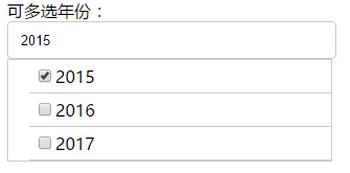
效果圖:
實現思路拆解
- 只讀 input 作為展示框。readonly 而非 disabled,是因為 disabled 的元素值不會隨表單提交,readonly 可以。
- 用 hover 類判斷鼠標位置。這是一個經典技巧:點擊 checkbox 時事件會冒泡到 document,如果單純判斷「焦點是否在 input 上」,點 checkbox 的瞬間焦點已經離開 input,面板會立刻被收起。用 hover 標記把「鼠標在面板上」這個狀態記錄下來,就能避開這個問題。
- data-name 存文本、value 存 id。展示用文本、提交用 id,兩者分離。
原代碼的幾個問題
- checkbox 的 name 被反覆改寫。原來在 collect 裡勾選時設 name="yearId"、未勾選時設 name="",這種做法既沒有必要也容易出錯。要提交勾選項,直接讓所有 checkbox 都帶
name="yearId"即可,未勾選的瀏覽器本來就不會提交。 - 點擊 label 會觸發兩次收斂。因為 label 包著 checkbox,點擊文字等同點擊 checkbox,同時 input 的 click 和 document 的 click 都會跑一遍 collect,屬於冗餘操作。
- 沒有「全選」和「清空」,多選組件的標配。
- 沒有鍵盤支持,無障礙訪問方面完全缺失。至少應該給展示框加 tabindex 並處理 Enter/Esc。
- 拼接字符串有 XSS 風險。用模板字符串把 arr 裡的值直接拼進 HTML,如果 name 中含有 <、> 等字符會破壞結構。更安全的做法是用 jQuery 逐個創建元素並用 .text() 賦值。
另外提醒一個 CSS 細節:input 加上 box-sizing: border-box 之後,width: 100% 才不會因為 padding 而撐出容器。原代碼缺這一行,實際渲染時 input 會比外層 div 寬 12px。
如果項目裡已經引入了成熟的 UI 庫,其實沒有必要自己造這個輪子——select2、LayUI 的 xm-select 都提供了更完善的多選體驗。但作為理解「自定義下拉 + 外部點擊收起」這個通用模式的練習,這份代碼的思維方式值得掌握,後面做自定義日期選擇器、城市選擇器時都是同一套骨架。