LayUI 分頁實戰:laytpl 模板渲染與 laypage 封裝
編輯:JQuery入門技巧
這篇整理 LayUI 的分頁用法,包括 laypage 的基本配置、如何與 laytpl 模板配合渲染表格、以及如何實現「刷新當前頁」。核心思路是把「取數據 → 渲染模板 → 初始化分頁」三步封裝成一個可複用的函數。
效果圖
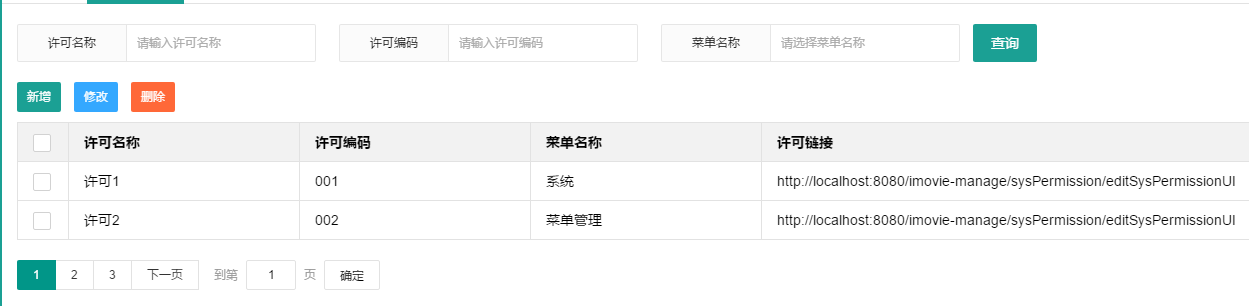
一、引入依賴
主要是 jQuery、layui.all.js,另外 json2.js 用來做 json 對象轉換(老瀏覽器兜底)。
<script type="text/javascript" src="${pageContext.request.contextPath}/js/jquery-1.11.3.min.js"></script>
<script type="text/javascript" src="${pageContext.request.contextPath}/plugin/layui/lay/dest/layui.all.js"></script>
<script type="text/javascript" src="${pageContext.request.contextPath}/js/json2.js"></script>
二、封裝分頁方法
1. 模板渲染
/**
 * 分頁模板的渲染方法
 * @param templateId 分頁需要渲染的模板 id
 * @param resultContentId 模板渲染後顯示內容的容器 id
 * @param data 服務器返回的 json 對象
 */
function renderTemplate(templateId, resultContentId, data) {
  layui.use(['form', 'laytpl'], function () {
    var laytpl = layui.laytpl;

    laytpl($('#' + templateId).html()).render(data, function (html) {
      $('#' + resultContentId).html(html);
    });
  });

  layui.form().render(); // 渲染表單控件
}
2. laypage 分頁封裝
/**
 * layui laypage 分頁封裝
 * @param laypageDivId 分頁控件所在 div 的 id
 * @param pageParams 分頁參數
 * @param templateId 分頁模板 id
 * @param resultContentId 渲染容器 id
 * @param url 請求分頁數據的鏈接
 */
function renderPageData(laypageDivId, pageParams, templateId, resultContentId, url) {
  if (isNull(pageParams)) {
    pageParams = { pageIndex: 1, pageSize: 10 };
  }

  $ajax({
    url: url,
    method: 'post',
    data: pageParams,
    async: true,
    error: function (XMLHttpRequest, textStatus, errorThrown) {
      if ('error' == textStatus) {
        error('服務器未響應,請稍候再試');
      } else {
        error('操作失敗,textStatus=' + textStatus);
      }
    },
    success: function (data) {
      var jsonObj = ('object' == typeof data) ? data : JSON.parse(data);

      // 渲染表格內容
      renderTemplate(templateId, resultContentId, jsonObj);

      // 重新初始化分頁插件
      layui.use(['form', 'laypage'], function () {
        layui.laypage({
          cont: laypageDivId,
          curr: jsonObj.pager.pageIndex,
          pages: jsonObj.pager.totalPage,
          skip: true,
          jump: function (obj, first) {
            // obj 包含分頁的所有配置信息
            // first 為 true 表示初始加載,可避免無限刷新
            pageParams.pageIndex = obj.curr;
            pageParams.pageSize = jsonObj.pager.pageSize;

            if (!first) {
              renderPageData(laypageDivId, pageParams, templateId, resultContentId, url);
            }
          }
        });
      });
    }
  });
}
這裡最值得記住的是 jump 回調的第二個參數 first。首次渲染 laypage 時 jump 也會被觸發,如果不判斷 first,就會導致「渲染 → 觸發 jump → 再渲染 → 再觸發 jump」的無限循環。這是使用 laypage 最常見的坑。
3. 刷新當前頁
/**
 * 刷新當前分頁的數據
 * 借助 laypage 的跳轉按鈕點擊事件實現
 */
function reloadCurrentPage() {
  $('.layui-laypage-btn').click();
}
這個做法有點取巧,依賴 laypage 內部 DOM 結構。更穩妥的方式是把當前 pageIndex 存在一個變量裡,直接調用 renderPageData 重新取數。
三、頁面代碼
1. 表格與分頁容器
<!-- 分頁表格 -->
<div class="layui-form">
  <table class="layui-table">
    <thead>
      <tr>
        <th class="w20">
          <input type="checkbox" name="checkBoxAll" lay-skin="primary" lay-filter="allChoose">
        </th>
        <th class="w200">許可名稱</th>
        <th class="w200">許可編碼</th>
        <th class="w200">菜單名稱</th>
        <th>許可鏈接</th>
      </tr>
    </thead>
    <tbody id="page_template_body_id"></tbody>
  </table>
</div>

<!-- 分頁控件 -->
<div id="imovie-page-div"></div>
2. laytpl 模板
<script id="page_template_id" type="text/html">
{{# layui.each(d.list, function(index, item){ }}
  <tr>
    <td>
      <input type="checkbox" name="permissionId" lay-skin="primary"
        value="{{item.permissionId}}">
    </td>
    <td>{{item.permissionName || ''}}</td>
    <td>{{item.permissionCode || ''}}</td>
    <td>{{item.menuName || ''}}</td>
    <td>{{item.permissionUrl || ''}}</td>
  </tr>
{{# }); }}
</script>
模板裡的 {{ } } 是輸出語法,{{# } } 中間可以寫 JS 邏輯。注意 item.xxx || '' 這種寫法可以避免 undefined 直接打到頁面上。
3. 參數收集與初始化
function getPageParams() {
  var pageParams = {
    pageIndex: 1,
    pageSize: 2
  };
  pageParams.permissionName = $("input[name='permissionName']").val();
  pageParams.permissionCode = $("input[name='permissionCode']").val();
  pageParams.menuName = $("input[name='menuName']").val();
  return pageParams;
}

function initPage() {
  renderPageData(
    'imovie-page-div',
    getPageParams(),
    'page_template_id',
    'page_template_body_id',
    basePath + '/sysPermission/pageSysPermission'
  );
}

$(function () {
  initPage();
});
4. 加上查詢表單
<div>
  <form class="layui-form layui-form-pane">
    <div class="layui-form-item">
      <div class="layui-inline">
        <label class="layui-form-label">許可名稱</label>
        <div class="layui-input-inline">
          <input type="text" name="permissionName" autocomplete="off"
            class="layui-input" placeholder="請輸入許可名稱">
        </div>
      </div>

      <div class="layui-inline">
        <label class="layui-form-label">許可編碼</label>
        <div class="layui-input-inline">
          <input type="text" name="permissionCode" autocomplete="off"
            placeholder="請輸入許可編碼" class="layui-input">
        </div>
      </div>

      <div class="layui-inline">
        <label class="layui-form-label">菜單名稱</label>
        <div class="layui-input-inline">
          <input type="text" name="menuName" autocomplete="off"
            placeholder="請選擇菜單名稱" class="layui-input">
        </div>
      </div>

      <div class="layui-inline">
        <button id="btnSubmit" class="layui-btn" lay-submit lay-filter="formFilter">查詢</button>
      </div>
    </div>
  </form>
</div>
$(function () {
  initPage();

  layui.use(['form'], function () {
    var form = layui.form();

    // 監聽提交:查詢時重置到第一頁
    form.on('submit(formFilter)', function (data) {
      getPageParams().pageIndex = 1;
      initPage();
      return false;
    });
  });
});
四、實踐中的幾點建議
- 查詢必須重置 pageIndex。忘記重置會出現「查詢結果只有 3 條,但當前在第 5 頁」的空白頁,是最常見的分頁 bug。
- 每次渲染都 layui.use 一次偏浪費。layui.use 內部有模塊加載檢查,重複調用開銷不大,但更清晰的寫法是在頁面初始化時 use 一次,把 laytpl、laypage 存到變量裡複用。
- 後端返回結構要約定好。這裡約定為
{ list: [...], pager: { pageIndex, pageSize, totalPage } },前後端對齊這個結構比分頁邏輯本身更重要。 - reloadCurrentPage 依賴內部 class 名,LayUI 升級後可能失效。建議改為保存當前 pageIndex 並直接調用 renderPageData。
- 模板渲染後要調 form.render(),否則新插入的 checkbox、select 不會被 LayUI 美化,會顯示成原生樣式。
懂 jQuery 插件封裝的同學可以把 renderPageData 進一步包成獨立的分頁插件,調用方式會更簡潔。核心邏輯就是這三段:模板渲染、數據請求、分頁初始化,把它們串起來並處理好 first 判斷與 pageIndex 重置,分頁這件事就不會再出問題。
- 上一篇文章: 用 jQuery 實現多選下拉列表(可回顯、可多選)
- 下一篇文章: jQuery 如何接收後台返回的 List 集合數據