jQuery 表單驗證插件 validate.js 的三種使用方式
編輯:JQuery特效代碼
jQuery 的表單驗證其實很簡單,本文整理常用的三種使用方式,並示範如何自訂驗證方法。
準備:引入插件
<script type="text/javascript" src="js/jquery-1.6.1.min.js"></script>
<script type="text/javascript" src="js/jquery.validate.js"></script>
<script type="text/javascript" src="js/jquery.metadata.js"></script>
<script type="text/javascript" src="js/messages_zh.js"></script>
<style type="text/css">
#frm label.error { color: Red; }
</style>
效果示意如下:
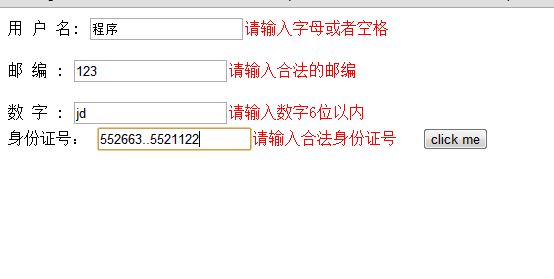
驗證需要兩件事:定義驗證方法、添加驗證規則。
自訂驗證方法:addMethod
jQuery.validator.addMethod("byteMaxLength", function(value, element, param) {
  var length = value.length;
  for (var i = 0; i < value.length; i++) {
    if (value.charCodeAt(i) > 127) { length++; } // 一個中文算 2 字節
  }
  return this.optional(element) || (length <= param);
}, $.validator.format("不能超過{0}個字節(一個中文字算2個字節)"));
addMethod() 有三個參數:方法名(須唯一)、回呼函數、錯誤提示訊息。回呼函數的三個參數分別是:value(目前元素的值)、element(目前被驗證的元素)、param(傳入的參數,如 byteMaxLength:10 中的 10)。其中 this.optional(element) 表示該欄位為非必填:值為空時視為通過,不為空時才依後續規則判斷。
第一種方式:rules + messages
$("#frm").validate({
  rules: {
    username: { required: true, minlength: 4, maxlength: 20, byteMaxLength:20, valiEnglish:true },
    postcode: { postcodeVal:true },
    number: { byteMaxLength:5, numFormat:5 },
    identifier: { sfzhValidate:true }
  },
  messages: {
    username: { required: "請輸入用戶名4--20個英文字符" },
    number: { numFormat: $.format("請輸入{0}數字") }
  }
});
rules{} 定義驗證規則、messages{} 定義錯誤提示,這是比較標準的寫法。
第二種方式:透過 class 附加規則
方法定義與第一種相同,差別在改用 attr() 為元素加上 class 形式的規則:
$("#frm").validate();
function check_infor(){
  $("#username").attr("class","{byteMaxLength:22,valiEnglish:true}");
  $("#postcode").attr("class","{byteMaxLength:6,postcodeVal:true}");
  $("#number").attr("class","{byteMaxLength:6,numFormat:6}");
  $("#identifier").attr("class","{sfzhValidate:true}");
}
check_infor();
注意:呼叫自訂的 check_infor() 之前,必須先呼叫 $("#frm").validate()。
第三種方式:rules("add") 逐一添加
$("#frm").validate();
$('#username').rules('add', { required: true, byteMaxLength:20, valiEnglish:true });
$('#postcode').rules('add', { postcodeVal:true });
$('#number').rules('add', { byteMaxLength:5, numFormat:5 });
$('#identifier').rules('add', { sfzhValidate:true });
它透過 rules("add", rules) 為每個元素個別添加規則,同樣必須先呼叫 $("form").validate();這個規則也能包含 messages 物件來定義對應提示。三種方式可按團隊習慣挑選,其中第一種結構最清晰、最推薦。希望本文對大家的開發有所幫助。
- 上一篇文章: jQuery 綁定 click 事件的三種寫法
- 下一篇文章: 用 jQuery 實作自訂右鍵菜單插件