自製 jQuery 插件:用 div 模擬 alert 與 confirm 對話框
編輯:JQuery特效代碼
現在幾乎沒有網站還在用原生的 alert 與 confirm 了——字型無法控制、無法客製、手機上外觀突兀,而且一律會阻斷整個頁面。這個插件就是為了取代它們而生:只用 CSS 畫面、不需要任何圖片,引入一支 JS 檔就能用。
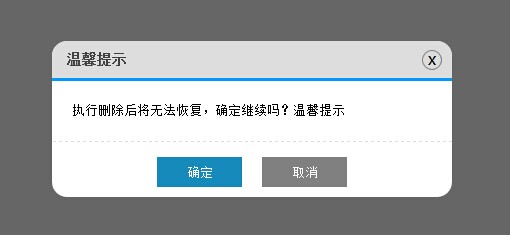
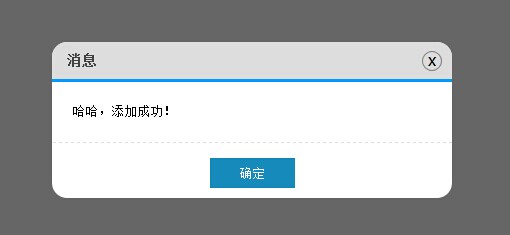
插件本體
(function () {
    $.MsgBox = {
        Alert: function (title, msg) {
            GenerateHtml("alert", title, msg);
            btnOk();   // alert 只負責提示,不需要回呼
            btnNo();
        },
        Confirm: function (title, msg, callback) {
            GenerateHtml("confirm", title, msg);
            btnOk(callback);
            btnNo();
        }
    };

    // 組出 HTML 結構
    var GenerateHtml = function (type, title, msg) {
        var _html = "";
        _html += '<div id="mb_box"></div><div id="mb_con"><span id="mb_tit">' + title + '</span>';
        _html += '<a id="mb_ico">x</a><div id="mb_msg">' + msg + '</div><div id="mb_btnbox">';
        if (type == "alert") {
            _html += '<input id="mb_btn_ok" type="button" value="確定" />';
        }
        if (type == "confirm") {
            _html += '<input id="mb_btn_ok" type="button" value="確定" />';
            _html += '<input id="mb_btn_no" type="button" value="取消" />';
        }
        _html += '</div></div>';

        $("body").append(_html);   // 先加入 DOM,才能量到尺寸
        GenerateCss();
    };

    // 樣式全部寫在 JS 裡,使用端不必另外載 CSS
    var GenerateCss = function () {
        $("#mb_box").css({
            width: '100%', height: '100%', zIndex: '99999', position: 'fixed',
            filter: 'Alpha(opacity=60)', backgroundColor: 'black',
            top: '0', left: '0', opacity: '0.6'
        });
        $("#mb_con").css({
            zIndex: '999999', width: '400px', position: 'fixed',
            backgroundColor: 'White', borderRadius: '15px'
        });
        $("#mb_tit").css({
            display: 'block', fontSize: '14px', color: '#444', padding: '10px 15px',
            backgroundColor: '#DDD', borderRadius: '15px 15px 0 0',
            borderBottom: '3px solid #009BFE', fontWeight: 'bold'
        });
        $("#mb_msg").css({
            padding: '20px', lineHeight: '20px',
            borderBottom: '1px dashed #DDD', fontSize: '13px'
        });
        $("#mb_ico").css({
            display: 'block', position: 'absolute', right: '10px', top: '9px',
            border: '1px solid Gray', width: '18px', height: '18px',
            textAlign: 'center', lineHeight: '16px', cursor: 'pointer',
            borderRadius: '12px', fontFamily: '微軟雅黑'
        });
        $("#mb_btnbox").css({ margin: '15px 0 10px 0', textAlign: 'center' });
        $("#mb_btn_ok, #mb_btn_no").css({ width: '85px', height: '30px', color: 'white', border: 'none' });
        $("#mb_btn_ok").css({ backgroundColor: '#168bbb' });
        $("#mb_btn_no").css({ backgroundColor: 'gray', marginLeft: '20px' });

        $("#mb_ico").hover(function () {
            $(this).css({ backgroundColor: 'Red', color: 'White' });
        }, function () {
            $(this).css({ backgroundColor: '#DDD', color: 'black' });
        });

        // 讓提示框在畫面正中央
        var _widht = document.documentElement.clientWidth;
        var _height = document.documentElement.clientHeight;
        var boxWidth = $("#mb_con").width();
        var boxHeight = $("#mb_con").height();
        $("#mb_con").css({
            top: (_height - boxHeight) / 2 + "px",
            left: (_widht - boxWidth) / 2 + "px"
        });
    };

    var btnOk = function (callback) {
        $("#mb_btn_ok").click(function () {
            $("#mb_box, #mb_con").remove();
            if (typeof (callback) == 'function') { callback(); }
        });
    };

    var btnNo = function () {
        $("#mb_btn_no, #mb_ico").click(function () {
            $("#mb_box, #mb_con").remove();
        });
    };
})();
對應的 HTML 結構
JS 裡是字串拼接,直接看結構會清楚一些:
<div id="mb_box"></div>
<div id="mb_con">
  <span id="mb_tit">標題</span><a id="mb_ico">x</a>
  <div id="mb_msg">內容</div>
  <div id="mb_btnbox">
    <input id="mb_btn_ok" type="button" value="確定" />
    <input id="mb_btn_no" type="button" value="取消" />
  </div>
</div>
兩個設計決策值得說明
為什麼遮罩與對話框是兄弟節點而非父子?如果把 mb_con 放在 mb_box 裡面,遮罩設定的 60% 透明度會連帶影響子元素,讓提示框也跟著變透明。原本想用 background-color: rgba() 解決,但 IE8 及以下不支援,所以乾脆把兩層拉平,再用 z-index 決定上下關係。
為什麼樣式寫在 JS 裡?為了讓使用端只要引入一支 JS 檔就能跑起來,不必再配 CSS 檔。代價是樣式不夠彈性——若想調整配色或字型,就得改 JS。這在追求「即插即用」與「可客製」之間做了明確取捨。
一個無法迴避的限制
div 彈出層做不到原生 alert 那樣的「執行緒阻塞」。原生對話框會讓後續程式碼停下來等使用者回應,而 div 不會——程式會繼續往下跑。因此後續的資料處理只能改寫成回呼函式,搭配 Ajax 完成。示範中的刪除、修改按鈕就是這個模式。
使用範例
<html xmlns="https://www.w3.org/1999/xhtml">
<head>
<title>模擬 alert 與 confirm 提示框</title>
</head>
<body>
<input id="add" type="button" value="添加" />
<input id="delete" type="button" value="刪除" />
<input id="update" type="button" value="修改" />

<script src="../js/jquery-1.4.1.min.js" type="text/javascript"></script>
<script src="../js/jquery.similar.msgbox.js" type="text/javascript"></script>
<script type="text/javascript">
$("#add").bind("click", function () {
    $.MsgBox.Alert("消息", "哈哈,添加成功!");
});

// 回呼可以直接寫匿名函式
$("#delete").bind("click", function () {
    $.MsgBox.Confirm("溫馨提示", "執行刪除後將無法恢復,確定繼續嗎?", function () {
        alert("你居然真的刪除了...");
    });
});

// 也可以傳方法名稱
function test() { alert("你點擊了確定,進行了修改"); }
$("#update").bind("click", function () {
    $.MsgBox.Confirm("溫馨提示", "確定要進行修改嗎?", test);
});
</script>
</body>
</html>
整體程式碼量並不大。若要再往前一步,可以加上 Esc 鍵關閉、點擊遮罩關閉、開啟時鎖定背景捲動,以及把樣式抽成獨立 CSS 檔以便主題化——這些都是從「能用」升級到「好用」的必經之路。
- 上一篇文章: 跨瀏覽器實作 Enter 鍵切換輸入焦點的 jQuery 方案
- 下一篇文章: 評估 jQuery 插件品質的 14 個檢查點