在「瘦客戶端轉成胖瀏覽器」的趨勢下,用 JavaScript 呼叫後端服務幾乎是必備技能。本文記錄如何用 jQuery 的 ajax 呼叫 WCF 服務,步驟分為三塊:改 WCF 設定、定義操作契約、瀏覽器發請求。
一、調整 WCF 服務設定
WCF 預設不允許用 HTTP 請求存取。需要修改設定檔(若有其他啟動 WCF 的專案,要改該專案的 app.config 或 web.config),在 serviceHostingEnvironment 節開啟 aspNetCompatibilityEnabled 並註冊服務啟用項:
<serviceHostingEnvironment aspNetCompatibilityEnabled="true">
  <serviceActivations>
    <add relativeAddress="TableManager.svc"
         service="TableManagerIntegrationTestService.TestResultService"
         factory="System.ServiceModel.Activation.WebScriptServiceHostFactory"/>
  </serviceActivations>
</serviceHostingEnvironment>
相關服務的 binding 必須改成 webHttpBinding,JavaScript 才能呼叫:
<service name="TableManagerIntegrationTestService.TestResultService">
  <endpoint address="" binding="webHttpBinding"
            contract="TableManagerIntegrationTestService.ITestResultService"
            behaviorConfiguration="EndpBehavior">
    <identity><dns value="localhost" /></identity>
  </endpoint>
</service>
二、標記操作契約
要能被呼叫的服務操作必須標上 WebGet 或 WebInvoke。WebGet 對應 HTTP GET,WebInvoke 則允許 POST 等其餘方法。
以下這個服務接收年月日,回傳當天的日誌記錄:
[ServiceContract]
public interface ITestResultService
{
    [OperationContract]
    [WebInvoke(Method = "POST",
               BodyStyle = WebMessageBodyStyle.Wrapped,
               ResponseFormat = WebMessageFormat.Json)]
    List<TestResultData> GetData(int year, int month, int date);
}
標記宣告了這支方法走 POST、回傳 JSON。指定回應格式之後,不必寫任何序列化程式碼,WCF 會自動把可序列化物件轉成對應格式。
服務實作類別還需要標上 AspNetCompatibilityRequirements:
[AspNetCompatibilityRequirements(RequirementsMode = AspNetCompatibilityRequirementsMode.Allowed)]
public class TestResultService : ITestResultService
{
    public List<TestResultData> GetData(int year, int month, int date)
    {
        DateTime start_time = new DateTime(year, month, date, 0, 0, 0);
        DateTime end_time   = new DateTime(year, month, date, 23, 59, 59);

        DataSet ds = LogDataAccess.SelectDailyBuildLog(start_time, end_time);
        var test_result_list = new List<TestResultData>();

        foreach (DataRow result in ds.Tables[0].Rows)
        {
            test_result_list.Add(new TestResultData
            {
                DeployDate        = Convert.ToDateTime(result["StatTime"]).ToString(),
                ServerName        = result["ComponentName"].ToString(),
                Build             = result["Build"].ToString(),
                Result            = result["Result"].ToString(),
                ServerInformation = result["Versions"].ToString()
            });
        }
        return test_result_list;
    }
}
三、瀏覽器端發出請求
$.ajax 在這個場景需要關注八個參數:
- type:操作方法,這裡是 POST。
- url:WCF 服務的完整位址(含方法名)。
- data:要傳給服務的資料,也就是參數。
- contentType:傳送資料的格式與編碼,這裡是 application/json; charset=utf-8。
- dataType:期望的回應格式。
- processData:是否讓 jQuery 自動把資料轉成 application/x-www-form-urlencoded。傳 JSON 字串時必須設為 false。
- success / error:成功與失敗的回呼。
先定義全域變數方便重複使用:
var Type, Url, Data, ContentType, DataType, ProcessData;

function CallService() {
    $.ajax({
        type: Type,
        url: Url,
        data: Data,
        contentType: ContentType,
        dataType: DataType,
        processData: ProcessData,
        success: function (msg) { ServiceSucceded(msg); },
        error: ServiceFailed
    });
}
從輸入框取值並呼叫服務:
function WcfJson() {
    Type = "POST";
    Url  = "https://localhost:8734/TableManagerIntegrationTestService/TestResultService/GetData";
    Data = '{"year":' + $("#Year").val() + ', "month":' + $("#Month").val() + ', "date":' + $("#Date").val() + '}';
    ContentType = "application/json; charset=utf-8";
    DataType    = "json";
    ProcessData = false;

    CallService();
}
四、處理回傳結果
請求成功後會呼叫 success 指定的方法。回傳的是 JSON,範例中是一個結果清單。若不確定結構,可以在這裡下中斷點看看:
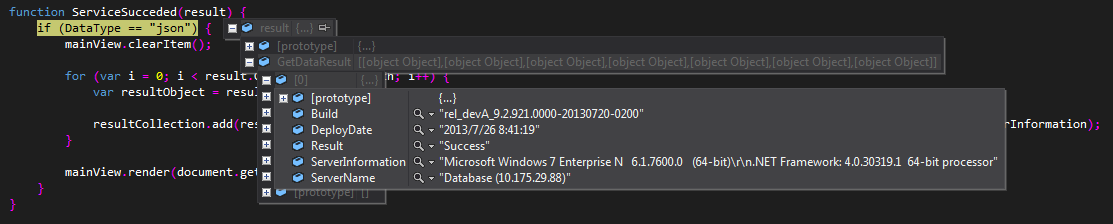
可以看到結果位在 result 物件的 GetDataResult 屬性裡(這個名稱由方法名加上 Result 組成)。逐一取出各元素即可:
function ServiceSucceded(result) {
    if (DataType == "json") {
        mainView.clearItem();
        for (var i = 0; i < result.GetDataResult.length; i++) {
            var resultObject = result.GetDataResult[i];
            resultCollection.add(resultObject.ServerName, resultObject.DeployDate,
                                 resultObject.Build, resultObject.Result,
                                 resultObject.ServerInformation);
        }
        mainView.render(document.getElementById("logContainer"));
    }
}
resultCollection 與 mainView 是自訂的兩個類別,分別負責存放要顯示的資料與繪製表格,這裡不展開。
啟動 WCF 服務,執行頁面,結果就出來了:
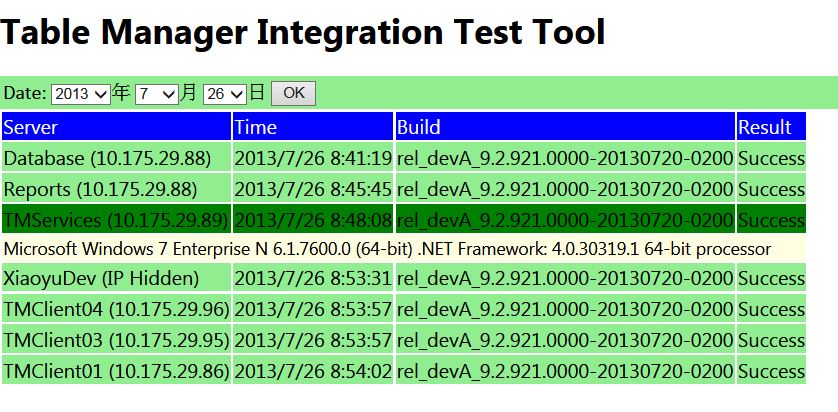
介面醜陋敬請見諒——稍微調一下 CSS 就會好看很多。
容易踩到的三個坑
processData 忘記設 false。這是最常見的錯誤。預設值 true 會讓 jQuery 把你已序列化的 JSON 字串當成物件再處理一次,結果格式全毀,服務端收到 400。
跨來源被瀏覽器攔下。頁面與 WCF 服務若不同來源(連接埠不同也算),需要 WCF 端設定 crossDomainScriptAccessEnabled="true" 並自行處理 OPTIONS 預檢請求。
WebInvoke 的 BodyStyle。Wrapped 模式下參數直接放在 JSON 主體;Bare 模式則需要包一層以方法名命名的物件。兩者對應的前端 data 格式不同,改了一邊別忘了改另一邊。
- 上一篇文章: jQuery post 不進入回呼函式?先檢查 JSON 格式
- 下一篇文章: 用 jQuery 做一個經典點燈小遊戲