jQuery 實現懸浮於網頁右側的 QQ 在線客服插件
編輯:JQuery特效代碼
QQ 在線客服是許多網站的標配,能讓訪客一鍵與客服對話。本文分享一款實用的懸浮客服插件,可自由設定靠左或靠右、是否隨滾動移動,並支援配置多位客服。
HTML 頁面
引入 jQuery 與客服腳本後,透過 Sonline 方法初始化並傳入配置:
<script type="text/javascript">
$(function(){
$("body").Sonline({
Position: "right", // left 或 right
Top: 200,          // 頂部距離,默認 200px
Effect: true,      // 滾動或固定:true 或 false
DefaultsOpen: true, // 默認展開:true,收縮:false
Qqlist: "<SPAN>435027|客服01,435027|客服02,435027|客服03,435027|客服04,435027|客服05</SPAN>" // 多個 QQ 用 , 隔開,QQ 和客服名用 | 隔開
});
});
</script>
CSS 樣式(預設藍色)
客服框由開合按鈕 .openTrigger、標題 .titleBox 與內容 .contentBox 組成,關閉按鈕還加上了旋轉的過渡動畫:
.SonlineBox{ width:162px; font-size:12px;overflow:hidden; z-index:9999;}
.SonlineBox .openTrigger{ width:30px; height:110px; position:absolute; top:0px; z-index:1; cursor:pointer; background:#0176ba url(../images/openTrigger.jpg) no-repeat;}
.SonlineBox .titleBox{ width:158px; height:35px; line-height:35px; background:#038bdc url(../images/SonlineTitleBg.gif) repeat-x; border-bottom:2px solid #0176ba;}
.SonlineBox .contentBox{ width:158px; height:auto; border:2px solid #0176ba; background:#fff; position:absolute; z-index:2;}
.SonlineBox .contentBox .closeTrigger{ width:25px; height:25px; display:block; cursor:pointer; position:absolute; top:5px;right:5px;-webkit-transition:all 0.8s ease-out;}
.SonlineBox .contentBox .closeTrigger:hover{-webkit-transform:scale(1) rotate(360deg);}
jQuery 腳本
插件透過 $.fn.Sonline 擴充,包含展開、關閉、滾動定位與 QQ 列表解析等子方法。其中 splitStr 負責把配置字串拆分成一組組客服連結:
(function($){
$.fn.Sonline = function(options){
var opts = $.extend({}, $.fn.Sonline.defualts, options);
$.fn.setList(opts); // 調用列表設置
if (opts.DefaultsOpen == false){
$.fn.Sonline.close(opts.Position, 0);
}
// 展開
$("#SonlineBox > .openTrigger").live("click", function(){ $.fn.Sonline.open(opts.Position); });
// 關閉
$("#SonlineBox > .contentBox > .closeTrigger").live("click", function(){ $.fn.Sonline.close(opts.Position, "fast"); });
// IE6 兼容或滾動方式顯示
if ($.browser.msie && ($.browser.version == "6.0") && !$.support.style || opts.Effect == true) { $.fn.Sonline.scrollType(); }
else if (opts.Effect == false){ $("#SonlineBox").css({position:"fixed"}); }
};
$.fn.Sonline.defualts = {
Position: "left",
Top: 200,
Effect: true,
DefaultsOpen: true,
Qqlist: ""
};
// ...open、close、setList、scrollType、splitStr 等方法省略,詳見附件完整原始碼...
})(jQuery);
效果圖如下:
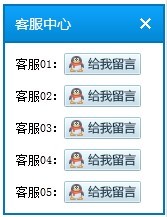
由於使用了 live() 與 $.browser,此插件較適合搭配舊版本的 jQuery(如 1.8.x)。若要在新版 jQuery 上使用,建議把 live() 替換為 on(),並改用 feature detection 取代 $.browser。
- 上一篇文章: jQuery 實現長文字部分顯示與展開收合效果
- 下一篇文章: 用 jQuery 判斷 iframe 內元素是否存在的方法