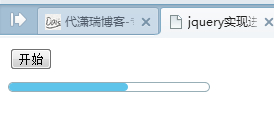
進度條看似只是個小元件,卻能幫助我們理解前端是怎麼做出「逐步推進」的視覺效果的。以下用 jQuery 加上 setInterval 實作一個簡易的進度條,雖無實際的進度計算,但已完整呈現了核心原理。
進度條源碼
<style>
.progressBar{width:200px;height:8px;border:1px solid #98AFB7;border-radius:5px;margin-top:10px;}
#bar{width:0px;height:8px;border-radius:5px;background:#5EC4EA;}
</style>
<script type="text/javascript">
function progressBar(){
//初始化js進度條
$("#bar").css("width","0px");
//進度條的速度,越小越快
var speed = 20;
bar = setInterval(function(){
nowWidth = parseInt($("#bar").width());
//寬度要不能大於進度條的總寬度
if(nowWidth<=200){
barWidth = (nowWidth + 1)+"px";
$("#bar").css("width",barWidth);
}else{
//進度條讀滿後,停止
clearInterval(bar);
}
},speed);
}
</script>
頁面上放一個開始按鈕與進度條容器:
<body>
<input type="button" value="開始" onclick="progressBar()" />
<div class="progressBar"><div id="bar"></div></div>
</body>
原理是透過 setInterval 每隔固定時間(speed 越小越快)把內部 bar 的寬度加一,直到填滿整個進度條容器後清除計時器。掌握這個思路後,就能替換成真正的進度來源,做出實用的載入動畫。
- 上一篇文章: 兩個多選 select 左右移動:新增、刪除選項與取值實例
- 下一篇文章: 用 jQuery 讓頁面跳到指定位置的方法