用 jQuery Timers 外掛做一個計時器
編輯:JQuery特效代碼
先到官網下載 jQuery Timers 外掛並引入頁面,這裡用的是 1.2 版:
<script src="../Javascripts/Plugins/jquery.timers-1.2.js" type="text/javascript"></script>
HTML
放一個 hidden 的伺服器控制項用來存值,當然這部分你可以自己決定要不要:
<asp:HiddenField ID="hicurrenttime" runat="server" />

<h1>jQuery Timers Test</h1>
<input type="button" id="btnmaster" value="StartTimer" />

<h2>Demos</h2>
<div class="demos">
  <span id="durationtimerspan"></span><br />
  <input id="txtresult" type="text" />
</div>
JavaScript
$(document).ready(function() {
  var countnum = <%=hicurrenttime.Value %>;

  $('#btnmaster').toggle(
    function() {
      $(this).val('StopTimer');
      $('#durationtimerspan').everyTime(1000, 'testtimer', function(i) {
        countnum = countnum + 1;
        $(this).html('Duration: ' + countnum);
        $('#<%=hicurrenttime.ClientID %>').val(countnum);
      });
    },
    function() {
      $(this).val('StartTimer');
      $('#durationtimerspan').stopTime('testtimer');
      $('#txtresult').val(countnum);
    }
  );
});
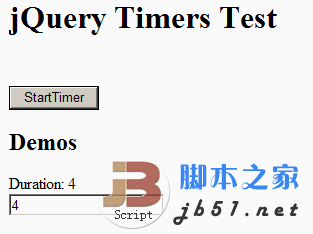
關鍵在 toggle:第一次點擊啟動計時並把按鈕文字改成 StopTimer,第二次點擊停止並把結果寫進文字框。計時器名稱 'testtimer' 是給 stopTime 指定要停哪一組用的。
效果如下:
這個外掛的三個方法
everyTime(interval, [label], fn, [times]):週期性重複執行。oneTime(interval, [label], fn):只執行一次。stopTime([label], [fn]):停止。
常見用法
// 每 1 秒執行 test()
function test(){ /* do something... */ }
$('body').everyTime('1s', test);

// 每 1 秒執行匿名函數
$('body').everyTime('1s', function(){ /* do something... */ });

// 每 1 秒執行,計時器命名為 A
$('body').everyTime('1s', 'A', function(){ /* do something... */ });

// 每 20 秒執行,最多 5 次,命名為 B
$('body').everyTime('2das', 'B', function(){ /* do something... */ }, 5);

// 每 20 秒執行、無限次,命名為 C
// 若時間到了但函數還沒跑完,會等它結束後才繼續計時
$('body').everyTime('2das', 'C', function(){ /* 執行超過 20 秒的程式 */ }, 0, true);

/***********************************************************
 * oneTime(時間間隔, [計時器名稱], 呼叫的函數)
 ***********************************************************/
// 倒數 10 秒後執行
$('body').oneTime('1das', function(){ /* do something... */ });

// 倒數 100 秒後執行,命名為 D
$('body').oneTime('1hs', 'D', function(){ /* do something... */ });

/************************************************************
 * stopTime([計時器名稱], [函數名稱])
 ************************************************************/
$('body').stopTime();          // 停止 $('body') 上所有計時器
$('body').stopTime('A');       // 停止名稱為 A 的計時器
$('body').stopTime(test);      // 停止所有呼叫 test() 的計時器
時間字串支援 ms(毫秒)、s(秒)、das(十天?此處依外掛定義)、hs 等單位寫法,實際可用單位建議對照外掛原始碼的解析規則。 Interval 也可以直接傳整數毫秒,像範例開頭的 1000。
值得注意的是第五個參數:設為 true 時,若上一次的函數還沒執行完而週期又到了,會等它結束再繼續計時,而不是直接觸發下一輪。做輪詢或需要避免重入的工作時,這個旗標很有用。
- 上一篇文章: jQuery + ashx 打造無刷新 GridView 表格外掛
- 下一篇文章: jQuery 表格工具集大整理