jquery.hotkeys 是一個好用的鍵盤快捷鍵外掛,能讓你以簡潔的語法綁定各種按鍵與組合鍵。以下示範它的基本用法。
先引入 jQuery 與 hotkeys 外掛:
<script src="jquery-1.4.1.min.js" type="text/javascript"></script>
<script src="jquery.hotkeys.js" type="text/javascript"></script>
綁定單一按鍵
用 bind 搭配 keydown 事件,即可針對不同按鍵觸發對應處理:
<script type="text/javascript">
$(function () {
$(document).bind("keydown", "esc", function (ev) { alert("您按下了Esc鍵!"); return false; })
.bind("keydown", "1", function (er) { alert("您按下了1鍵!"); return false; })
.bind("keydown", "2", function (er) { alert("您按下了2鍵!"); return false; })
.bind("keydown", "3", function (er) { alert("您按下了3鍵!"); return false; });
});
</script>
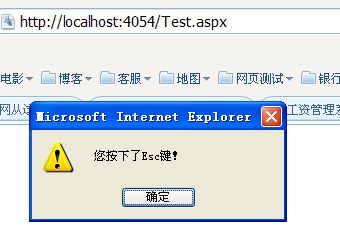
支援完整的組合鍵
hotkeys 最強大的地方,是它支援大量的按鍵與組合鍵寫法,包括 esc、tab、space、return、方向鍵、F1 到 F12、數字與字母鍵,以及 Ctrl+、Shift+、Alt+ 的各種組合。例如下面這種寫法都能正確觸發:
jQuery(document).bind('keydown', 'Ctrl+s', function (evt){ /* ... */ return false; });
jQuery(document).bind('keydown', 'Alt+f4', function (evt){ /* ... */ return false; });
jQuery(document).bind('keydown', 'Shift+left', function (evt){ /* ... */ return false; });
透過為按鍵加上 dirty 樣式或使用自訂的處理函式,你就能輕鬆打造鍵盤快捷操作,大幅提升應用的操作效率。
- 上一篇文章: 用 jQuery 監聽 Enter 鍵觸發指定方法
- 下一篇文章: 用 jQuery 攔截 Enter 鍵切換焦點