jQuery + Ajax 實作無刷新分頁的完整流程
編輯:JQuery特效代碼
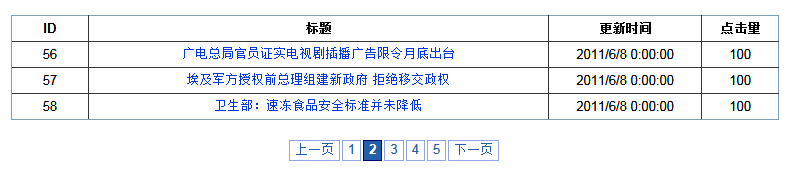
無刷新分頁的原理並不複雜:借助 jquery.pagination 外掛繪製頁碼,每當使用者點擊頁碼,就以非同步方式向後端索取該頁資料,再把結果填進表格。
一、資料表結構
示例表很簡單,只有四個欄位:News_id、News_title、News_time、News_readtimes。
二、前台頁面
<link href="Styles/common.css" rel="stylesheet" type="text/css" />
<link href="Styles/paging.css" rel="stylesheet" type="text/css" />
<script src="Scripts/jquery-1.4.1.js" type="text/javascript"></script>
<script src="Scripts/jquery.pagination.js" type="text/javascript"></script>
<script type="text/javascript">
  var pageIndex = 0;
  var pageSize = 3;

  $(function () {
    InitTable(0); // 首次載入第一頁

    $("#Pagination").pagination(<%=pageCount %>, {
      callback: PageCallback,
      prev_text: '上一頁',
      next_text: '下一頁',
      items_per_page: pageSize,
      num_display_entries: 6,  // 頁碼條主體顯示的頁碼數
      current_page: pageIndex, // 當前頁索引
      num_edge_entries: 2      // 首尾各顯示的頁碼數
    });

    // 翻頁時的回呼
    function PageCallback(index, jq) {
      InitTable(index);
    }

    // 向後端索取資料
    function InitTable(pageIndex) {
      $.ajax({
        type: "POST",
        dataType: "text",
        url: 'Ajax/PagerHandler.ashx',
        data: "pageIndex=" + (pageIndex + 1) + "&pageSize=" + pageSize,
        success: function (data) {
          $("#Result tr:gt(0)").remove(); // 保留表頭,移除其餘資料列
          $("#Result").append(data);      // 把新資料附加到表格
        }
      });
    }
  });
</script>
三、表格容器
<table id="Result" border="1" cellpadding="5" style="border-collapse: collapse; width:60%">
  <tr>
    <th style="width: 10%">ID</th>
    <th style="width: 60%">標題</th>
    <th style="width: 20%">更新時間</th>
    <th style="width: 10%">點擊量</th>
  </tr>
</table>
<div id="Pagination" class="paging"></div>
四、後台取得總筆數
public string pageCount = string.Empty; // 總條目數

protected void Page_Load(object sender, EventArgs e)
{
  if (!IsPostBack)
  {
    pageCount = new News().GetNewsCount();
  }
}
五、Ajax 處理程式 PagerHandler.ashx
public class PagerHandler : IHttpHandler
{
  public void ProcessRequest(HttpContext context)
  {
    context.Response.ContentType = "text/plain";
    int pageIndex = Convert.ToInt32(context.Request["pageIndex"]);
    int size = Convert.ToInt32(context.Request["pageSize"]);
    if (pageIndex == 0) pageIndex = 1;

    int count = 0;
    News n = new News();
    List<News> list = n.GetNewsList(pageIndex, size, ref count);

    StringBuilder sb = new StringBuilder();
    foreach (News p in list)
    {
      sb.Append("<tr><td>").Append(p.News_id).Append("</td>");
      sb.Append("<td><a href='#'>").Append(p.News_title).Append("</a></td>");
      sb.Append("<td>").Append(p.News_time).Append("</td>");
      sb.Append("<td>").Append(p.News_readtimes).Append("</td></tr>");
    }
    context.Response.Write(sb.ToString());
  }

  public bool IsReusable { get { return false; } }
}
幾個值得強化的環節
- 用字串拼接組 HTML 時,標題等使用者可編輯的欄位必須先做 HTML 編碼(如
Server.HtmlEncode),否則會有 XSS 風險。 GetNewsList內部的分頁查詢請務必在資料庫層做(如ROW_NUMBER()、OFFSET/FETCH),不要撈出全部再於記憶體中切。- 使用通用
.ashx而非整頁.aspx是正確選擇,負擔小、回應乾淨。 - 翻頁時可加上載入提示並防止連續點擊造成請求堆疊。
把「頁碼渲染」交給外掛、「資料取得」交給輕量 handler、「畫面更新」交給 jQuery,三者各司其職,維護起來清爽許多。
- 上一篇文章: Ajax 無刷新更新下拉選單內容的實作案例
- 下一篇文章: jQuery + Ajax + C# 實作無刷新讀寫資料庫