使用 jQuery 和 PHP 實現類似 360 的功能開關效果
編輯:JQuery特效代碼

本例將實現一個類似 360 軟件的功能開關效果:頁面上列出各項功能及其狀態,用戶點擊開關按鈕即可即時開啟或關閉,狀態保存到數據庫。整個過程是典型的 Ajax 應用。
準備工作:數據表
為了記錄功能說明與開啟狀態,我們需要一張數據表 pro:
CREATE TABLE `pro` (
  `id` int(11) NOT NULL auto_increment,
  `title` varchar(50) NOT NULL,
  `description` varchar(200) NOT NULL,
  `status` tinyint(1) NOT NULL default '0',
  PRIMARY KEY (`id`)
) ENGINE=MyISAM DEFAULT CHARSET=utf8;
建好表後,可以向其中插入幾條測試數據。
index.php:展示功能列表
使用 PHP 讀取數據表,並以列表形式展示,根據 status 字段決定開關按鈕的初始樣式:
<?php
require_once('connect.php');   // 連接數據庫
$query = mysql_query("select * from pro order by id asc");
while ($row = mysql_fetch_array($query)) {
?>
<div class="list">
    <div class="fun_title">
        <span rel="<?php echo $row['id'];?>" <?php if ($row['status'] == 1) { ?>
            class="ad_on" title="點擊關閉"<?php } else { ?>class="ad_off" title="點擊開啟"<?php }?>></span>
        <h3><?php echo $row['title']; ?></h3>
    </div>
    <p><?php echo $row['description'];?></p>
</div>
<?php } ?>
CSS:美化開關外觀
為了呈現更好的視覺效果,我們只用一張雪碧圖來標識開關按鈕,通過 background-position 定位不同狀態:
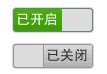
.list { padding: 6px 4px; border-bottom: 1px dotted #d3d3d3; position: relative; }
.fun_title { height: 28px; line-height: 28px; }
.fun_title span {
    width: 82px; height: 25px;
    background: url(switch.gif) no-repeat;
    cursor: pointer; position: absolute; right: 6px; top: 16px;
}
.fun_title span.ad_on  { background-position: 0 -2px; }
.fun_title span.ad_off { background-position: 0 -38px; }
.fun_title h3 { font-size: 14px; font-family: 'microsoft yahei'; }
.list p { line-height: 20px; }
.cur_select { background: #ffc; }
jQuery:處理開關交互
點擊開關按鈕時,前端向後台發送 POST 請求,後台更新數據庫並返回結果,前端根據返回結果動態切換按鈕樣式:
$(function () {
    // 鼠標滑過換色
    $(".list").hover(function () {
        $(this).addClass("cur_select");
    }, function () {
        $(this).removeClass("cur_select");
    });

    // 關閉
    $(".ad_on").live("click", function () {
        var add_on = $(this);
        var status_id = $(this).attr("rel");
        $.post("action.php", { status: status_id, type: 1 }, function (data) {
            if (data == 1) {
                add_on.removeClass("ad_on").addClass("ad_off").attr("title", "點擊開啟");
            } else {
                alert(data);
            }
        });
    });

    // 開啟
    $(".ad_off").live("click", function () {
        var add_off = $(this);
        var status_id = $(this).attr("rel");
        $.post("action.php", { status: status_id, type: 2 }, function (data) {
            if (data == 1) {
                add_off.removeClass("ad_off").addClass("ad_on").attr("title", "點擊關閉");
            } else {
                alert(data);
            }
        });
    });
});
代碼提交的參數是對應功能的 id 和 type,後台據此判斷要操作哪個功能、執行開啟還是關閉。
action.php:更新狀態
後台接收請求,執行相應的 SQL 更新語句,並把執行結果返回給前端:
require_once('connect.php');
$id = $_POST['status'];
$type = $_POST['type'];
if ($type == 1) {          // 關閉
    $sql = "update pro set status=0 where id=" + $id;
} else {                   // 開啟
    $sql = "update pro set status=1 where id=" + $id;
}
$rs = mysql_query($sql);
if ($rs) {
    echo '1';
} else {
    echo '服務器忙,請稍後再試!';
}
至此,一個具備數據持久化的功能開關效果就完成了。用戶的每次操作都會即時保存到數據庫,刷新頁面後狀態依然保留。
- 上一篇文章: 對 jQuery 中的 ajax 再封裝,簡化操作示例
- 下一篇文章: jQuery 實現網頁查找功能示例分享
熱門推薦
$(document).ready() 到底是什麼?與 onload 的差別一次說清
原生 JS 與 jQuery 的顯示隱藏切換:className 與 toggleClass 對照
AeroWindow:仿 Windows Aero 玻璃質感的 jQuery 彈出視窗插件
jQuery 中 bind 與 live 的用法與差異
搞懂 jQuery 的 attr() 與 val():屬性與值的讀寫技巧
jQuery toggleClass() 切換類別
用 jQuery Ajax 讀取 XML 資料:前端解析與後端輸出的完整對接
jQuery 遍歷與篩選數組的方法大全
用 jQuery 實作浮動側邊的返回頂部按鈕