EasyUI datagrid 框架的基本使用入門
編輯:JQuery特效代碼
datagrid 一直是許多人覺得棘手的框架,尤其是 Json 資料的拼接,前台後台環環相扣,使用時最需要的就是細心。本文就從最基礎的用法談起。
首先是頁面引用的樣式與腳本:
<link href="jquery-easyui-1.3.2/themes/default/easyui.css" rel="stylesheet" type="text/css" />
<link href="jquery-easyui-1.3.2/themes/icon.css" rel="stylesheet" type="text/css" />
<script src="jquery-easyui-1.3.2/jquery-1.8.0.min.js" type="text/javascript"></script>
<script src="jquery-easyui-1.3.2/jquery.easyui.min.js" type="text/javascript"></script>
<script src="jquery-easyui-1.3.2/locale/easyui-lang-zh_CN.js" type="text/javascript"></script>
</head>
<body id="layoutbody" class="easyui-layout">
<div data-options="region:'north',title:'North Title',split:true" style="height: 100px;"></div>
<div data-options="region:'south',title:'South Title',split:true" style="height: 100px;"></div>
<div data-options="region:'east',iconCls:'icon-reload',title:'East',split:true" style="width: 100px;"></div>
<div data-options="region:'west',title:'West',split:true" style="width: 100px;"></div>
<div data-options="region:'center',title:'center title'" href="HTMLPage.htm" style="padding: 5px; background: #eee; overflow: hidden;"></div>
</body>
HTMLPage.htm 中的 datagrid 初始化:
<script type="text/javascript" charset="utf-8">
$(function () {
$("#dg").datagrid({
url: "GetJson.ashx", // 回傳 Json 格式資料
title: "數據展示表格",
iconCls: "icon-add",
fitColumns: false,
idField: 'id',
loadMsg: "正在努力為您加載數據",
pagination: true,
rownumbers: true,
pageSize: 10,
pageList: [10, 20, 30],
sortName: "name",
sortOrder: "asc",
columns: [[
{ field: 'code', title: 'Code', width: 100 },
{ field: 'name', title: 'Name', width: 100, sortable: true },
{ field: 'addr', title: 'addr', width: 100 }
// formatter: function (value, row, index) { ... } 可自訂顯示內容
]]
});
});
</script>
<div id="tt" class="easyui-tabs" style="width: 500px; height: 250px;" fit="true" border="false">
<div title="Tab1" style="padding: 20px;" border="false">
<table id="dg"></table>
</div>
</div>
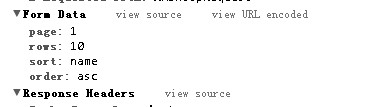
這是前台請求資料時發送的內容。
重要提醒:Json 格式的資料一定要用雙引號,單引號是無法顯示資料的。資料格式如下:
{
"total": 239,
"rows": [
{"code":"001","name":"Name 1","addr":"Address 11","col4":"col4 data"},
{"code":"002","name":"Name 2","addr":"Address 13","col4":"col4 data"},
{"code":"003","name":"Name 3","addr":"Address 87","col4":"col4 data"}
]
}
後台資料返回的關鍵
表格 POST 或 GET 回去的請求中,page 代表目前頁碼、rows 代表一頁的大小;後台返回的資料格式必須是 {total: '', rows: [{}, {}]},也就是一定要包含總數 total 欄位與具體的 rows 列資料。
Asp.Net MVC 範例:
public JsonResult GetAllUserInfos()
{
int pageSize = 5;
int pageIndex = 1;
int.TryParse(this.Request["page"], out pageIndex);
int.TryParse(this.Request["rows"], out pageSize);
pageSize = pageSize <= 0 ? 5 : pageSize;
pageIndex = pageIndex < 1 ? 1 : pageIndex;

var temp = db.UserInfo
.OrderBy(u => u.Sort)
.Skip<UserInfo>((pageIndex - 1) * pageSize)
.Take<UserInfo>(pageSize)
.ToList<UserInfo>();

Hashtable ht = new Hashtable();
ht["total"] = db.UserInfo.Count();
ht["rows"] = temp;
return Json(ht);
}
Asp.Net WebForm 範例(一般處理常式):透過 StringBuilder 手動拼接 Json 字串,並輸出 {"total":..., "rows":[...]} 結構即可。
此外,.NET 中也有現成的類別(如 JavaScriptSerializer)可以協助序列化 Json 格式資料,能省去手動拼接的麻煩。