用 jQuery 寫一個簡單的動畫效果
編輯:JQuery特效代碼
需求背景
jQuery 已經相當成熟,基於它的外掛更是上百種。不過偶爾還是自己動手寫一遍,對理解 animate 的行為很有幫助,這篇就是一個手刻的動畫小例。
實作
程式碼如下:
<!DOCTYPE html PUBLIC "-//W3C//DTDHTML 4.01 Transitional//EN" "https://www.w3.org/TR/html4/loose.dtd">
<html>
<head>
<meta http-equiv="Content-Type"content="text/html; charset=UTF-8">
<title>jQuery 實現動畫效果</title>
<script language="JavaScript"src="../jQuery/jquery-1.7.1.min.js"></script>
<style type="text/css">
     #test {
         position:relative;
         width:100px;
         height:100px;
         border:1px solid #0050d0;
         background:#96e555;
          cursor:pointer;
     }
</style>
<script type="text/javascript">
     $(function(){
         $("#test").css("opacity","0.5");//設置透明度
         $("#test").click(function(){
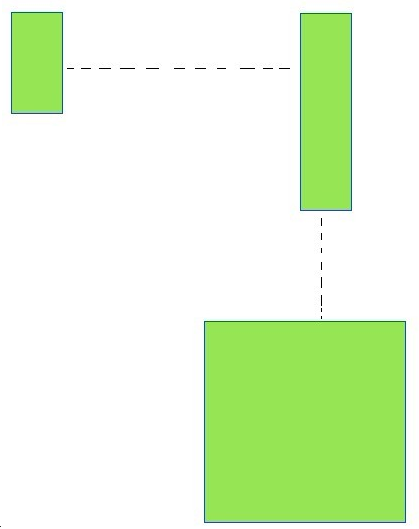
                 $(this).animate({left:"400px",height:"200px",opacity:"1"},300)
                               .animate({top:"200px",width:"200px"},300)
                               .fadeOut("slow");
          });
     });
</script>
</head>
<body>
     <div id="test"></div>
</body>
</html>
重點說明
三個觀念值得記下來:
- 用 position 才有位移可言。元素必須是
relative或absolute,left、top的動畫才有意義。 - animate 可以串。用
.接起來的多段動畫會依序播放,前一段 300ms 跑完才進到下一段,最後接一個fadeOut("slow")收尾。 - 同一元素的 CSS 屬性可一次動畫多個。第一段同時改變 left、height、opacity,這三個會一起補間,而不是一個跑完再跑下一個。
範例原本寫的 optcity 是拼錯的,正確屬性名稱是 opacity,上面已經修正。
執行結果
- 上一篇文章: 用 jQuery 監聽輸入框的即時輸入並觸發事件
- 下一篇文章: jQuery 中 bind 與 live 的用法與差異