用 jQuery 打造自訂樣式的下拉選單,取代原生 select
編輯:JQuery特效代碼
設計稿上的下拉選單常有講究,特別是右側那個箭頭按鈕,瀏覽器原生的樣式幾乎無法客製。既然沒辦法改,就用 JavaScript 加 div 自己畫一個。
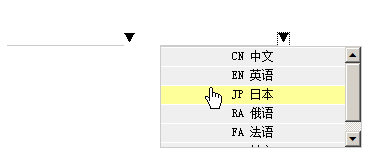
樣式
*{font-size:12px;line-height:18px;list-style:none;padding:0;
  margin:0;text-decoration:none;color:#000;border:0}
.input_expand{border-bottom:solid 1px #ccc;height:18px}
.expand{display:none;position:absolute;width:200px;height:100px;
  overflow-y:auto;border:solid 1px #ccc}
.expand li{margin:1px 0;background:#fff}
.expand a{display:block;padding:0 5px;background:#efefef;margin:1px 0}
.expand a:hover{background:#ff9}
展開與定位
function showExpand(targetId, expandId, expand_class) {
    // 先關掉其他已展開的層
    if (expand_class != undefined) { $("." + expand_class).hide(); }

    var isIE = (! +[1, ]);
    var expand = $("#" + expandId);
    var target = $("#" + targetId);

    // 依瀏覽器微調偏移量
    var dx = isIE ? -2 : 0;
    expand.get(0).style.left =
        target.get(0).getBoundingClientRect().left + dx + "px";

    dx = isIE ? 17 : 19;
    expand.get(0).style.top =
        parseInt(target.get(0).getBoundingClientRect().top) + dx + "px";
    expand.show();

    // 每個選項點擊時回填數值
    $("#" + expandId).find("li").each(function (i) {
        $(this).show().click(function () {
            target.val($(this).text().split(' ')[1]);
            expand.hide();
        });
    });
}
鍵入時過濾選項
function search(srcId, expandId) {
    var expand = $("#" + expandId);
    var src = $("#" + srcId);
    var A = expand.find("a");
    var v = src.val().toUpperCase();

    A.each(function (i) {
        if (v.length >= 2) {
            if ($(this).text().toUpperCase().indexOf(v) == -1) {
                $(this).parent().hide();
            } else {
                $(this).parent().show();
            }
        }
        if (v.length <= 0) { $(this).parent().show(); }
    });
    src.val(v);
}
綁定事件
$().ready(function(){
    $("#txt_city").keyup(function(){
        search('txt_city', 'city_select1');
    }).focus(function(){
        showExpand('txt_city', 'city_select1', 'expand');
    });
});
HTML 結構
<input type="text" id="txt_city" />
<a href="#" onclick="showExpand('txt_city','city_select1','expand')">▼</a>
<div class="expand" id="city_select1">
  <ul>
    <li><a href="javascript:void(0)">SH 上海</a></li>
    <li><a href="javascript:void(0)">BJ 北京</a></li>
    <li><a href="javascript:void(0)">HZ 杭州</a></li>
  </ul>
</div>
這個版本的不足
坦白說還有兩個明顯缺陷:一是用鍵盤上下鍵操作時,沒有高亮選項跟著移動;二是鍵入文字過濾結果的手感,跟原生 select 比起來還是略顯生硬。若要補齊,需要額外處理 keydown/keyup 來維護一個「目前高亮索引」,並在 Enter 時確認選擇。
另外要提醒的是,自製下拉選單完全脫離了原生控制項的無障礙支援。實務上更划算的做法是保留真正的 <select>,只把箭頭按鈕的樣式用 CSS 蓋掉(例如 appearance: none 搭配自訂背景圖),這樣既能客製外觀,又不會失去鍵盤操作與螢幕閱讀器的支援。