jQuery tooltip 插件實現頂部淡入淡出提示效果
編輯:JQuery特效代碼
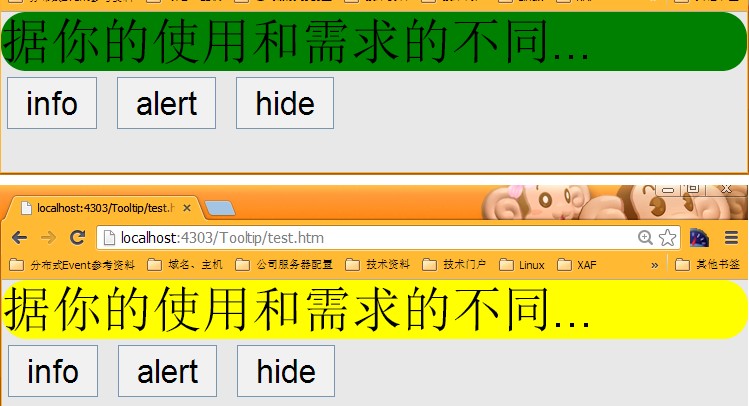
以下示範一個自製的 tooltip 插件,可透過淡入淡出的方式在頁面頂部顯示提示訊息,並支援 info(資訊)、alert(警示)與 hide(隱藏)三種操作。
HTML 結構
<head>
  <title></title>
  <link href="base.css" rel="stylesheet" type="text/css" />
  <link href="jquery.tooltip.less" rel="stylesheet/less" type="text/css">
  <script src="less-1.4.2.min.js" type="text/javascript"></script>
  <script src="//ajax.googleapis.com/ajax/libs/jquery/1.10.1/jquery.min.js" type="text/javascript"></script>
  <script src="jquery.tooltip.js" type="text/javascript"></script>
</head>
<body>
  <div id="tooltipContainer" style="display:none;"></div>
  <button onclick="javascript:tg1();">info</button>
  <button onclick="javascript:tg2();">alert</button>
  <button onclick="javascript:tg3();">hide</button>
  <script language="javascript">
    $("#tooltipContainer").tooltip();   // 初始化
    function tg1() { $("#tooltipContainer").tooltip("info", "根據你的使用和需求的不同..."); }
    function tg2() { $("#tooltipContainer").tooltip("alert", "根據你的使用和需求的不同..."); }
    function tg3() { $("#tooltipContainer").tooltip("hide"); }
  </script>
</body>
CSS 樣式
.tooltip_info{
    background:green;
    font-size:20px;
    border-radius: 10px;
}
.tooltip_alert{
    background:yellow;
    font-size:20px;
    border-radius: 10px;
}
tooltip 插件核心程式碼
(function ($) {
    var methods = {
        init: function (options) {
            return this.each(function () {
                var $this = $(this);
                var settings = $this.data('tooltip');
                if (typeof (settings) == 'undefined') {
                    var defaults = {
                        infoCss: 'tooltip_info',
                        alertCss: 'tooltip_alert',
                        disappearTime: 1000
                    };
                    settings = $.extend({}, defaults, options);
                    $this.data('tooltip', settings);
                } else {
                    settings = $.extend({}, settings, options);
                    $this.data('tooltip', settings);
                }
                $tooltip = $("#tooltip");
                $tooltip.hide();
                if ($tooltip.length == 0) {
                    $tooltip = $("<div></div>");
                    $('body').prepend($tooltip);
                    $tooltip.hide();
                }
            })
        },
        info: function (options) {
            return this.each(function () {
                var $this = $(this);
                var setting = $this.data('tooltip');
                clearTimeout($this.data("autoDisappearHandle"));
                $tooltip.html(options);
                $tooltip.removeClass(setting.alertCss).addClass(setting.infoCss);
                $tooltip.fadeIn();
                var hideTooltip = function () { $tooltip.fadeOut(); }
                $this.data("autoDisappearHandle", setTimeout(hideTooltip, setting.disappearTime));
            })
        },
        alert: function (options) {
            return this.each(function () {
                var $this = $(this);
                var setting = $this.data('tooltip');
                clearTimeout($this.data("autoDisappearHandle"));
                $tooltip.html(options);
                $tooltip.removeClass(setting.infoCss).addClass(setting.alertCss);
                $tooltip.fadeIn();
                var hideTooltip = function () { $tooltip.fadeOut(); }
                $this.data("autoDisappearHandle", setTimeout(hideTooltip, setting.disappearTime));
            })
        },
        hide: function () {
            return this.each(function () {
                var $this = $(this);
                clearTimeout($this.data("autoDisappearHandle"));
                $tooltip.fadeOut();
            })
        }
    };
    $.fn.tooltip = function () {
        var method = arguments[0];
        if (methods[method]) {
            method = methods[method];
            arguments = Array.prototype.slice.call(arguments, 1);
        } else if (typeof (method) == 'object' || !method) {
            method = methods.init;
        } else {
            $.error('Method ' + method + ' does not exist on jQuery.tooltip');
            return this;
        }
        return method.apply(this, arguments);
    }
})(jQuery);
整個插件採用物件導向式的「方法分派」結構:透過 $.fn.tooltip 判斷第一個參數的名稱,決定呼叫哪一個內部方法。info 與 alert 的差別只在套用的 CSS 類別不同,兩者都會在 disappearTime(預設 1000 毫秒)後自動淡出。