用 jQuery 插件模擬電子簽章蓋章效果
編輯:JQuery特效代碼
客戶提出需求:需要在已審核的文件中加蓋公章。網上找不到現成方案,於是動手自行實作,並封裝成 jQuery 插件,方便重複使用。
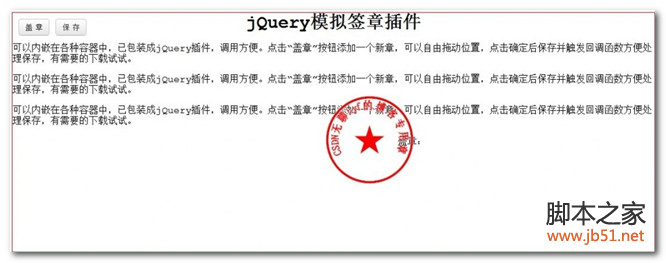
這個插件可內嵌於各種容器中,點擊「蓋章」按鈕即新增一個章,章可自由拖曳定位,點擊「確定」後保存並觸發回呼函數,方便進一步處理保存邏輯。
JavaScript 主體
/*
 desc: jQuery 模擬蓋章
 author: hyf
 date: 2012-11-08
*/
$.fn.zSign = function (options) {
  var _s = $.extend({
    img: '',
    width: 120,
    height: 120,
    offset: 8,      // 邊界值
    callBack: null
  }, options || {});

  var _parent = $(this).addClass('zsign');
  var range = {
    minX: _s.offset,
    minY: _s.offset,
    maxX: _parent.width() - _s.width - _s.offset - 18, // 扣去 2 個 padding=8px 與 2 個邊框 1px
    maxY: _parent.height() - _s.height - _s.offset - 18
  };

  var _btnPanel = $("<div class='panel'><button class='btn add'>蓋 章</button><button class='btn cancel'>關 閉</button></div>").appendTo(_parent);
  var _html = "<div class='sign' style='height:" + _s.height + "px;width:" + _s.width + "px;top:" + _s.offset + "px;left:" + _s.offset + "px'><img src='" + _s.img + "' draggable='false'/><button class='btn ok'>確定</button><button class='btn del'>刪除</button></div>";

  var _add = $('.add', _btnPanel).click(function (e) {
    _add.attr('disabled', 'disabled');
    var sign = $(_html).appendTo(_parent);
    $('.ok', sign).click(function () {
      sign.addClass('ok').off('mousedown').find('.btn').remove(); // 確定蓋章
      _add.removeAttr('disabled');
      if (_s.callBack) {
        _s.callBack.call(this, { img: _s.img, top: parseInt(sign.css('top')), left: parseInt(sign.css('left')) });
      }
    });
    $('.del', sign).click(function () { // 取消蓋章
      sign.remove();
      _add.removeAttr('disabled');
    });

    // 綁定移動事件
    sign.on('mousedown', function (e) {
      sign.data('x', e.clientX);
      sign.data('y', e.clientY);
      var position = sign.position();
      $(document).on('mousemove', function (e1) {
        var x = e1.clientX - sign.data('x') + position.left;
        var y = e1.clientY - sign.data('y') + position.top;
        x = x < range.minX ? range.minX : x;
        x = x > range.maxX ? range.maxX : x;
        y = y < range.minY ? range.minY : y;
        y = y > range.maxY ? range.maxY : y;
        sign.css({ left: x, top: y });
      }).on('mouseup', function () {
        $(this).off('mousemove').off('mouseup');
      });
    });
  });

  $('.cancel', _btnPanel).click(function () {
    var r = true;
    if (_add.attr('disabled') == 'disabled') {
      if (!confirm("未確定的蓋章將被取消,確定要關閉嗎?")) { r = false; }
    }
    if (r) {
      $('.sign:not(.ok)', _parent).remove(); // 刪除未確定位置的蓋章
      _btnPanel.remove();
    }
  });
};
CSS 樣式(節錄)
.zsign .panel { position: absolute; top: 8px; right: 8px; }
.zsign .sign {
  position: absolute;
  cursor: move;
  border: 1px dashed #ccc;
  padding: 8px;
  display: -webkit-box;
  -webkit-box-pack: center;
  -webkit-box-align: center;
}
.zsign .sign.ok { cursor: default; border-color: transparent; }
.zsign .sign img { max-height: 100%; max-width: 100%; }
.zsign .sign .btn.del { bottom: 4px; right: 4px; }
.zsign .sign .btn.ok { bottom: 4px; right: 50px; }
HTML 呼叫方式
<!DOCTYPE html>
<html>
<head>
  <title>測試</title>
  <link href="jquery.zsign.css" rel="stylesheet" type="text/css" />
  <script src="jquery-1.7.1.min.js" type="text/javascript"></script>
  <script src="jquery.zsign.js" type="text/javascript"></script>
</head>
<body>
  <div id="test" style="width:800px;height:500px;border:1px solid red;margin:40px auto; position:relative;"></div>
  <script>
    $("#test").zSign({ img: '1.gif' });
  </script>
</body>
</html>
只要準備好印章圖片並传入 img 參數,即可在容器中呈現可拖曳、可確認的電子簽章效果。
- 上一篇文章: jQuery 入門:核心概念與基礎範例
- 下一篇文章: jQuery 事件處理機制詳解