基於 datagrid 框架實作資料查詢
編輯:JQuery特效代碼
本文延續 datagrid 框架的應用,示範如何在一個完整的 EasyUI 頁面中加入查詢功能,並搭配自訂的 jQuery 擴充方法把查詢表單序列化為物件。
整體頁面結構
<head>
<meta http-equiv="Content-Type" content="text/html; charset=utf-8" />
<link href="jquery-easyui-1.3.2/themes/default/easyui.css" rel="stylesheet" />
<link href="jquery-easyui-1.3.2/themes/icon.css" rel="stylesheet" />
<script src="jquery-easyui-1.3.2/jquery-1.8.0.min.js"></script>
<script src="JavaScript.js"></script><!-- 擴充 jQuery 的方法 -->
<script src="jquery-easyui-1.3.2/jquery.easyui.min.js"></script>
<script src="jquery-easyui-1.3.2/locale/easyui-lang-zh_CN.js"></script>
</head>
<body id="layoutbody" class="easyui-layout">
<div data-options="region:'north',title:'North Title',split:true" style="height: 100px;"></div>
<div data-options="region:'south',title:'South Title',split:true" style="height: 100px;"></div>
<div data-options="region:'east',iconCls:'icon-reload',title:'East',split:true" style="width: 100px;"></div>
<div data-options="region:'west',title:'West',split:true" style="width: 100px;"></div>
<div data-options="region:'center',title:'center title'" href="CenterPage.html" style="background: #eee; overflow: hidden;"></div>
</body>
CenterPage.html 中的 datagrid 與查詢
<script type="text/javascript" charset="utf-8">
$(function () {
$("#dg").datagrid({
url: "GetJson.ashx", // 回傳 Json 格式資料
iconCls: "icon-add",
fitColumns: false,
idField: 'id',
loadMsg: "正在努力為您加載數據",
pagination: true,
rownumbers: true,
pageSize: 10,
pageList: [10, 20, 30],
sortName: "name",
sortOrder: "asc",
columns: [[
{ field: 'code', title: 'Code', width: 100 },
{ field: 'name', title: 'Name', width: 100, sortable: true },
{ field: 'addr', title: 'addr', width: 100 }
]],
toolbar: [{
text: "添加", iconCls: "icon-add", handler: function () {}
}, '-', {
text: "刪除", iconCls: "icon-remove", handler: function () {}
}, '-', {
text: "修改", iconCls: "icon-edit", handler: function () {}
}, '-']
});
});

// 點擊查找按鈕觸發事件
function searchFunc() {
$("#dg").datagrid("load", sy.serializeObject($("#searchForm").form()));
}

// 點擊清空按鈕觸發事件
function clearSearch() {
$("#dg").datagrid("load", {});
$("#searchForm").find("input").val("");
}
</script>
<div class="easyui-tabs" fit="true" border="false">
<div title="數據展示表格" border="false" fit="true">
<div class="easyui-layout" fit="true" border="false">
<div data-options="region:'north',title:'高級查詢'" style="height: 100px; background: #F4F4F4;">
<form id="searchForm">
<table>
<tr><th>用戶姓名:</th><td><input name="name" /></td></tr>
<tr>
<th>創建開始時間</th>
<td><input class="easyui-datetimebox" editable="false" name="subStartTime" /></td>
<th>創建結束時間</th>
<td><input class="easyui-datetimebox" editable="false" name="subEndTime" /></td>
<td><a class="easyui-linkbutton" onclick="searchFunc();">查找</a></td>
<td><a class="easyui-linkbutton" onclick="clearSearch();">清空</a></td>
</tr>
</table>
</form>
</div>
<div data-options="region:'center',split:false">
<table id="dg"></table>
</div>
</div>
</div>
</div>
jQuery 擴充:表單序列化為物件
var sy = $.extend({}, sy);/* 定義一個全域變數 */

sy.serializeObject = function (form) {
var o = {};
$.each(form.serializeArray(), function (index) {
if (o[this['name']]) {
o[this['name']] = o[this['name']] + "," + this['value'];
} else {
o[this['name']] = this['value'];
}
});
return o;
};
圖示:
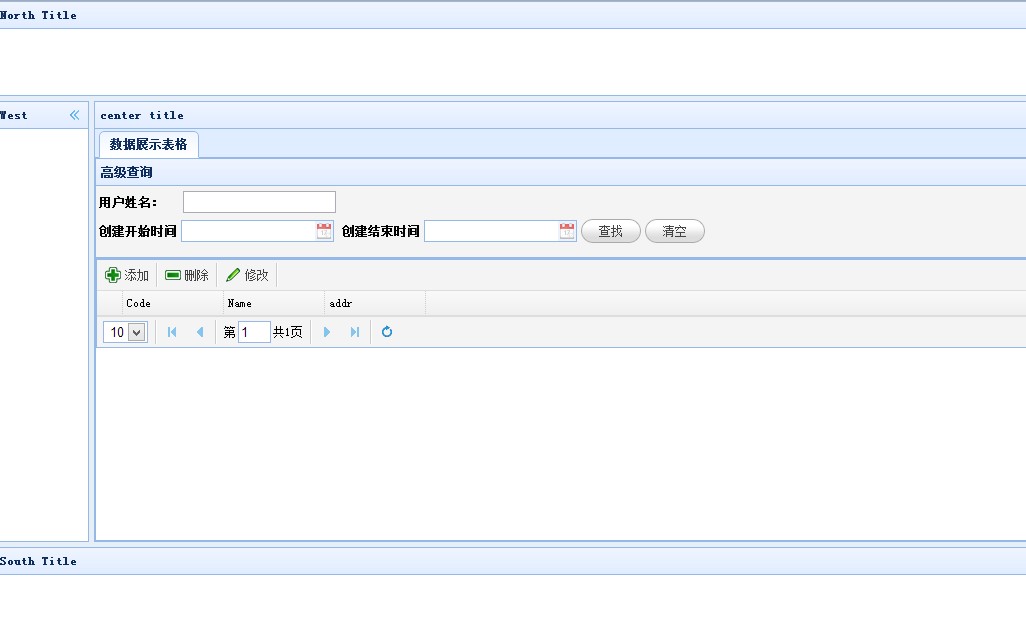
查詢的關鍵在於 datagrid("load", ...):把表單序列化後的物件傳給它,datagrid 就會帶著這些條件重新向後台請求資料,从而实现條件篩選。
- 上一篇文章: datagrid 框架的增刪改完整實作
- 下一篇文章: EasyUI datagrid 進階用法:時間格式處理與工具列