jQuery getJSON + .ashx 實現無刷新分頁(改進版)
編輯:JQuery特效代碼
這個版本相比早期寫法做了幾點改進:一、ashx 只回傳 JSON 資料,減少傳輸量,HTML 樣式也更靈活;二、改寫了前端 jQuery 程式碼;三、把原本的三個 ashx 合併為一個。
一、建立測試資料
create table test(id int identity, title varchar(36))
-- 迴圈插入測試資料
二、HTML 頁面與前端邏輯
透過 getJSON 向後端要資料,再用 each 動態拼出表格列,並用隱藏欄位記錄目前頁碼:
function Go(type, index) {
  $("#Content").html("");
  if (index == 0 || index == -1) { Init(); return; }
  $.getJSON("Handler.ashx", { type: type, index: index }, function(data) {
    $("#Content").append("<tr><th>id</th><th>title</th></tr>");
    $.each(data, function(i) {
      $("#Content").append("<tr><td>" + data[i].id + "</td><td>" + data[i].title + "</td></tr>");
    });
    $("#pageInfo").append("當前第 " + (index + 1) + " 頁");
    $("#pageIndex").val(index);
  });
  }
三、ashx 後端
後端依 type(first/next/pre)與 index 決定查詢範圍,並把 DataTable 轉為 JSON 輸出:
int pageSize = 10;
int.TryParse(context.Request.Params["index"], out pageIndex);
string sql = string.Format("select * from ( select row_number() over (order by id) as rowNum,* from test) as t "
  + " where rowNum>{0} and rowNum<={1}", pageIndex * pageSize, (pageIndex+1) * pageSize);
DataTable dt = db.GetDataSet(sql, null).Tables[0];
context.Response.Write(JSONHelper.DataTableToJSON(dt));
四、效果
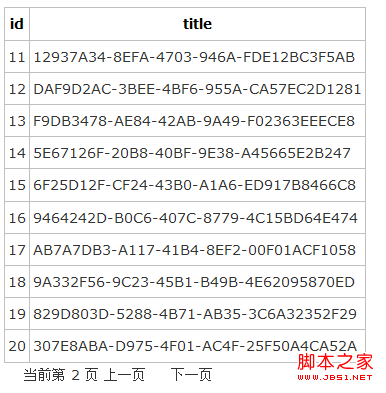
備註:使用 SQL Server 2005 的 row_number() 分頁寫法後,ashx 的程式碼可大幅簡化,只需一條 SQL 就能依 pageIndex 與 pageSize 取出對應區間的資料,兼顧效能與可讀性。
- 上一篇文章: jQuery 實現 div 內容層的放大與縮小
- 下一篇文章: 商城焦點圖輪播:簡單實用的滾動效果代碼