ASP.NET jQuery 實例 14:在表單中驗證日期範圍
編輯:JQuery特效代碼
需要讓使用者挑選起訖日期時,jQuery UI 的 Datepicker 是最省力的方案。本文示範用它搭配一段區間比較邏輯,完成日期範圍的驗證。
下載位址:https://jqueryui.com/download,Theme 選擇 Sunny。
界面程式碼
<form id="form1" runat="server">
<div align="center">
<fieldset style="width: 400px; height: 150px">
<table border="0" cellpadding="3" cellspacing="3">
<tr>
<td colspan="2">
請輸入日期范圍:
</td>
</tr>
<tr>
<td>
開始時間:
</td>
<td>
<asp:TextBox ID="txtStartDate" runat="server"></asp:TextBox>
</td>
</tr>
<tr>
<td>
結束時間:
</td>
<td>
<asp:TextBox ID="txtEndDate" runat="server"></asp:TextBox>
</td>
</tr>
<tr>
<td colspan="2">
<asp:Button ID="btnSubmit" runat="server" Text="提交" />
<asp:Button ID="btnReset" runat="server" Text="重置" />
</td>
</tr>
</table>
</fieldset>
</div>
</form>
腳本草稿
<head id="Head1" runat="server">
<title>Recipe14</title>
<link rel="Stylesheet" href="Styles/sunny/jquery-ui-1.8.17.custom.css" />
<script type="text/javascript" src="Scripts/jquery-1.4.1-vsdoc.js"></script>
<script type="text/javascript" src="Scripts/jquery-ui-1.8.17.custom.min.js"></script>
<script type="text/javascript">
$(function () {
$("#txtStartDate").datepicker();
$("#txtEndDate").datepicker();

$("#btnSubmit").click(function (e) {
e.preventDefault();
var startdate = Date.parse($("#txtStartDate").val());
var enddate = Date.parse($("#txtEndDate").val());

if (startdate > enddate) {
alert("開始時間不能大於結束時間!");
}
});

$("#btnReset").click(function (e) {
e.preventDefault();
$("#txtStartDate").val("");
$("#txtEndDate").val("");
});
});
</script>
</head>
要點說明
核心驗證只有兩行:Date.parse() 把日期字串轉為毫秒數,再直接比大小。這比自己做字串切割來得可靠,也能正確處理跨月、跨年的情況。
不過要留意兩點:其一,若輸入框為空,Date.parse("") 會得到 NaN,而 NaN 參與的任何比較都回傳 false,因此「開始不可大於結束」這條規則會被跳過——空值應該另行以必填規則攔下。其二,Date.parse() 的解析結果依瀏覽器而異,若要求嚴格,建議搭配 Datepicker 的 dateFormat 指定固定格式,或改用 $.datepicker.parseDate() 明確解析。
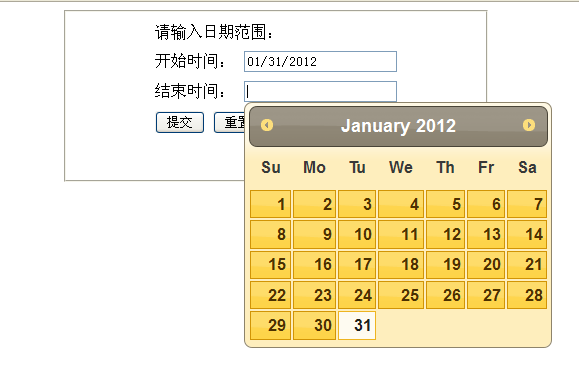
最終界面:
- 上一篇文章: 原創 jQuery 外掛:TextArea Counter 文本框字元限制外掛完整實作
- 下一篇文章: ASP.NET jQuery 實例 15:用 CustomValidator 驗證 CheckBoxList