ASP.NET jQuery 實例 16:用 CustomValidator 驗證 RadioButtonList
編輯:JQuery特效代碼
單選控制項的驗證比多選簡單——只要確認「至少選了一個」。本文用 CustomValidator 加上一行 jQuery 完成它。
界面程式碼
<form id="form1" runat="server">
<div align="center">
<fieldset style="width: 350px; height: 200px;">
<table border="0" cellpadding="3" cellspacing="3">
<tr>
<td>
請選擇汽車類型:
</td>
</tr>
<tr>
<td>
<asp:RadioButtonList ID="rbCar" runat="server">
<asp:ListItem Value="1" Text="奔馳汽車"></asp:ListItem>
<asp:ListItem Value="2" Text="寶馬汽車"></asp:ListItem>
<asp:ListItem Value="3" Text="奧迪汽車"></asp:ListItem>
<asp:ListItem Value="4" Text="現代汽車"></asp:ListItem>
<asp:ListItem Value="5" Text="豐田汽車"></asp:ListItem>
</asp:RadioButtonList>
</td>
</tr>
<tr>
<td>
<asp:Button ID="btnSubmit" runat="server" Text="提交" />
</td>
</tr>
</table>
</fieldset>
<asp:CustomValidator ID="ctvCar" runat="server" Display="Dynamic" ErrorMessage="至少選擇一種車!"
ForeColor="Red" ClientValidationFunction="rbCar_Validation"></asp:CustomValidator>
</div>
</form>
腳本草稿
<head id="Head1" runat="server">
<title>Recipe16</title>
<script type="text/javascript" src="Scripts/jquery-1.4.1-vsdoc.js"></script>
<script type="text/javascript">
function rbCar_Validation(sender, args) {
args.IsValid = ($("#rbCar :radio:checked").length > 0);
}
</script>
</head>
關鍵是 $("#rbCar :radio:checked").length > 0。注意 #rbCar 與 :radio 之間那個空格——它代表後代選擇器,少了空格就會變成「id 為 rbCar 且同時是 radio 的元素」,永遠選不到東西。
顯示效果:
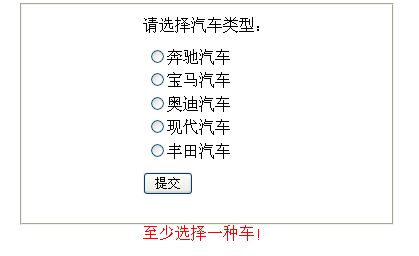
與 CheckBoxList 版本的差異
和上一篇的多選驗證相比,這裡的判斷條件從 >= 3 改成 > 0,其餘結構完全一致。這也說明了 CustomValidator 的價值:驗證邏輯完全由你決定,控制項本身不必具備任何相關能力。
- 上一篇文章: ASP.NET jQuery 實例 15:用 CustomValidator 驗證 CheckBoxList
- 下一篇文章: ASP.NET jQuery 實例 17:用 jQuery Validation 外掛驗證 ListBox