ASP.NET jQuery 實例 18:用 jQuery Validation 外掛驗證 DropDownList
編輯:JQuery特效代碼
下拉選單的驗證有兩條路:一條是靠控制項屬性宣告規則,另一條是在 rules 中明確指定。本文示範兩種寫法都能達到相同效果。
界面程式碼
<form id="form1" runat="server">
<div align="center">
<fieldset style="width: 350px; height: 200px;">
<table border="0" cellpadding="3" cellspacing="3">
<tr>
<td>
請選擇汽車類型:
</td>
</tr>
<tr>
<td>
<asp:DropDownList ID="dllCar" runat="server" ToolTip="至少選擇一種車!" CssClass="required">
<asp:ListItem Value="" Text="---請選擇---"></asp:ListItem>
<asp:ListItem Value="1" Text="奔馳汽車"></asp:ListItem>
<asp:ListItem Value="2" Text="寶馬汽車"></asp:ListItem>
<asp:ListItem Value="3" Text="奧迪汽車"></asp:ListItem>
<asp:ListItem Value="4" Text="現代汽車"></asp:ListItem>
<asp:ListItem Value="5" Text="豐田汽車"></asp:ListItem>
</asp:DropDownList>
</td>
</tr>
<tr>
<td>
<asp:Button ID="btnSubmit" runat="server" Text="提交" />
</td>
</tr>
</table>
</fieldset>
<div id="message" class="alertmsg">
</div>
</div>
</form>
這裡有個巧妙的對應關係:DropDownList 的 ToolTip 屬性會被渲染成 HTML 的 title,而 Validation 外掛在找不到自訂 messages 時,會自動拿 title 當作提示文案;CssClass="required" 則直接指定了外掛要套用的驗證規則。也就是說,光靠控制項屬性就完成了宣告式驗證。
腳本草稿(寫法一:依賴控制項屬性)
<head id="Head1" runat="server">
<title>Recipe18</title>
<script type="text/javascript" src="Scripts/jquery-1.4.1-vsdoc.js"></script>
<script type="text/javascript" src="Scripts/jquery.validate.js"></script>
<script type="text/javascript">
$(function () {
$("#form1").validate({
errorLabelContainer: $("#message")
});
});
</script>
<style type="text/css">
.alertmsg
{
color: #FF0000;
}
</style>
</head>
因為規則與訊息都已寫在控制項上,這裡只需指定錯誤訊息要放在哪個容器。
寫法二:不設 ToolTip 與 CssClass
若不設定這兩個屬性,把規則與訊息改寫在腳本中,效果完全相同:
<script type="text/javascript">
$(function () {
$("#form1").validate({
rules: {
dllCar: "required"
},
messages: {
dllCar: "至少選擇一種車!"
},
errorLabelContainer: $("#message")
});
});
</script>
顯示效果
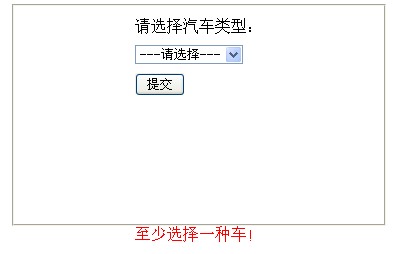
該怎麼選
宣告式寫法(控制項屬性)讓規則緊跟著控制項,介面一改就知道驗證怎麼設,適合欄位眾多、由不同人分工維護的頁面;命令式寫法(rules/messages)把規則集中在一處,方便統一調整與審閱。兩者也可以混用,但要避免同一欄位被重複宣告不同規則,那會讓後續維護者摸不著頭緒。
另外提醒:placeholder 選項的 value 必須是空字串,required 才能正確攔下「請選擇」這個預設值;若 value 給了任意非空字串,驗證就會永遠通過。