這一章內容很簡單,直接看頁面程式碼。
. 程式碼如下:
<%@ Page Language="C#" AutoEventWireup="true" CodeFile="Recipe6.aspx.cs" Inherits="Recipe6" %>
<!DOCTYPE html PUBLIC "-//W3C//DTD XHTML 1.0 Transitional//EN" "https://www.w3.org/TR/xhtml1/DTD/xhtml1-transitional.dtd">
<html xmlns="https://www.w3.org/1999/xhtml">
<head runat="server">
<title>Recipe6</title>
<script src="Scripts/jquery-1.4.1-vsdoc.js" type="text/javascript"></script>
<script type="text/javascript">
$(function () {
$("#<%=chkSelectAll.ClientID %>").click(function () {
// 很簡單,一行程式碼搞定
$("#<%=chkList.ClientID %> input[type=checkbox]").attr("checked", $("#<%=chkSelectAll.ClientID %>").is(":checked"));
});
});
</script>
</head>
<body>
<form id="form1" runat="server">
<div align="left">
<p>
實作全選或全取消操作</p>
<fieldset style="width: 400px; height: 150px;">
<asp:CheckBox ID="chkSelectAll" runat="server" Text="全選" />
<hr />
<asp:CheckBoxList ID="chkList" runat="server">
<asp:ListItem Value="1" Text="C#"></asp:ListItem>
<asp:ListItem Value="2" Text="Java"></asp:ListItem>
<asp:ListItem Value="3" Text="C++"></asp:ListItem>
<asp:ListItem Value="4" Text="JavaScript"></asp:ListItem>
</asp:CheckBoxList>
</fieldset>
</div>
</form>
</body>
</html>
效果圖:
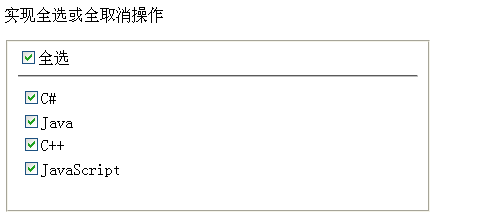
核心只有一句:用 is(":checked") 讀出「全選」核取方塊的狀態,再透過 attr("checked", ...) 把同一個布林值套到 CheckBoxList 底下所有的 checkbox。在較新的 jQuery 版本中,建議改用 prop("checked", ...),語意更精準。