多選清單勾了什麼,往往需要往下捲才知道。這個實例在勾選的當下就把結果即時列出來。
介面程式碼
. 程式碼如下:
<form id="form1" runat="server">
<div align="left">
<fieldset style="width: 400px; height: 150px">
<p>
請選擇語言</p>
<asp:CheckBoxList ID="ckbListPro" runat="server">
<asp:ListItem Value="1" Text="C#"></asp:ListItem>
<asp:ListItem Value="2" Text="JAVA"></asp:ListItem>
<asp:ListItem Value="3" Text="C++"></asp:ListItem>
<asp:ListItem Value="4" Text="JavaScript"></asp:ListItem>
</asp:CheckBoxList>
</fieldset>
<br />
<div id="message" style="color:Red;"></div>
</div>
</form>
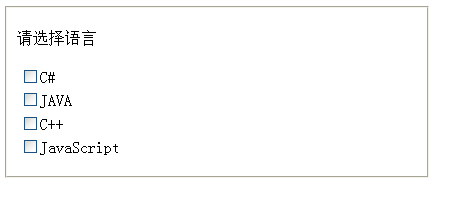
顯示效果:
腳本程式碼
. 程式碼如下:
<script src="Scripts/jquery-1.4.1-vsdoc.js" type="text/javascript"></script>
<script type="text/javascript">
$(document).ready(function () {
// CheckBoxList 呈現時會轉成 <table id="ckbListPro">
// 每個 ListItem 會轉成 <input type="checkbox"> 加 <label>
$("#<%=ckbListPro.ClientID %>").click(function () {
var str = "";
// 這裡抓到被勾選的 <input type="checkbox">
$("#<%=ckbListPro.ClientID %> input[type=checkbox]:checked").each(function () {
str = str + $(this).val() + ":" + $(this).next().text() + " "; // next() 指的就是 <label>
});
$("#message").text(str);
});
});
</script>
勾選語言後的畫面:
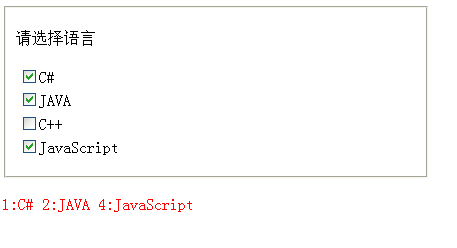
兩個容易踩到的細節:一是 CheckBoxList 實際輸出的是 table 而非單一 input,所以要用 input[type=checkbox]:checked 往下找;二是 next() 取到的是緊接在 checkbox 後面的 label 元素,才能拿到顯示文字而不只是 Value。