使用 jQuery 的 ajax 實作無刷新分頁完整代碼
編輯:JQuery特效代碼
功能簡介:主要實現分頁顯示資料,可於設定檔中配置每頁顯示的筆數,並支援多條件聯查(此處先以簡單查詢為例)。歡迎拍磚指正。先看效果圖——無刷新的喔!
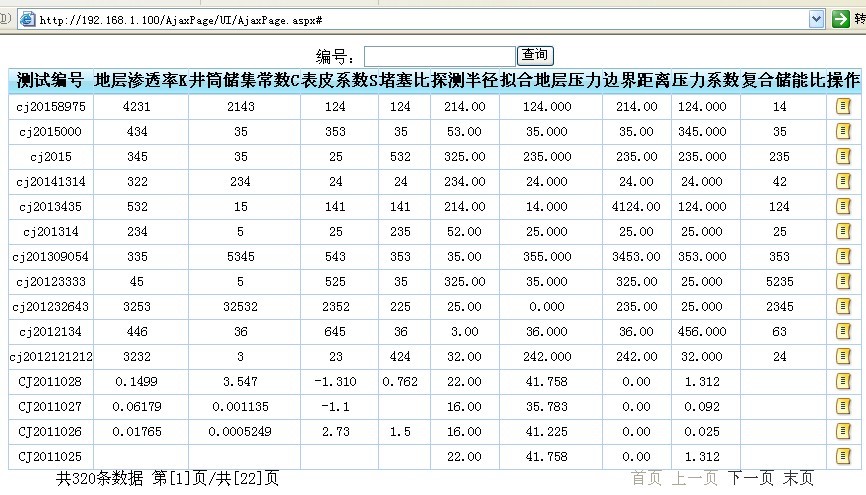
以下為具體實現,請看源碼:
1、ASPX 頁面
<%@ Page Language="C#" AutoEventWireup="true" CodeBehind="AjaxPage.aspx.cs" Inherits="MeasurementWellCurve.UI.AjaxPage" %>
<!DOCTYPE html PUBLIC "-//W3C//DTD XHTML 1.0 Transitional//EN" "https://www.w3.org/TR/xhtml1/DTD/xhtml1-transitional.dtd">
<html xmlns="https://www.w3.org/1999/xhtml">
<head>
<title>ajax分頁</title>
<link href="../CSS/tb_Style.css" rel="stylesheet" type="text/css" />
<script src="../JS/jquery-1.4.2.min.js" type="text/javascript"></script>
</head>
<body>
<form id="form1" runat="server">
<div id="divLayer">
<div>
編號:<asp:TextBox ID="txtCSBH" runat="server"></asp:TextBox><input id="btnSearch" type="button" value="查詢" />
</div>
<table id="jgcsTable" class="listTable" cellpadding="0" cellspacing="0">
<thead><tr><th>測試編號</th><th>操作</th></tr></thead>
<tbody id="tb_body"></tbody>
<tfoot id="load"><tr><td align="center"><img src="../images/loading.gif" /></td></tr></tfoot>
</table>
<div class="navigation">
<div style="text-align: left; float: left;">
共<label id="lblToatl"></label>條數據 第[<label id="lblCurent"></label>]頁/共[<label id="lblPageCount">0</label>]頁
</div>
<div style="text-align: right; float: right;">
<a id="first" href="#">首頁</a> <a id="previous" href="#">上一頁</a> <a id="next" href="#">下一頁</a> <a id="last" href="#">末頁</a>
</div>
</div>
</div>
</form>
</body>
</html>
2、具體實現 JS
var pageIndex = 1; //頁索引
var where = " where 1=1";
$(function() {
BindData();
//第一頁按鈕click事件
$("#first").click(function() {
pageIndex = 1;
$("#lblCurent").text(1);
BindData();
});
//上一頁
$("#previous").click(function() {
if (pageIndex != 1) { pageIndex--; $("#lblCurent").text(pageIndex); }
BindData();
});
//下一頁
$("#next").click(function() {
var pageCount = parseInt($("#lblPageCount").text());
if (pageIndex != pageCount) { pageIndex++; $("#lblCurent").text(pageIndex); }
BindData();
});
//最後一頁
$("#last").click(function() {
var pageCount = parseInt($("#lblPageCount").text());
pageIndex = pageCount;
BindData();
});
//查詢
$("#btnSearch").click(function() {
where = " where 1=1";
var csbh = $("#txtCSBH").val();
if (csbh != null && csbh != NaN) {
pageIndex = 1;
where += " and csbh like '%" + csbh + "%'";
}
BindData();
});
})
//AJAX取得資料並顯示
function BindData() {
$.ajax({
type: "get",
dataType: "json",
url: "../AjaxService/JgcsService.ashx",
data: { "pageIndex": pageIndex, "where": where },
ajaxStart: function() { $("#load").show(); },
complete: function() { $("#load").hide(); },
success: function(msg) {
var data = msg.table;
if (data.length != 0) {
var t = document.getElementById("tb_body");
while (t.rows.length != 0) { t.removeChild(t.rows[0]); }
}
$.each(data, function(i, item) {
$("#jgcsTable").append("<tr><td>" + item.CSBH + "</td><td><a href='AjaxPaging.htm' target='blank'>查看</a></td></tr>");
})
},
error: function() {
var t = document.getElementById("tb_body");
while (t.rows.length != 0) { t.removeChild(t.rows[0]); }
alert("加載數據失敗");
}
});
GetTotalCount();
GetPageCount();
bindPager();
}
3、一般處理程序(ashx)
public class JgcsService : IHttpHandler
{
readonly int pageSize = 15;
public void ProcessRequest(HttpContext context)
{
context.Response.ContentType = "text/plain";
context.Response.Buffer = true;
context.Response.CacheControl = "no-cache"; //不讓瀏覽器緩存
string result = "";
if (!string.IsNullOrEmpty(context.Request["whereCount"])) //記錄總條數
{
string where = context.Request.Params["whereCount"].ToString();
result = Jgcs.GetToatlNum(where).ToString();
}
if (!string.IsNullOrEmpty(context.Request["wherePageCount"])) //總頁數
{
string where = context.Request.Params["wherePageCount"].ToString();
int count = Jgcs.GetToatlNum(where);
string pageCount = Math.Ceiling((double)count / (double)pageSize).ToString();
result = pageCount;
}
if (!string.IsNullOrEmpty(context.Request.Params["pageIndex"])
&& !string.IsNullOrEmpty(context.Request.Params["where"])) //分頁數據
{
string where = context.Request.Params["where"].ToString();
int pageIndex = Convert.ToInt32(context.Request.Params["pageIndex"]);
result = GetJsonString(where, pageIndex);
}
context.Response.Write(result);
}
protected string GetJsonString(string where, int pageIndex)
{
DataTable dt = Jgcs.GetInfo("csbh", where, pageIndex, pageSize);
return JsonHelper.DataTable2Json(dt, "table");
}
public bool IsReusable { get { return false; } }
}
4、分頁查詢方法
public static DataTable GetInfo(string orderFile, string where, int pageNumber, int pageSize)
{
DBHelper db = new DBHelper();
string str = @"with TestInfo as
(
select row_number() over(order by {0} desc) as rowNumber,* from
(select CSBH,K,C,S from YW_JGCS) temp {1}
)
select * from TestInfo
where rowNumber between (({2}-1)*{3}+1) and {2}*{3}";
string strSql = string.Format(str, orderFile, where, pageNumber, pageSize);
db.DBOpen();
return db.DbDataSet(strSql);
}
以上即為以 jQuery ajax 實作無刷新分頁的完整代碼,實際應用時在資料處理上建議再依需求優化。
- 上一篇文章: 用 jQuery 模擬按下 Enter 鍵的實現代碼與應用
- 下一篇文章: 用 jQuery 實現簡易拖拽排序效果的完整代碼