用 jQuery 做一個仿 AjaxPro 的 RegisterTypeForAjax 輔助類
編輯:JQuery特效代碼
專案裡的模板欄位引擎是 HTML 加 jQuery 寫的,資料勢必得靠 Ajax 拿。問題是團隊對 JavaScript 的掌握程度不一,每次都要手寫 $.ajax 的 url、data 組裝,出錯率不低。於是我做了一個伺服器端輔助類,讓後端只要掛個 Attribute,前端就能像呼叫本地函式一樣呼叫伺服器方法——用法刻意貼近早年 AjaxPro 的 RegisterTypeForAjax。
核心概念
在 Page_Load 中註冊目標型別後,輔助類會做兩件事:
- 註冊時:用反射找出所有標了
[jQueryInvokeMethod]的靜態方法,動態產生一組對應的 JavaScript 函式,掛在全域物件(型別名稱)下。 - 被呼叫時:前端帶著
method與AjaxInvoke=1回打同一支頁面,伺服器依 method 名稱反射呼叫,把回傳值序列化成 JSON 或 XML 寫回。
標記用的 Attribute
[AttributeUsage(AttributeTargets.Method, AllowMultiple = false, Inherited = false)]
public class jQueryInvokeMethodAttribute : Attribute
{
}
jQueryAjaxUtility
using System;
using System.Collections.Generic;
using System.Linq;
using System.Text;

namespace Green.Utility
{
    public class jQueryAjaxUtility
    {
        public static string AjaxInvokeParam = "AjaxInvoke";
        public static string AjaxInvokeValue = "1";
        public static string ResponseCharset = "UTF-8";

        protected static System.Web.UI.Page Page
        {
            get { return System.Web.HttpContext.Current.Handler as System.Web.UI.Page; }
        }

        // 對外唯一入口:依是否為 Ajax 呼叫決定走哪條路
        public static void RegisterClientAjaxScript(Type type)
        {
            if (Page == null) return;

            if (System.Web.HttpContext.Current.Request[AjaxInvokeParam] == AjaxInvokeValue)
                RegisterAjaxInvokeEvent(type);   // 執行方法並輸出結果
            else
                RegisterAjaxInvokeScript(type);  // 注入前端代理腳本
        }

        protected static void RegisterAjaxInvokeScript(Type type)
        {
            // 先註冊全域預設選項
            Page.ClientScript.RegisterClientScriptBlock(
                type.GetType(),
                type.GetType().FullName + "_" + typeof(jQueryAjaxUtility).FullName
                    + "_AjaxInvokeDefaultOption",
                "window.defaultAjaxOption={type:'GET',cache:false, dataType:'text'};",
                true);

            // 反射結果做型別層級快取,避免每次請求都重跑
            if (!jQueryUtilityCache.Current.Exists(type))
            {
                var methodinfo = type
                    .GetMethods(System.Reflection.BindingFlags.IgnoreCase
                        | System.Reflection.BindingFlags.Static
                        | System.Reflection.BindingFlags.Public)
                    .Where(t =>
                    {
                        var attrs = t.GetCustomAttributes(
                            typeof(jQueryInvokeMethodAttribute), false);
                        return attrs != null && attrs.Length > 0;
                    }).ToList();

                if (methodinfo != null && methodinfo.Count > 0)
                {
                    var sb = new StringBuilder();
                    sb.AppendFormat(" window.{0}=function(){{}}; ", type.Name);

                    methodinfo.ForEach(t =>
                    {
                        var parameters = t.GetParameters().Select(p => p.Name).ToArray();

                        // 產生形如 Type.Method = function(a, b, ajaxOption) { ... }
                        sb.AppendFormat(" {2}.{0} = function ({1} ajaxOption) {{",
                            t.Name,
                            parameters.Count() > 0
                                ? string.Join(",", parameters) + "," : "",
                            type.Name);

                        sb.Append("if(ajaxOption==null||typeof ajaxOption=='undefined'){ajaxOption={};};");

                        // 去掉 query string,只保留頁面路徑作為 url
                        var url = Page.Request.RawUrl.IndexOf("?") == -1
                            ? Page.Request.RawUrl
                            : Page.Request.RawUrl.Substring(0, Page.Request.RawUrl.IndexOf("?"));

                        sb.AppendFormat("ajaxOption.url = '{0}';", url);

                        // 依參數清單組出查詢字串
                        var data = "''";
                        if (parameters.Count() > 0)
                        {
                            data = string.Join(" ", parameters
                                .Select(p => string.Format("'&{0}=' + {0}+", p))
                                .ToArray()).TrimEnd('+');
                        }

                        sb.AppendFormat("ajaxOption.data = 'method={1}&rn={4}&{2}={3}'+{0};",
                            data, t.Name, AjaxInvokeParam, AjaxInvokeValue,
                            Guid.NewGuid().ToString());   // rn 用來破快取

                        sb.Append("ajaxOption= jQuery.extend(window.defaultAjaxOption,ajaxOption);");
                        sb.Append("jQuery.ajax(ajaxOption);};");
                    });

                    jQueryUtilityCache.Current.AddScript(type, sb.ToString());
                }
            }

            var script = jQueryUtilityCache.Current.GetScript(type);
            Page.ClientScript.RegisterClientScriptBlock(
                type.GetType(),
                type.GetType().FullName + "_" + typeof(jQueryAjaxUtility).FullName
                    + "_AjaxInvoke",
                script, true);
        }

        protected static void RegisterAjaxInvokeEvent(Type type)
        {
            var Request = System.Web.HttpContext.Current.Request;
            var Response = System.Web.HttpContext.Current.Response;
            var method = Request["method"];
            if (string.IsNullOrEmpty(method)) return;

            Response.Clear();
            var methodinfo = type.GetMethod(method,
                System.Reflection.BindingFlags.IgnoreCase
                | System.Reflection.BindingFlags.Static
                | System.Reflection.BindingFlags.Public);

            if (methodinfo == null) return;

            Response.Charset = ResponseCharset;
            Response.ContentType = string.Join(",", Request.AcceptTypes);

            // 依參數型別轉型後以反射呼叫
            var param = methodinfo.GetParameters();
            object[] objs = new object[param.Length];
            var i = 0;
            param.ToList().ForEach(t =>
            {
                objs[i++] = Convert.ChangeType(Request[t.Name], t.ParameterType);
            });

            var obj = methodinfo.Invoke(null, objs);
            if (obj != null)
            {
                if (!obj.GetType().IsValueType && obj.GetType() != typeof(string))
                {
                    // 依 Accept 標頭協商輸出格式
                    if (Request.AcceptTypes.Contains("text/xml"))
                        Response.Write(Green.Utility.SerializerUtility.XmlSerializer(obj));
                    else if (Request.AcceptTypes.Contains("application/json"))
                    {
                        Response.ContentType = "application/json, text/javascript, */*";
                        Response.Write(Green.Utility.SerializerUtility.JsonSerializer(obj));
                    }
                    else
                        Response.Write(obj);
                }
                else
                {
                    Response.Write(obj);
                }
            }

            Response.Flush();
            Response.Close();
            Response.End();
        }
    }
}
為了避免每個請求都重跑一次反射,我另外加了 jQueryUtilityCache 做型別層級的腳本快取,實作細節在附檔 demo 裡。
使用方式
後端在 Page_Load 註冊型別:
Green.Utility.jQueryAjaxUtility.RegisterClientAjaxScript(typeof(_Default));例一:回傳字串
前端:
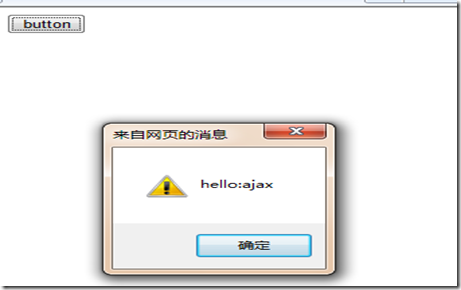
_Default.Test("ajax", {
    success: function (e) { alert(e); },
    dataType: "text"
});
後端:
[Green.Utility.jQueryInvokeMethod()]
public static string Test(string str)
{
    return "hello:" + str;
}
例二:回傳陣列並以 JSON 消費
前端:
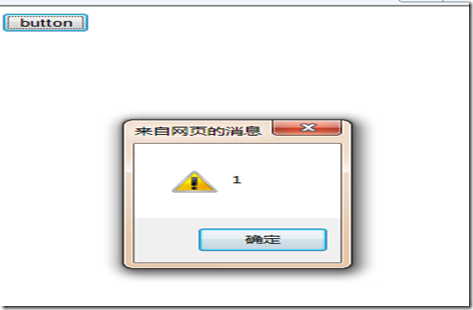
_Default.TestArrayJson(1, 2, 3, {
    success: function (e) {
        $.each(e, function (i, n) { alert(n); });
    },
    dataType: "json"
});
後端:
[Green.Utility.jQueryInvokeMethod()]
public static int[] TestArrayJson(int p1, int p2, int p3)
{
    return new int[] { p1, p2, p3 };
}
例三:回傳自訂物件
前端:
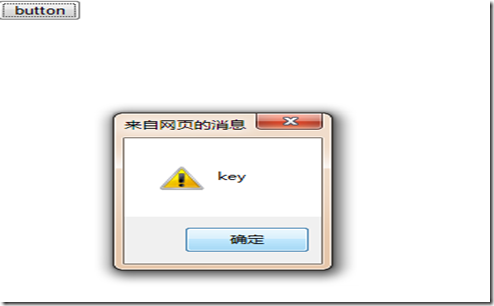
_Default.TestArrayxml("key", "value", {
    success: function (e) {
        alert(e.key);
        alert(e.Value);
    },
    dataType: "json"
});
後端:
[Green.Utility.jQueryInvokeMethod()]
public static Test TestArrayxml(string key, string value)
{
    return new Test() { key = key, Value = value };
}
最後看一下 FireBug 裡的請求標頭,可以確認 Accept 協商與自訂參數都如預期送出:
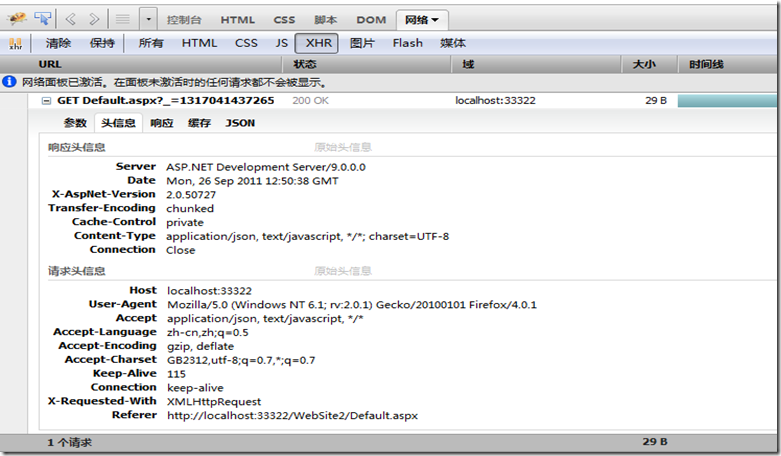
這套設計的取捨
好處很明顯:後端方法只要掛一個 Attribute,前端就多出一個同名函式,參數對位、回傳序列化都由框架處理,團隊不必再背 $.ajax 的細節。
代價也要說清楚:反射呼叫比直接呼叫慢,所以務必保留型別層級的快取;另外所有公開的靜態方法都等於對外開放,方法本身仍須自行做權限與輸入驗證,不能因為「有 Attribute 保護」就省掉檢查。
原始碼下載請見原頁面。作者:破狼(cnblogs)