用 jQuery 打造可拖曳浮動視窗:兩種實作方案完整解析
編輯:JQuery特效代碼
在網頁互動設計裡,浮動視窗是很常見的需求,無論是彈出提示、表單輸入還是廣告展示,都能派上用場。本文整理兩種以 jQuery 為基礎的浮動視窗實作方式,一種偏向手動控制遮罩與拖曳,另一種則結合 iframe 與 Ajax 動態載入內容,可以依實際情境挑選。
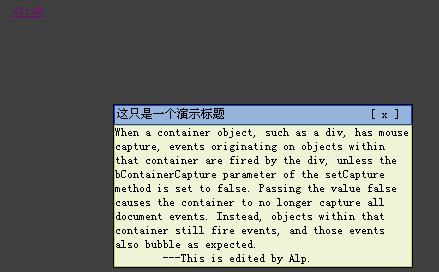
第一種方法:淡入淡出搭配自訂拖曳
這個版本透過 fadeIn、fadeOut 控制視窗的顯示與隱藏,並在點擊時切換遮罩層的顏色與透明度,同時自帶一個可拖曳的標題列。整體結構清楚,適合需要輕量互動的頁面。
HTML 結構
<html>
<head>
<title>浮動窗口</title>
<link type="text/css" rel="stylesheet" href="css/overflow.css" />
<script type="text/javascript" src="js/jquery.js"></script>
<script type="text/javascript" src="js/overflow.js"></script>
<script type="text/javascript">
$(document).ready(function(){
var b = $("#b");
var overFlow = $("#over");
b.click(function(){
overFlow.fadeIn();
$("#mask").css("background","#111");
$("#mask").css("opacity","0.8");
})
$("#close").click(function(){
overFlow.fadeOut();
$("#mask").css("background","#fff");
$("#mask").css("opacity","1");
});
drag($("#over"),$("#title"));
}) ;
</script>
</head>
<body>
<div id="over">
<div id="title"><span id="t">這只是一個演示標題</span><span id="close">[ x ]</span></div>
<div id="content">
When a container object, such as a div, has mouse capture, events originating on objects within that container are fired by the div, unless the bContainerCapture parameter of the setCapture method is set to false. Passing the value false causes the container to no longer capture all document events. Instead, objects within that container still fire events, and those events also bubble as expected.<br/>
---This is edited by Alp.
</div>
</div>
<div id="mask"> <a id="b" href="#">click</a></div>
</body>
</html>
JavaScript:拖曳邏輯
拖曳的核心在於計算滑鼠位移,並即時更新元素座標。這裡同時處理了 setCapture 與事件冒泡的相容性寫法。
function drag(overFlow,title){
title.onmousedown = function(evt){
var doc = document;
var evt = evt || window.event;
var x = evt.offsetX?evt.offsetX:evt.layerX;
var y = evt.offsetY?evt.offsetY:evt.layerY;
if(overFlow.setCapture){
overFlow.setCapture();
}else if(window.captureEvents){
window.captureEvents(Event.MOUSEMOVE|Event.MOUSEUP);
}
doc.onmousemove = function(evt){
evt = evt || window.event;
var xPosition = evt.pageX || evt.clientX;
var yPosition = evt.pageY || evt.clientY;
var newX = xPosition - x;
var newY = yPosition - y;
overFlow.style.left = newX;
overFlow.style.top = newY;
};
doc.onmouseup = function(){
if(overFlow.releaseCapture){
overFlow.releaseCapture();
}else if(window.captureEvents){
window.captureEvents(Event.MOUSEMOVE|Event.MOUSEUP);
}
doc.onmousemove=null;
doc.onmouseup=null;
};
};
}
CSS 樣式
#over{
position: absolute;
left: 300px;
top: 200px;
border: 1px solid black;
display: none;
background: #cccccc;
cursor: default;
width: 300px;
z-index: 10;
opacity: 1;
}
#title{
border: 1px solid #1840C4;
background: #95B4DC;
padding: 2px;
font-size:12px;
cursor: default;
}
#close{
cursor: pointer;
margin-right: 1px;
overflow: hidden;
}
#content{
border: 1px solid #C2D560;
background: #EFF4D7;
}
#t{
margin-right:145px;
}
#mask{
z-index: 1;
background: #fff;
width: 1024px;
height: 800px;
}
#b{
position: absolute;
left: 200px;
top: 100px;
}
body{
padding: 0px;
margin: 0px;
}
#over{
background: transparent;
}
第二種方法:iframe 遮罩搭配 Ajax 載入
第二種做法更適合需要載入外部內容或動態資料的場合。它用一個隱藏的 iframe 當作遮罩襯底,再透過 Ajax 把遠端頁面抓回來填進浮動層,同時在載入期間顯示 loading 動畫,使用者體驗更順暢。
訊息框與遮罩層的容器:
<iframe id="show_upload_iframe" frameborder=0 scrolling="no" style="display:none; position:absolute;"></iframe>
<div id="show_upload">nothing...</div>
頁面載入中的提示動畫:
<div id="body_loading" onClick="loaded();"><img src="__PUBLIC__/images/body_load.gif"></div>
關閉與開啟浮動視窗的觸發連結:
<a href="javascript:hideupload()">關閉窗口建議用小圖片</a>
<a href="javascript:showupload('admin.php')">打開浮動</a>
對應的 JavaScript
// 消息框loading
function loading(){
var o = $('#body_loading');
o.css("left",(($(document).width())/2-(parseInt(o.width())/2))+"px");
o.css("top",((($(document).height()+$(document).scrollTop())/2-(parseInt(o.height())/2)))+"px");
o.fadeIn("fast");
}
// 消息框消失
function loaded(){
var o = $('#body_loading');
o.fadeOut("fast");
}
// 隱藏浮動窗口
function hideupload(){
$('#show_upload').hide();
$('#show_upload_iframe').hide();
}
// 彈出浮動窗口
function showupload(ajaxurl){
loading();
var o=$('#show_upload');
var f=$('#show_upload_iframe');
var top = 200;
$.ajax({
url: ajaxurl,
success: function(res){
loaded();
o.html(res);
o.css("left",(($(document).width())/2-(parseInt(o.width())/2))+"px");
if($(document).scrollTop()>200){
top = ($(document).height()+$(document).scrollTop())/2-(parseInt(o.height())/2);
}
o.css("top",top+"px");
f.css({'width':o.width(),'height':o.height(),'left':o.css('left'),'top':o.css('top')});
f.show();
o.show();
}
});
}
- 上一篇文章: ThickBox 插件使用心得(附替代方案建議)
- 下一篇文章: 深入探討 jQuery fadeIn / fadeOut 的動畫隊列陷阱