用 jQuery treeview 在 ASP.NET 中實作樹狀選單
編輯:JQuery特效代碼
權限管理、分類目錄這類需求都會遇到樹狀結構。做法是把資料存在單一資料表裡,用一個「父節點 ID」欄位表達層級關係,後端把它組成人員能讀的 JSON,前端再交給 jQuery treeview 繪製。
資料表設計
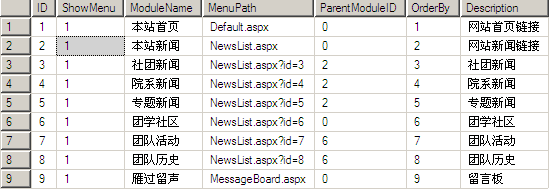
表中的 ParentModuleID 代表父節點,若目前是根節點則固定為 0。
實體類別
先用 IList<T> 承接資料:
using System;
using System.Collections.Generic;

namespace RolePermission1
{
    public class Tree
    {
        public int ModuleID { get; set; }
        public int ParentID { get; set; }
        public string ModulePath { get; set; }
        public string ModuleName { get; set; }
    }
}
把單表組裝成 JSON
關鍵在遞迴:先撈出所有根節點,再對每個節點判斷有沒有子節點,有的話就繼續往下鑽。
[WebMethod]
public static string GetJson()
{
    string json = "[";
    IList<Tree> t = DB.returnParentTree();
    foreach (Tree model in t)
    {
        if (model != t[t.Count - 1])
            json += GetJsonByModel(model) + ",";
        else
            json += GetJsonByModel(model);
    }
    json += "]";
    json = json.Replace("'", "\"");
    return json;
}

public static string GetJsonByModel(Tree t)
{
    string json = "";
    bool flag = DB.isHaveChild(t.ModuleID);
    json = "{"
        + "'id':'" + t.ModuleID + "',"
        + "'text':'" + t.ModuleName + "',"
        + "'value':'" + t.ModuleID + "',"
        + "'showcheck':true,"
        + "'checkstate':'0',"
        + "'hasChildren':" + flag.ToString().ToLower() + ","
        + "'isexpand':false,"
        + "'ChildNodes':";   // 注意:是 ChildNodes,大寫 C
    if (!flag)
    {
        json += "null,";
        json += "'complete':false}";
    }
    else
    {
        json += "[";
        IList<Tree> list = DB.getChild(t.ModuleID);
        foreach (Tree tree in list)
        {
            if (tree != list[list.Count - 1])
                json += GetJsonByModel(tree) + ",";
            else
                json += GetJsonByModel(tree);
        }
        json += "],'complete':true}";
    }
    return json;
}
這裡有個實戰教訓值得記下:屬性名稱必須是 ChildNodes,大寫 C。寫成 childNodes 的話,外掛會靜默地畫不出子節點,而且完全沒有錯誤訊息,只能靠自己慢慢比對。
資料存取類別
using System.Data;
using System.Data.SqlClient;

namespace RolePermission1
{
    public class DB
    {
        public static readonly string connStr =
            System.Configuration.ConfigurationManager.AppSettings["connStr"];

        public static SqlConnection GetConn()
        {
            SqlConnection conn = new SqlConnection(connStr);
            conn.Open();
            return conn;
        }

        public static DataTable GetDT(string sql)
        {
            DataTable dt = new DataTable();
            using (SqlConnection conn = DB.GetConn())
            {
                SqlDataAdapter sda = new SqlDataAdapter(sql, conn);
                sda.Fill(dt);
            }
            return dt;
        }

        public static IList<Tree> returnParentTree()
        {
            IList<Tree> t = new List<Tree>();
            string sql = "select * from Models where [ParentModuleID]=0 order by OrderBy asc";
            foreach (DataRow dr in GetDT(sql).Rows)
            {
                Tree tParent = new Tree();
                tParent.ModuleID = Int32.Parse(dr["ID"].ToString());
                tParent.ModuleName = dr["ModuleName"].ToString();
                tParent.ModulePath = dr["MenuPath"].ToString();
                tParent.ParentID = Int32.Parse(dr["ParentModuleID"].ToString());
                t.Add(tParent);
            }
            return t;
        }

        public static bool isHaveChild(int id)
        {
            string sql = "select ID from Models where ParentModuleID=" + id;
            return GetDT(sql).Rows.Count > 0;
        }

        public static IList<Tree> getChild(int id)
        {
            IList<Tree> t = new List<Tree>();
            string sql = "select * from Models where ParentModuleID=" + id;
            foreach (DataRow dr in GetDT(sql).Rows)
            {
                Tree tParent = new Tree();
                tParent.ModuleID = Int32.Parse(dr["ID"].ToString());
                tParent.ModuleName = dr["ModuleName"].ToString();
                tParent.ModulePath = dr["MenuPath"].ToString();
                tParent.ParentID = Int32.Parse(dr["ParentModuleID"].ToString());
                t.Add(tParent);
            }
            return t;
        }
    }
}
前端頁面
<%@ Page Language="C#" AutoEventWireup="true" CodeBehind="Default.aspx.cs"
    Inherits="RolePermission1._Default" %>
<head runat="server">
<title></title>
<script src="jquery.treeview/lib/jquery.js" type="text/javascript"></script>
<link href="jquery.treeview/tree.css" rel="stylesheet" type="text/css" />
<script src="jquery.treeview/common.js" type="text/javascript"></script>
<script src="jquery.treeview/jquery.tree.js" type="text/javascript"></script>
</head>
<body>
<form id="form1">
  <button id="showchecked" runat="server">Get Selected Nodes</button>
  <div id="showTree" class="filetree"></div>
</form>
<script type="text/javascript">
$(document).ready(function() {
    $.ajax({
        type: "post",
        contentType: "application/json;charset=utf-8",
        dataType: "json",
        url: "WebForm1.aspx/GetJson",
        success: function(data) {
            var o = { showcheck: true };
            o.data = eval(data.d);
            $("#showTree").treeview(o);
        }
    });
});

$("#showchecked").click(function(e) {
    var s = $("#showTree").getTSVs();
    if (s != null) alert(s.join(","));
    else alert("NULL");
});
</script>
</body>
結果
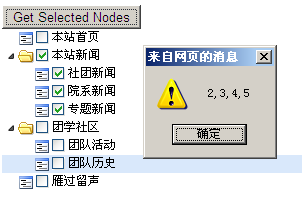
三個要注意的地方
第一,遞迴的終止條件必須正確,否則容易堆疊溢出。第二,JSON 屬性名稱嚴格區分大小寫,ChildNodes 不能寫成 childNodes。第三,只要在前端要呼叫的方法上標註 [WebMethod],就能透過 $.ajax 直接存取,不必額外寫 ashx 常式處理程式。
另外提醒一點:範例中的 SQL 是直接字串拼接,實務上應改用參數化查詢(SqlParameter)以避免 SQL injection 風險;而 eval(data.d) 也建議替換為 JSON.parse(),安全性與效能都更好。