擴充 jQuery(一):自製 alert 與 confirm 對話框
編輯:JQuery特效代碼
原生的 alert() 與 confirm() 會被瀏覽器凍結整個頁面,外觀也無法客製。以下示範如何把它們包成模態對話框,並且完全沿用原本的呼叫方式,降低替換成本。
成果預覽
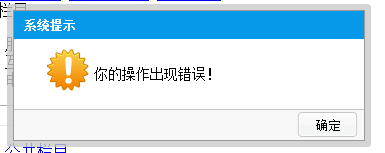
完整程式碼
/**
 * @author xing
 */
(function($){
    $.extend({
        alert: function(html, callback){
            var dialog = new Dialog();
            dialog.build('alert', callback, html);
        },
        confirm: function(html, callback){
            var dialog = new Dialog();
            dialog.build('confirm', callback, html);
        }
    });

    var Dialog = function(){
        var render = {
            template:
                '<div class="alertParent"><div class="alertContent">'
              + '<h2 class="title">系統提示</h2>'
              + '<div class="alertHtml">你的操作出現錯誤!</div>'
              + '<div class="btnBar">'
              + '<input type="button" value="確定" id="sure" />'
              + '</div></div></div>',

            templateConfirm:
                '<div class="alertParent" id="confirmPanel"><div class="alertContent">'
              + '<h2 class="title">系統提示</h2>'
              + '<div class="alertHtml">你的操作出現錯誤!</div>'
              + '<div class="btnBar">'
              + '<input type="button" value="取消" id="cancel" />'
              + '<input type="button" value="確定" id="sure" />'
              + '</div></div></div>',

            // 依類型決定要產生哪一種對話框
            renderDialog: function(type, callback, html){
                if (type == 'alert') this.renderAlert(callback, html);
                else                 this.renderConfirm(callback, html);
            },

            renderAlert: function(callback, html){
                var temp = $(this.template).clone().hide();
                temp.find('div.alertHtml').html(html);
                $(document.body).append(temp);
                this.setPosition(temp);
                temp.fadeIn();
                this.bindEvents('alert', temp, callback);
            },

            renderConfirm: function(callback, html){
                var temp = $(this.templateConfirm).clone().hide();
                temp.find('div.alertHtml').html(html);
                $(document.body).append(temp);
                this.setPosition(temp);
                temp.fadeIn();
                this.bindEvents('confirm', temp, callback);
            },

            // 置中定位
            setPosition: function(el){
                var width = el.width(),
                    height = el.height(),
                    pageSize = this.getPageSize();
                el.css({
                    top:  (pageSize.h - height) / 2,
                    left: (pageSize.w - width) / 2
                });
            },

            bindEvents: function(type, el, callback){
                if (type == "alert") {
                    if ($.isFunction(callback)) {
                        $('#sure').click(function(){
                            callback();
                            $('div.alertParent').remove();
                        });
                    } else {
                        $('#sure').click(function(){
                            $('div.alertParent').remove();
                        });
                    }
                } else {
                    if ($.isFunction(callback)) {
                        $('#sure').click(function(){
                            callback();
                            $('div.alertParent').remove();
                        });
                    } else {
                        $('#sure').click(function(){
                            $('div.alertParent').remove();
                        });
                    }
                    $('#cancel').click(function(){
                        $('div.alertParent').remove();
                    });
                }
            },

            getPageSize: function(){
                return {
                    w: document.documentElement.clientWidth,
                    h: document.documentElement.clientHeight
                };
            }
        };

        return {
            build: function(type, callback, html){
                render.renderDialog(type, callback, html);
            }
        };
    };
})(jQuery);
設計思路拆解
為何用 $.extend 而非 $.fn.extend
因為 alert 與 confirm 不需要選擇器支援,直接掛在 jQuery 物件上就好:
$.extend({
    alert: function(html, callback){},
    confirm: function(html, callback){}
});
若寫成 $.fn.alert,呼叫時就必須先選一個元素,語意完全不符。
用單體封裝元件
Dialog 回傳一個公開方法 build 作為對外介面,其餘細節全部藏在內部:
var Dialog = function(){
    return {
        build: function(type, callback, html){
            render.renderDialog(type, callback, html);
        }
    };
};
模板與填充分離
先把 HTML 字串定義成 template 與 templateConfirm 兩份,再由 renderAlert/renderConfirm 複製一份、填入內容、附加到 body、定位、淡入,最後綁定事件。這個流程讓「長相」與「行為」各自獨立,之後要改樣式不必碰邏輯。
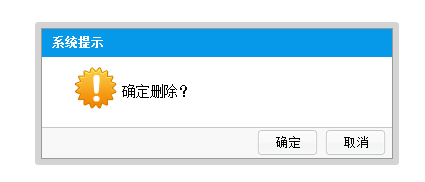
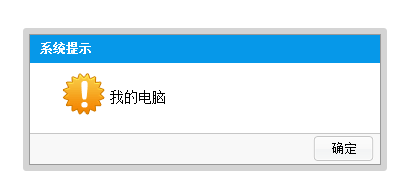
呼叫方式
$.confirm('確定刪除?', function(){
    alert('cccc');
});

$.alert('我的電腦');
CSS
div.alertParent {
    padding: 6px;
    background: #ccc;
    background: rgba(201, 201, 201, 0.8);
    width: auto;
    position: absolute;
    -moz-border-radius: 3px;
    font-size: 12px;
    top: 50px;
    left: 50px;
}
div.alertContent {
    background: #fff;
    width: 350px;
    height: auto;
    border: 1px solid #999;
}
h2.title {
    width: 100%;
    height: 28px;
    background: #0698E9;
    text-indent: 10px;
    font-size: 12px;
    color: #fff;
    line-height: 28px;
    margin: 0;
}
div.alertHtml {
    background: url(dtips.gif) 0 0 no-repeat;
    height: 50px;
    margin: 10px 10px 10px 30px;
    text-indent: 50px;
    line-height: 50px;
    font-size: 14px;
}
div.btnBar {
    border-top: 1px solid #c6c6c6;
    background: #f8f8f8;
    height: 30px;
}
div.btnBar input {
    background: url(sure.png) no-repeat;
    border: 0;
    width: 63px;
    height: 28px;
    float: right;
    margin-right: 5px;
}
HTML
<div class="alertParent">
  <div class="alertContent">
    <h2 class="title">系統提示</h2>
    <div class="alertHtml">你的操作出現錯誤!</div>
    <div class="btnBar">
      <input type="button" value="確定" />
    </div>
  </div>
</div>
待改進之處
高手勿笑——為了說明實作方式,這段程式碼是在半小時內寫出來的,很多地方沒有仔細推敲。幾個明顯可以更好的點:
- 缺少遮罩層:目前只能置中顯示,背景仍可互動,稱不上真正的模態。
- id 會衝突:
#sure、#cancel是寫死的 id,同一頁開兩個對話框就會互相干擾,應改用相對定位el.find('input#sure')。 - 重複點擊會堆疊:沒有先移除既有實例的保護。
- confirm 的取消行為:目前「取消」不執行任何回呼,實務上通常會傳
false給回呼函式以便區分。
下一篇會改用建構 Button 的方式重寫這個元件,並補上遮罩、Ajax 呼叫與 iframe 寬高自適應等更實用的功能。
熱門推薦
textarea 不支援 maxlength 的解法:自寫 jQuery 擴充攔截輸入
用 jQuery on() 實作 hover 效果
用不同的 jQuery API 處理各種瀏覽器事件
jQuery LigerUI 之 ligerDrag 與 ligerResizable 拖拽縮放插件示例
9 款視覺效果出色的 jQuery 頁面元件推薦
jQuery Tools 幻燈片 Slideshow 實作與參數整理
8個超實用的jQuery學習網站,建議收藏
jQuery 無法為 select 設定 selected 的解法:放進 setTimeout
jQuery 商品櫥窗:滑鼠移過縮圖顯示大圖